Filing of annual accounts (eCDF)
This service concerns entities subject to the legal obligation to issue their accounting documents in accordance with the standard chart of accounts (PCN). Prior to the filing of their annual accounts with the RCS, they will have to prepare certain documents of the accounting bundle on the eCDF platform (electronic platform for the collection of financial data).
The user can then, when creating their filing request to the RCS, directly retrieve the data previously validated on the eCDF platform. They must also attach, in PDF/A format, any other documents required by law such as the appendix, the management report or the verification report, etc.
What is the standard chart of accounts?
The standard chart of accounts is defined in the appendix to the Grand-Ducal Regulation of 12 September 2019 determining the content of the standard chart of accounts referred to in Article 12 of the Code of Commerce (for financial years beginning on or after 1 January 2020).
Note that this Grand-Ducal regulation repeals the one dated 10 June 2009 determining the content and presentation of a standard chart of accounts and applicable to financial years beginning before 1 January 2020.
What is the eCDF platform and how does it work?
The eCDF platform is an electronic platform for collecting financial data managed by the Centre des technologies de l’information de l’Etat (CTIE).
This platform allows companies subject to the obligation to file the balance of accounts according to the standard chart of accounts (PCN) model to prepare and validate the balance sheet, the profit and loss account, the balance of accounts and the mapping table, which can then be filed via the website of LBR, administrator of the RCS.
The eCDF platform offers two options to the applicant:
- Entry of financial data via the standardised forms available on the eCDF platform.
- Transfer of data in the form of an XML file generated from the applicant's accounting tool.
Who has to prepare the accounting documents on the eCDF platform?
Article 8 of the Code of Commerce lists the persons who have to prepare their accounting documents on the eCDF platform, prior to their filing with the RCS.
Exceptions
Are excluded:
- Companies referred to in Article 13 of the Code of Commerce.
- Companies that have obtained an exemption pursuant to Article 27 of the modified law of 19 December 2002 on the trade and company register and the accounting and annual accounts of companies.
- Companies that draw up their annual accounts according to international accounting standards.
- Companies under foreign law with a Luxembourg subsidiary, with regard to their accounting documents, as issued according to the law of the state to which they are subject.
What accounting documents have to be prepared on the platform?
Standardisation via the eCDF platform covers the following accounting documents:
- Balance sheet
- Profit and loss account
- Balance of accounts
- Mapping table
What information must be entered in the RCS and how can the required documents be attached?
Dates of the financial year
The user first has to enter the start and end date of the financial year of the annual accounts filed. The dates must be consistent with those mentioned in the eCDF declaration and any other accounting documents to be attached to the filing request.
They then click Next to continue creating their filing request.

Choice of language for the accounting bundle
The user then has to select the language of the accounting bundle filed, i.e. the language of the forms chosen on the eCDF platform.

Selection of the eCDF declaration
The user then has to select the eCDF declaration concerned from the drop-down list (plan comptable).
The other documents, namely the balance sheet, the profit and loss account and the mapping table, will be attached automatically and cannot be modified.
Note that the declaration selected by default is the one most recently prepared on the platform.
The content of the declarations can be refreshed by clicking on the Refresh button.
The user also has to choose whether the profit and loss account can be consulted by third parties.
To continue the filing request, the user then has to click on Complete publication.

Documents to be attached
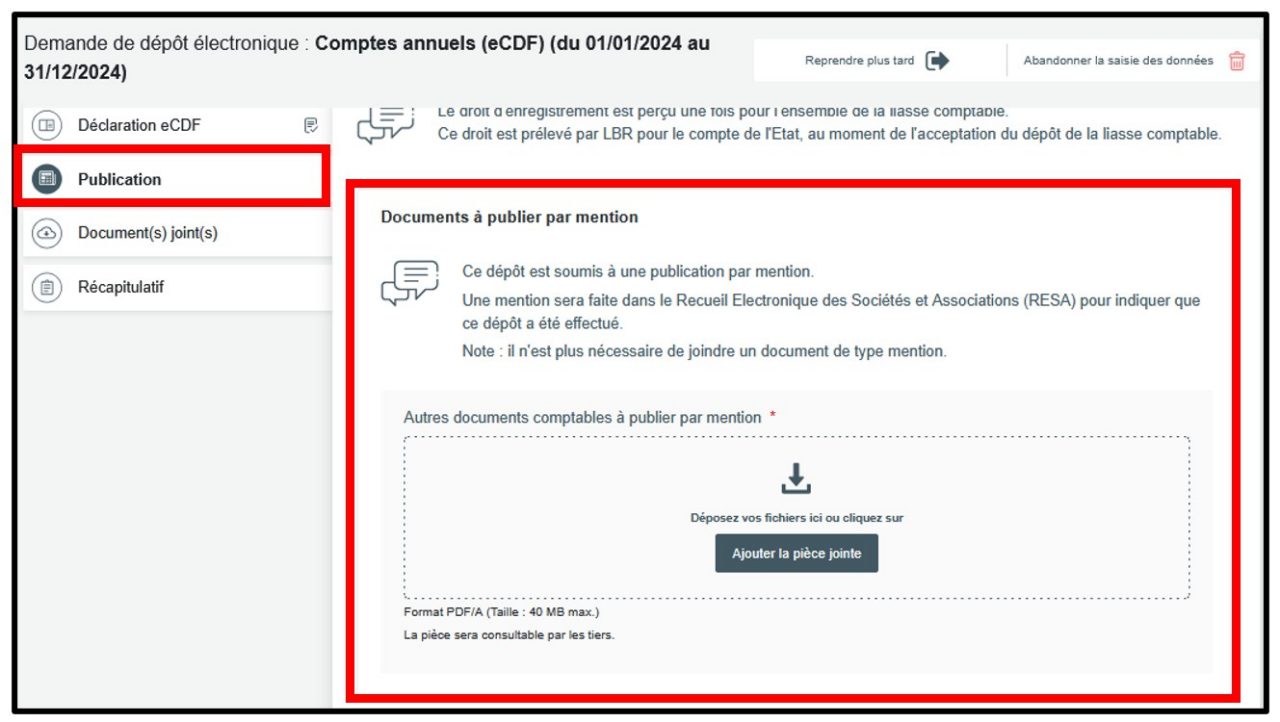
Other accounting documents to be filed with the RCS, which by law must be published in the RESA, should be attached under the heading Publication in the field Documents to be published per mention.
They should be attached in a single PDF/A file. The file will be available for consultation by third parties and published in the RESA by means of a filing mention generated automatically by the RCS administrator.
The user can choose a specific publication date if they wish. They then have to check the box I wish to specify the publication date and indicate the desired date. Otherwise, the publication date corresponds to the date on which the filing request was accepted by the RCS administrator.
To continue their filing request, the user then has to click on Add documents to attach.
If other accounting documents are to be attached but do not have to be published in the RESA, the user should attach them under the heading Attached document(s) in the field Document(s) to file.
They should be attached as a single document in PDF/A format. The document will not be consultable by third parties and will not be published in the RESA.
They can then finalise their filing request by clicking on Verification of the filing application.
