Filings of modification
Any modification of the information entered in the RCS in respect of a registered person or entity has to be filed with the RCS using the administrative procedure Modification. The request has to be accompanied by the document or documents whose publication is required by law.
In order to be able to proceed with their filing request for modification, it is mandatory for the user to have authenticated themselves, either by LuxTrust electronic certificate, via the GouvID application, or by eIDAS certificate.
In order to facilitate modifications to the information registered with the RCS, the data entry forms relating to the filing of modifications are pre-filled with the data registered with the RCS at the time the request is made available.
User guide
Modification services available
Modification of the information entered in the RCS
This procedure concerns the modification of the information entered in the RCS in relation to a registered person or entity. If the modification is not statutory in nature and only concerns the authorised representatives, the auditors of the business accounts or the depositary, the user is invited to select the procedure Modification relating solely to authorised representatives accessible in the Modification category.
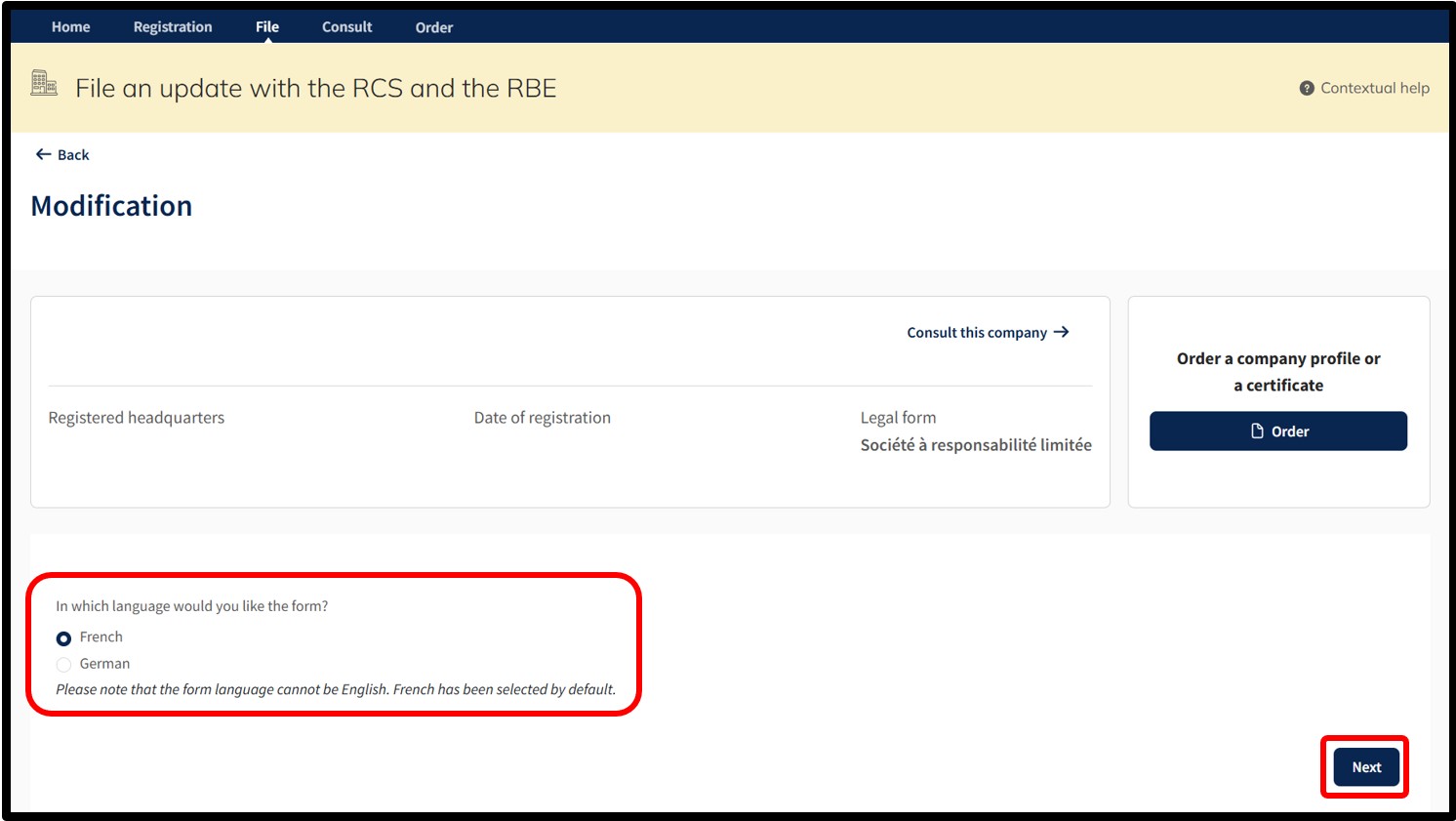
After selecting this procedure, the user moves on to the next page, where they are invited to choose the language of the data entry form relating to the modification request.
Important: Make sure you have the information required to proceed with the modification and the necessary documentary evidence.
After indicating their choice, the user confirms the creation of their request for modification by clicking on the Next button. The user is then redirected to the data entry form corresponding to the chosen procedure.
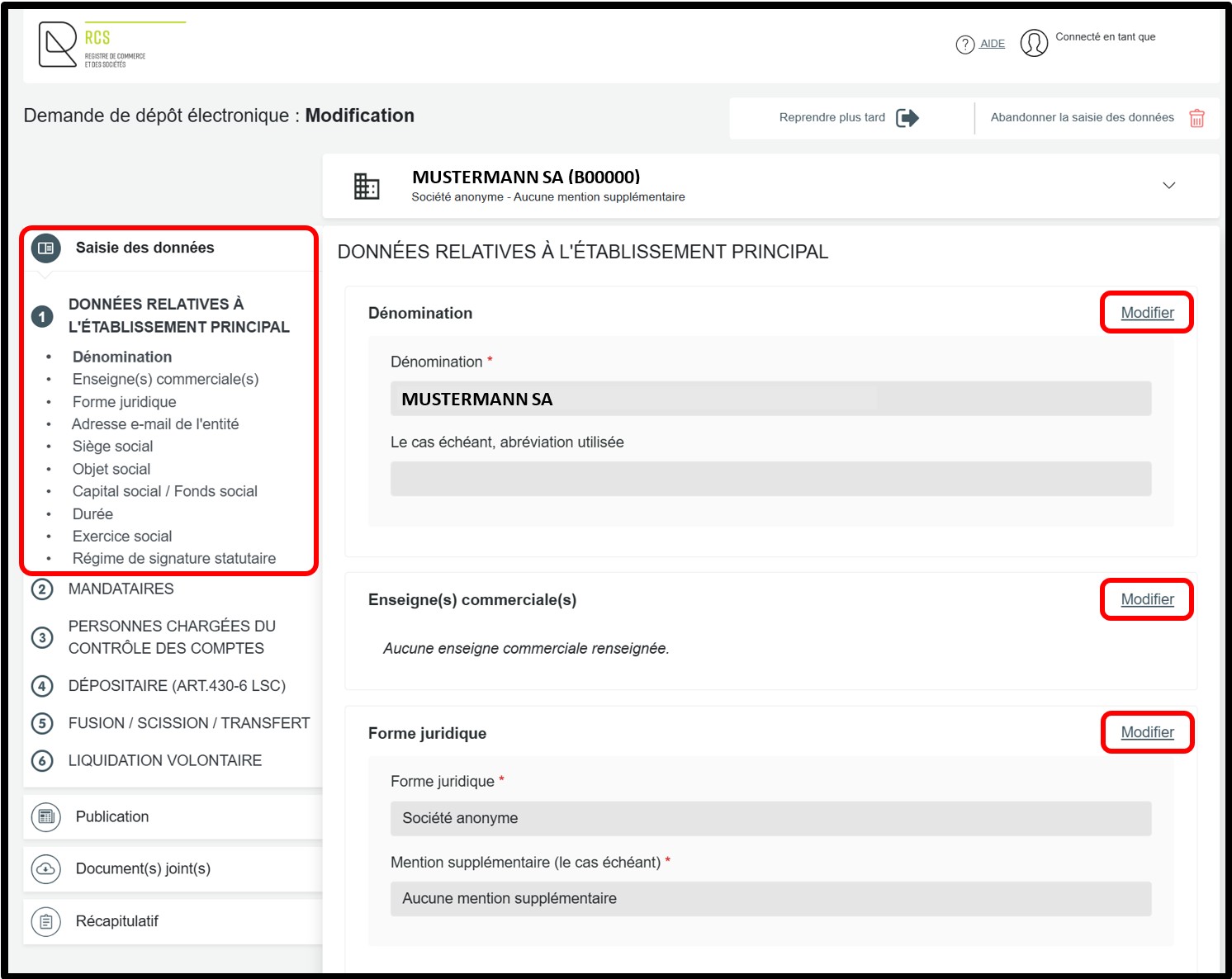
Within the data entry form:
- The option Modifier (Modify) allows the user to modify the data registered in the RCS. By clicking on this option, the user unlocks the field concerned, allowing them to make the desired modifications.
The user can cancel the modification by clicking on the Annuler la modification (Cancel modification) option.
Once the modifications have been made, the user clicks on Compléter la publication (Complete publication).
Case scenario: Luxembourg national identification number
In the context of the registration or creation of the Luxembourg national identification number for natural persons registered with the RCS, this number must be provided for any natural person registered or to be registered with the RCS in the entity’s file, in whatever capacity (as an associate, authorised representative, statutory auditor, etc.).
However, there are a few exceptions where this number does not need to be provided:
- When the natural person is a legal authorized representative, appointed as part of a procedure registered with the RCS.
- When the natural person is an authorized representative of a company under foreign law that has opened a subsidiary in the Grand Duchy of Luxembourg.
Important: The request to create a Luxembourg national identification number can only be made by the registered entity or by its authorized representative, who will request the creation of a national identifier for natural persons registered or to be registered in its file. Users are reminded that only one Luxembourg national identification number can be assigned per natural person.
Update of the Luxembourg national identification number for natural persons registered with the RCS
If the entity has several associates and/or authorised representatives who already have a Luxembourg national identification number, this number must be entered for each natural person concerned, in the section Saisie des données, under Associés or Mandataires, as applicable, in the field Identité de la personne physique.
Within the data entry form, the user is offered two options:
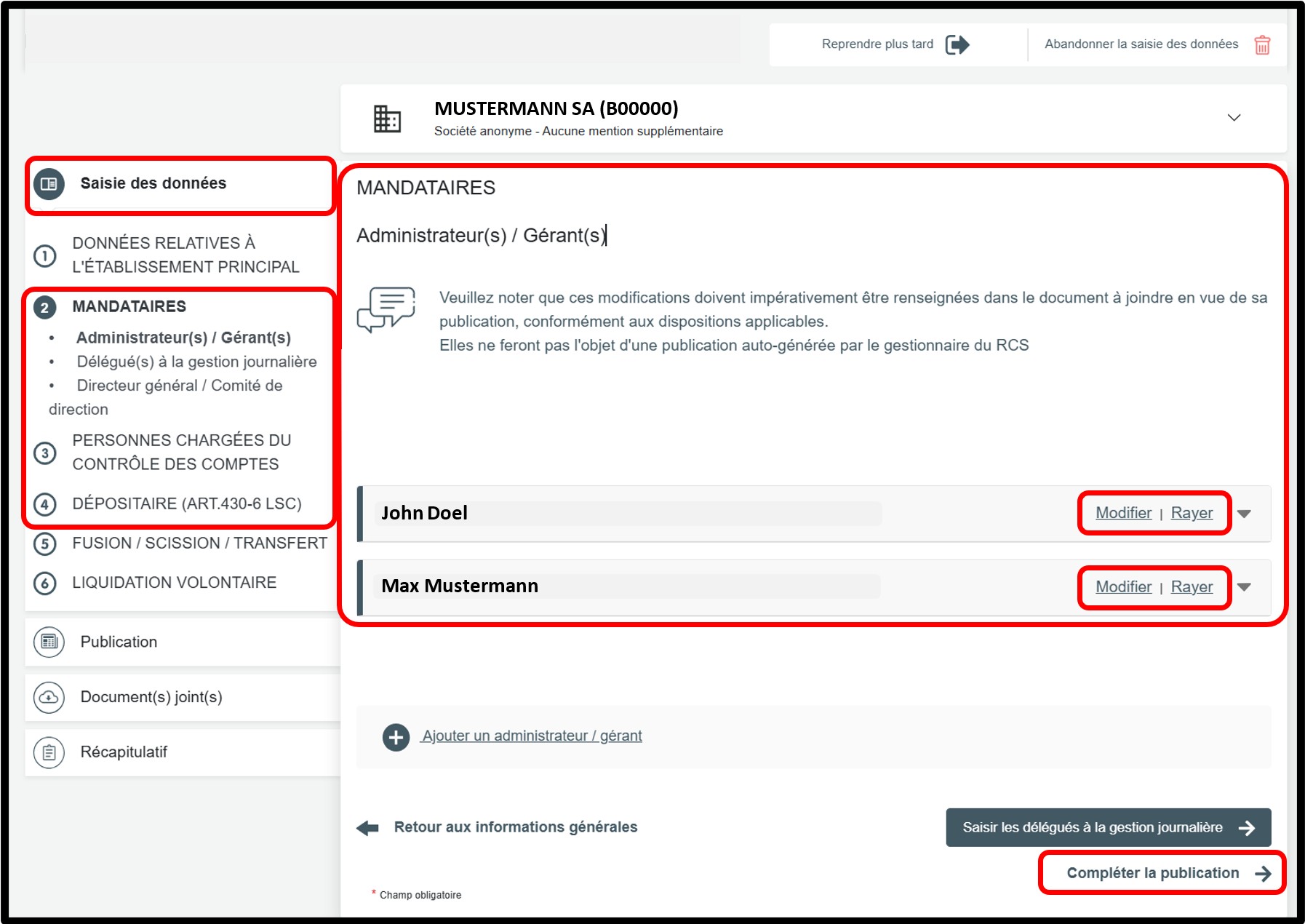
- The option Modifier (Modify) allows the user to modify the data of the person registered in the RCS. By clicking on this option, the user unlocks the field concerned, allowing them to make the desired modifications.
The user can cancel the modification by clicking on the Annuler la modification (Cancel modification) option.
- The option Rayer (Delete) allows the user to delete a person registered in the RCS.
The user can cancel the deletion by clicking on the Annuler la radiation (Cancel deletion) option. The original data will be displayed again in the field concerned.
Depending on their needs, the user can also register a new associate and/or an authorised representative. Depending on the situation, the user clicks either on Ajouter un associé or Ajouter un administrateur / gérant, then selects the corresponding type of person and completes the required information.
Once the modifications relating to the associates and/or authorised representatives have been made, the user clicks on Compléter la publication (Complete publication).
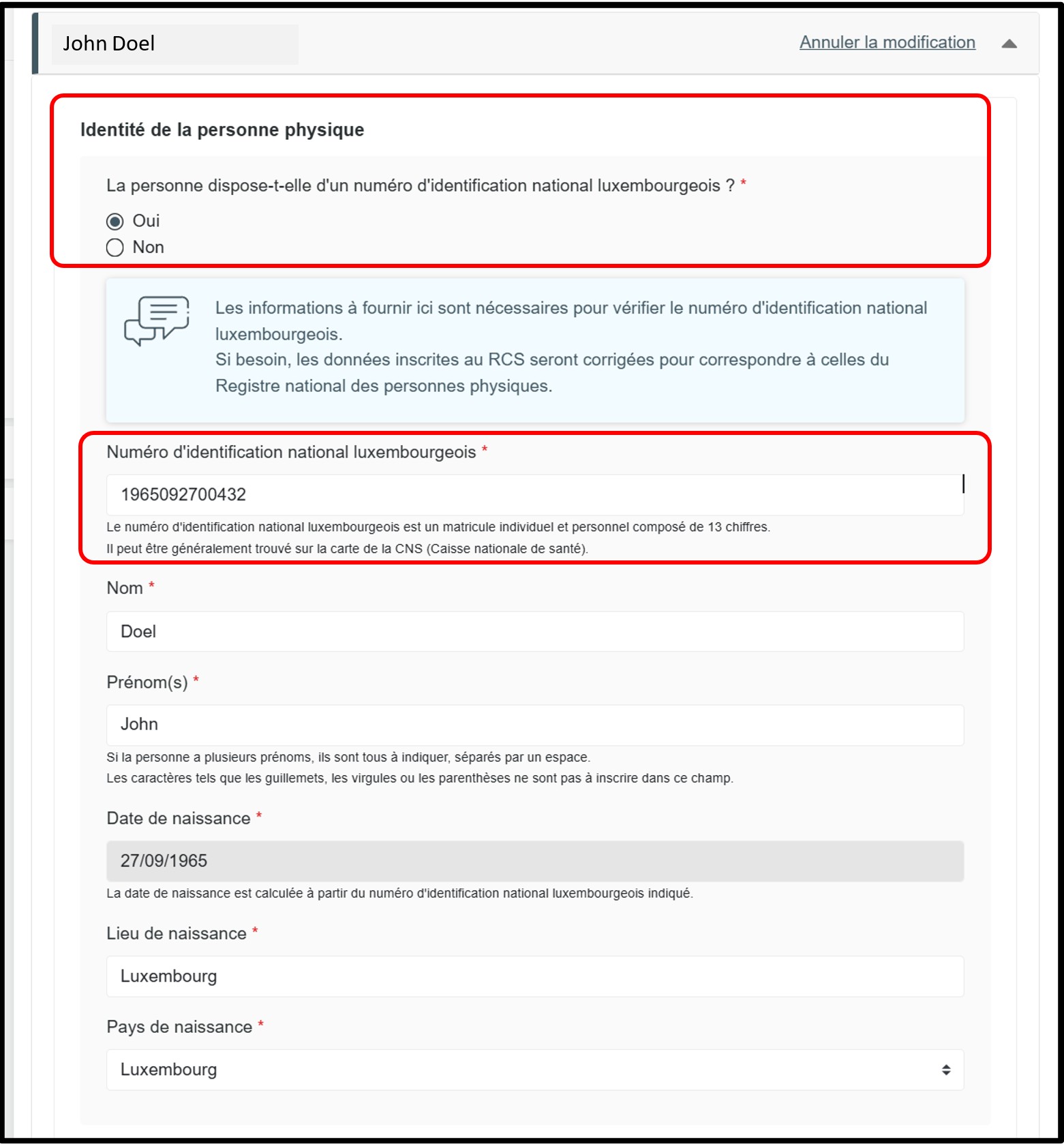
In the section Identité de la personne physique, indicate whether the person concerned has a Luxembourg national identification number.
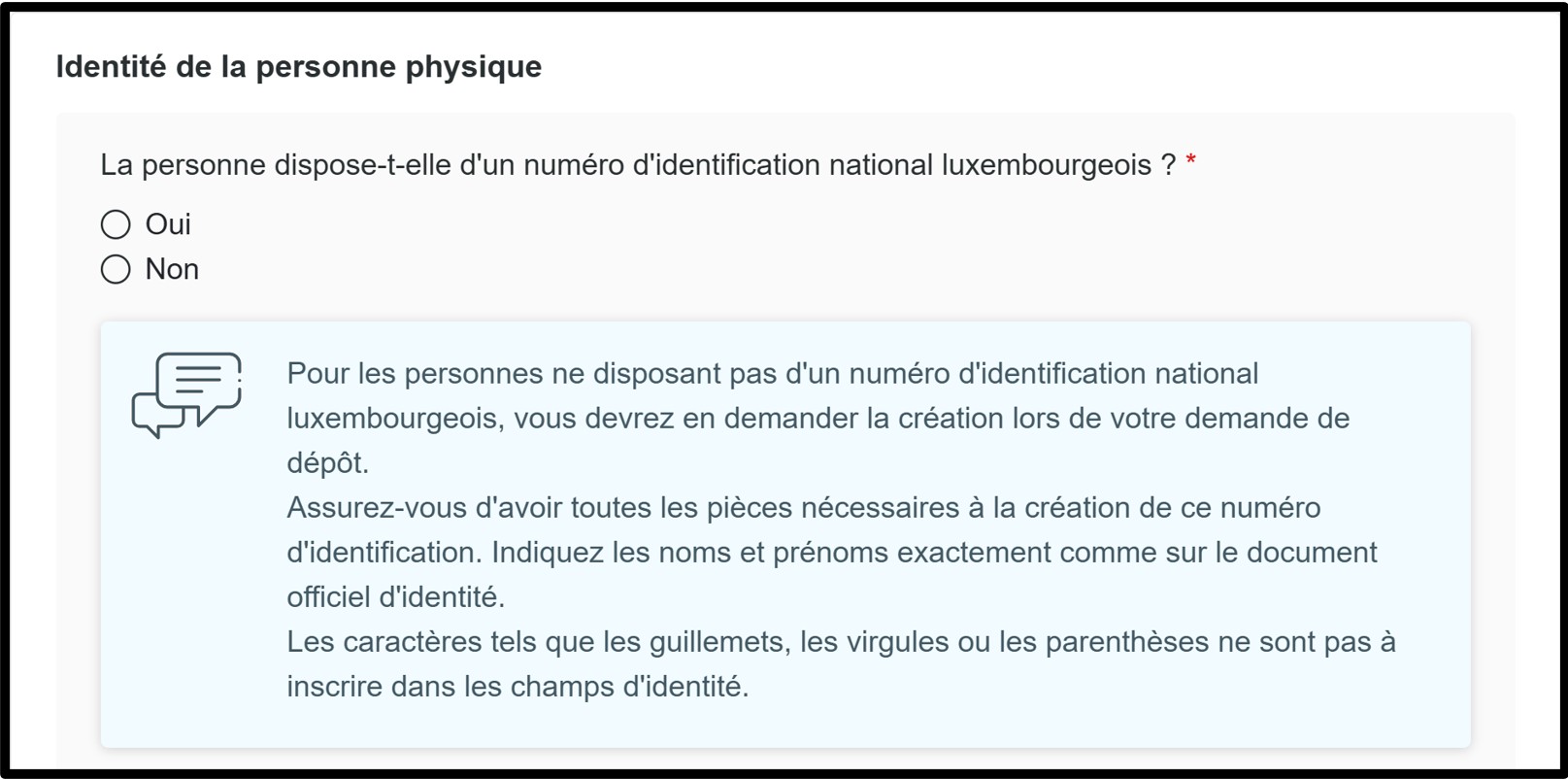
If the person has a Luxembourg national identification number, you must answer Oui to the relevant question and enter the national identification number in the field provided for this purpose.
No supporting document needs to be attached for the national identification number.
Please remember to check both sections (if applicable):
- the section relating to Associés,
- as well as the section relating to Mandataires.
Once the updates have been completed, click on the button Compléter la publication to proceed to the next step.
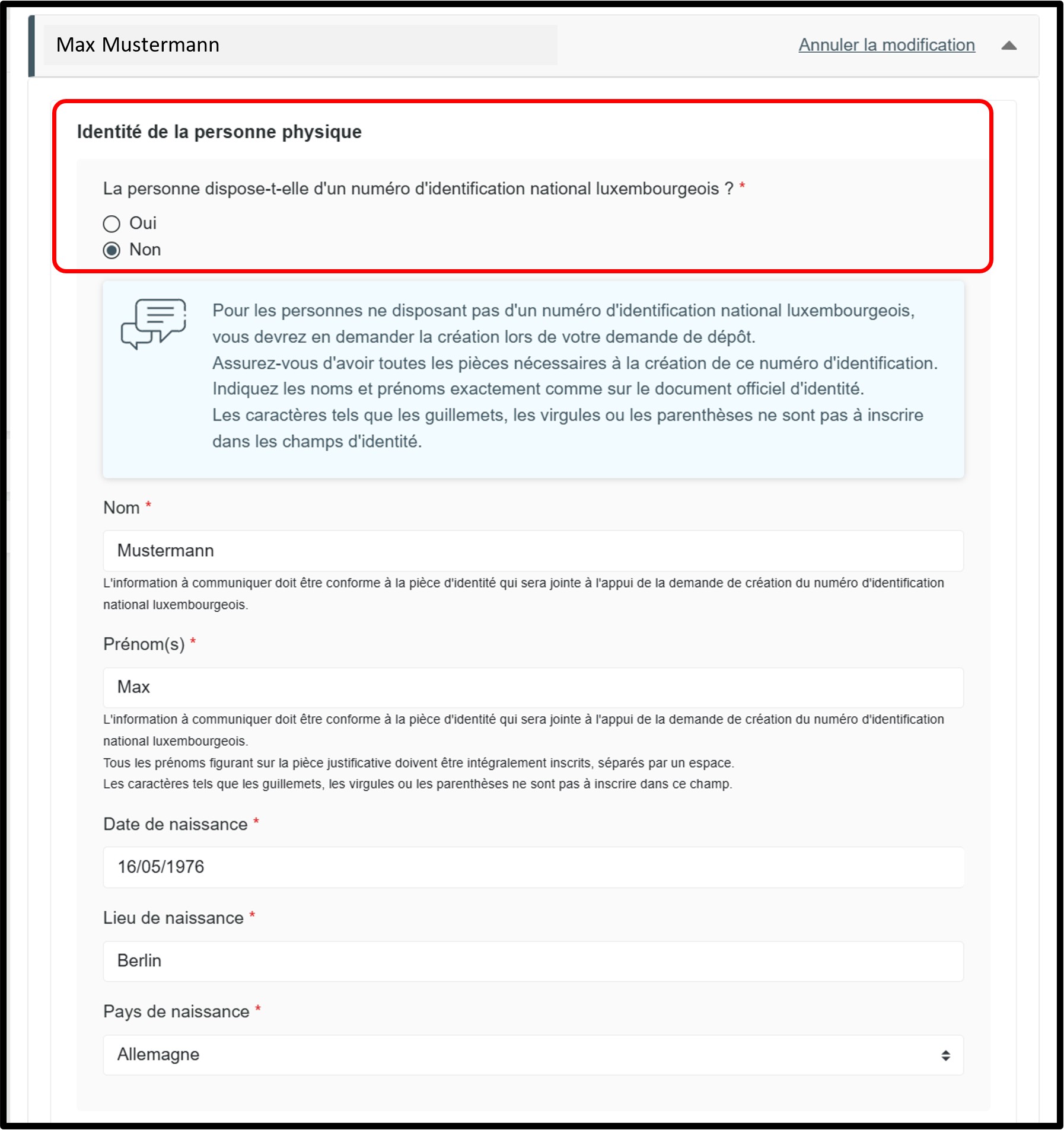
If the person does not have a Luxembourg national identification number, you must answer Non to the relevant question.
Please remember to check both sections (if applicable):
- the section relating to Associés,
- as well as the section relating to Mandataires.
To proceed to the next step, click on the button Compléter la publication or on Saisir les données relatives à la création du numéro d’identification national luxembourgeois, as appropriate.
Creation of the Luxembourg national identification number
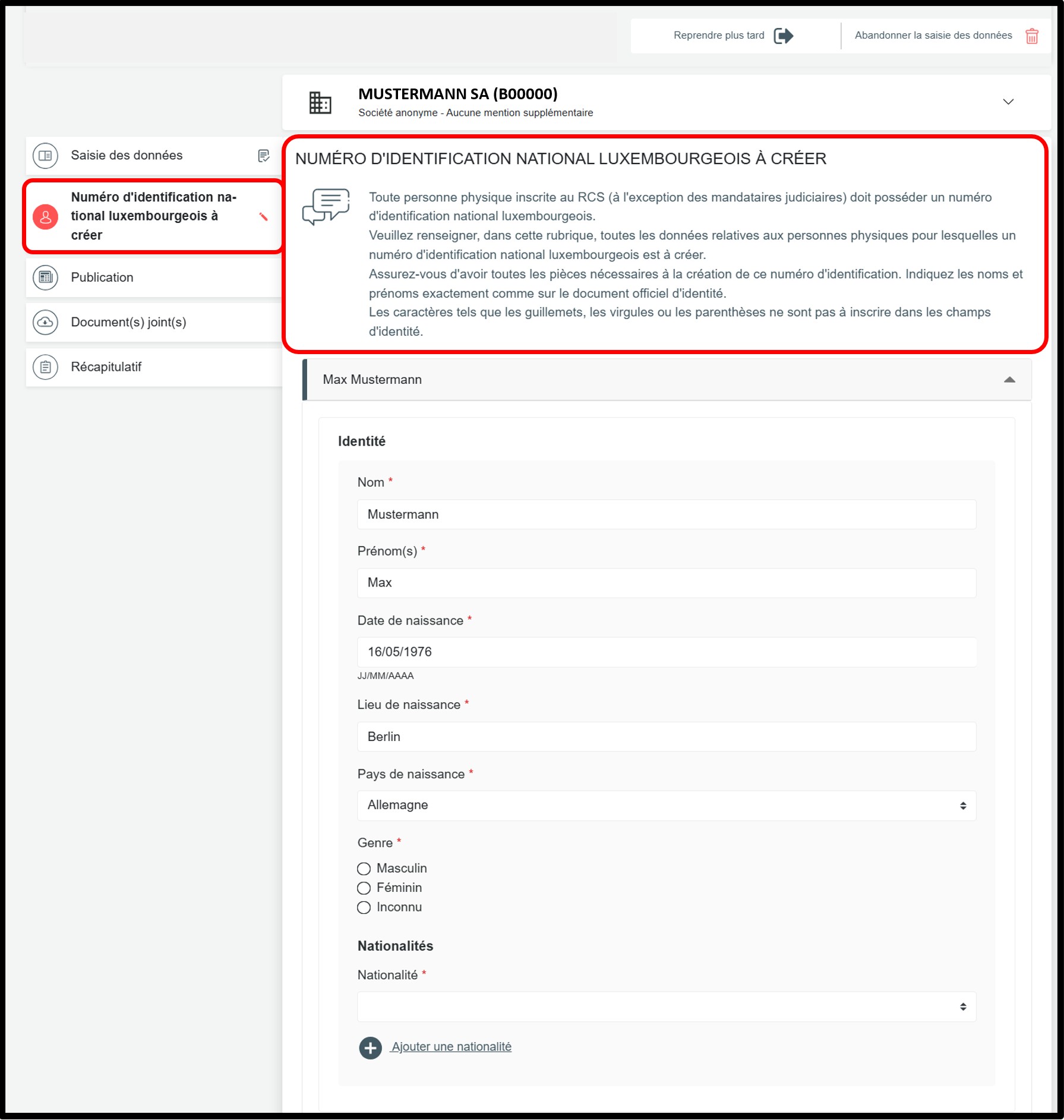
In the Numéro d'identification national luxembourgeois à créer section, the following information must be provided in order to create the Luxembourg national identification number:
- Surname(s)
- Given name(s)
All given names of the natural person must be provided. - Date, place and country of birth
- Gender (male, female, unknown)
- Nationality
All nationalities of the natural person must be indicated using the drop-down list. - Private home address (number, street, postal code, locality, country) – supporting document required. The full address must be provided, not only the locality and the country.
In this case, you must also attach an identity document and, where necessary, proof of address. These documents are used to create the Luxembourg national identification number by the manager of the RCS when processing the application.
It is important that the information provided in the application exactly matches the information shown on the attached documents.
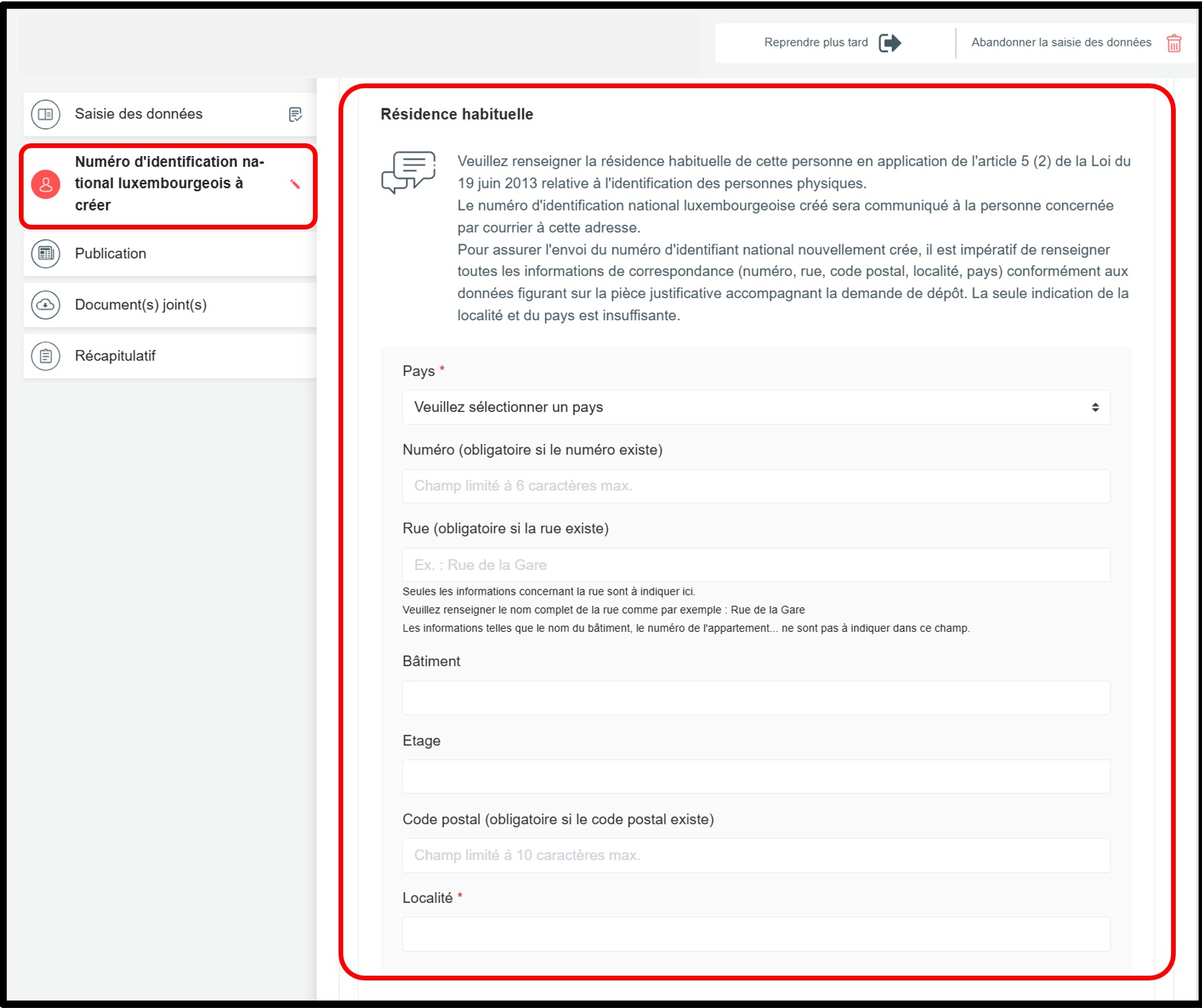
When applying for the creation of a Luxembourg national identification number, you must indicate the person’s private home address in the Résidence habituelle section. The national identification number will be sent to this address.
It is therefore mandatory to provide all address details (number, street, postal code, locality and country), in accordance with the information shown on the supporting document attached to the application. Providing only the locality and the country is not sufficient.
To verify the identity of the person for whom a Luxembourg national identification number is to be created, one of the following valid documents must be provided for control purposes:
- A passport:
Where several nationalities are indicated and not all of them appear on a single supporting document, a supporting document corresponding to each nationality must be attached to the filing application. Where several passports are submitted as supporting documents, it is recommended that they be grouped together in a single scanned document.
- A national identity card.
To justify the private home address (where this information does not appear on the identity document), one of the following documents must be provided for control purposes. The document must not be older than six months:
- a certificate of residence issued by the municipality (or an official document issued by the competent regional authority responsible for confirming home addresses);
- a sworn statement from the person concerned, stamped or countersigned by the competent regional authority responsible for confirming home addresses, an embassy, a notary, or a police station;
- if none of these documents can be provided: a water, electricity, gas, telephone or internet bill.
Please note that these documents are not listed in any order of priority.
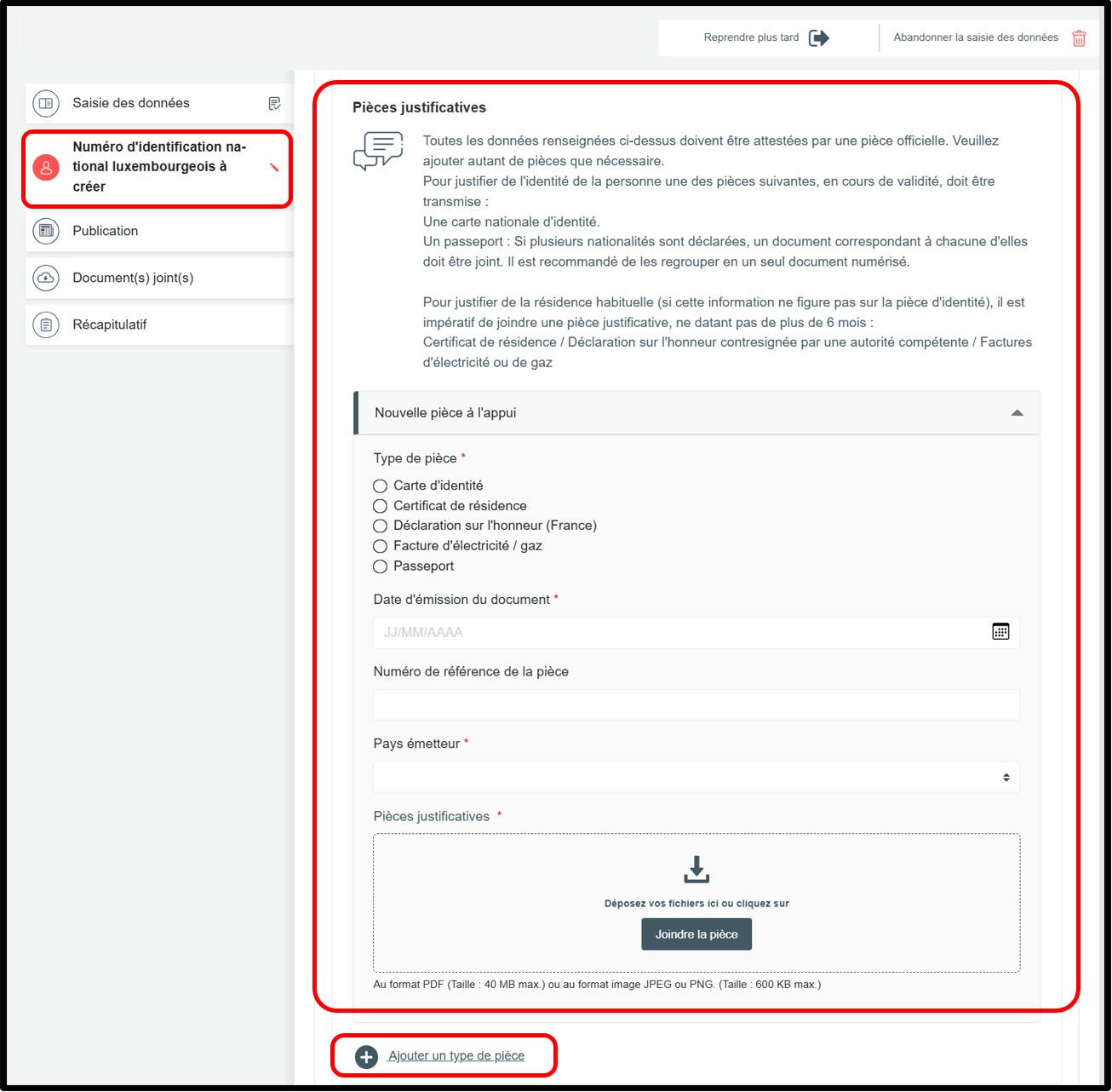
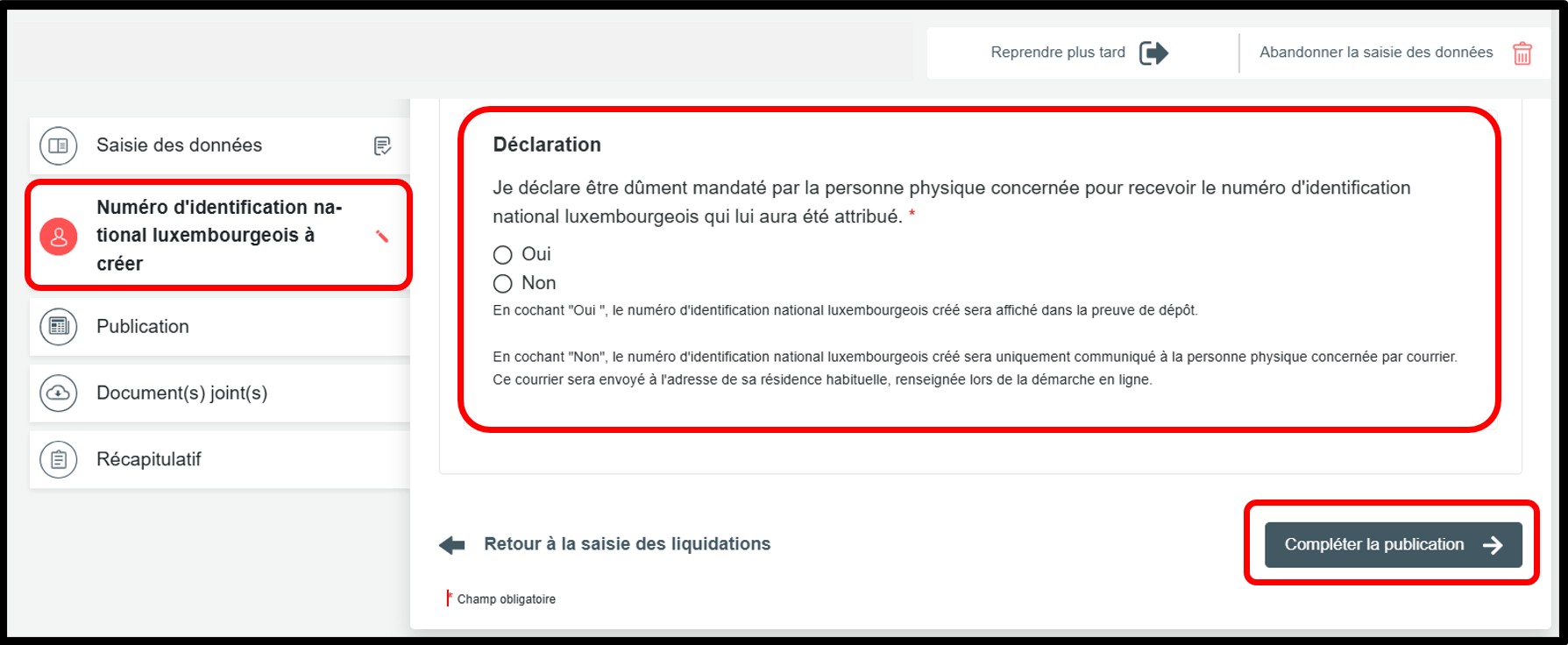
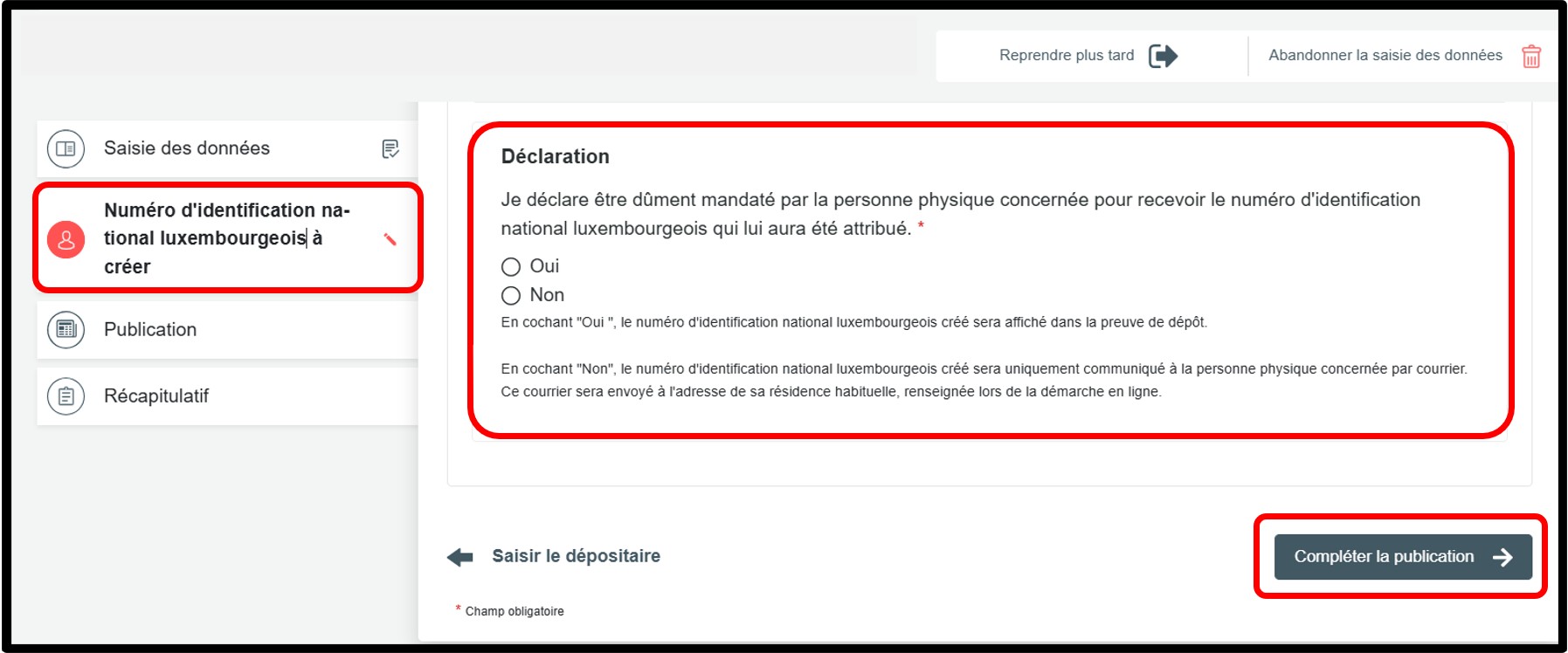
You must indicate whether you are authorised to receive the Luxembourg national identification number for the person concerned.
If you select Oui: the national identification number will be shown in the proof of filing, which can be downloaded at the end of the procedure.
If you select Non: the number will not appear in the proof of filing. It will be sent by post directly to the person concerned, at the address indicated in the application.
Once the information has been completed, click on the button Compléter la publication to continue the procedure.
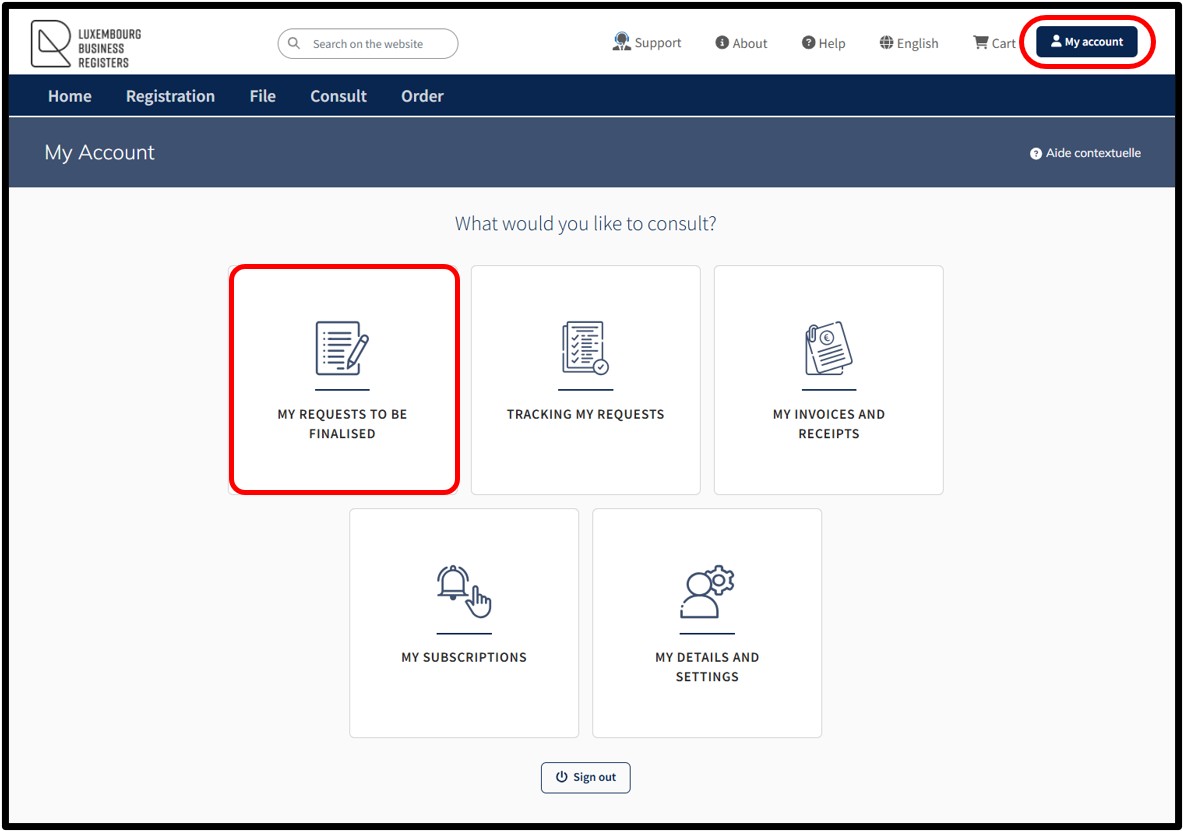
The user can also access their modification request in the My requests to be finalised section available in their customer space, which can be accessed via the My Account menu. The user can thus consult or complete their filing request in process.
Modification relating solely to authorised representatives
This procedure concerns the filing of registration, modification or deletion of one or more authorised representatives, depositaries or, where applicable, one or more auditors of the business accounts of the main establishment.
Important: By using this procedure, there is no need to create and attach an extract of the deed for publication.
In fact, by way of administrative simplification, the publication is auto-generated by the RCS administrator, based on the information that has been listed in the modification request. The automatic generation of publication will be issued in the same language as the modification request and cannot be modified.
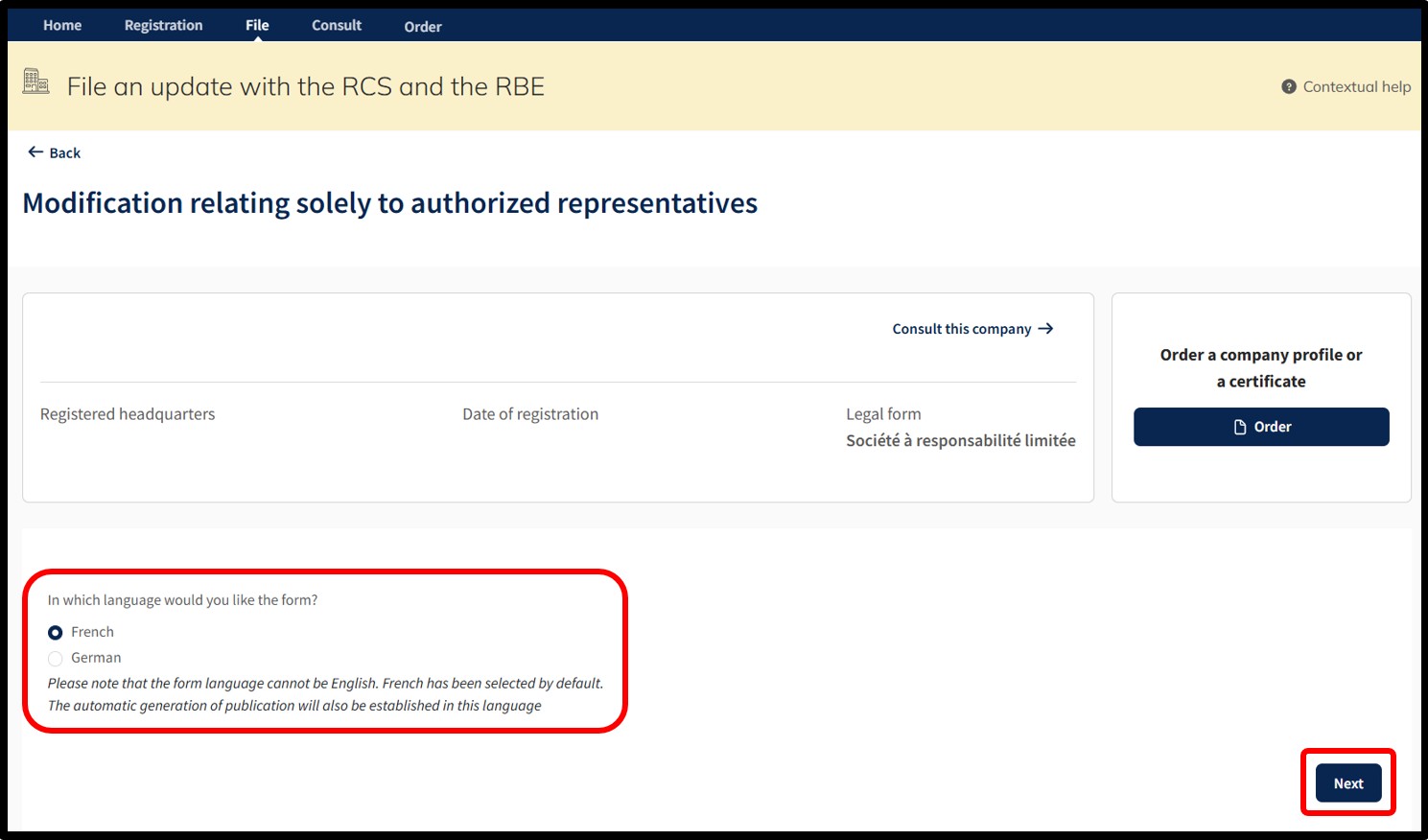
After selecting this procedure, the user moves on to the next page where they are invited to choose the language of the data entry form relating to the modification request.
Important: Make sure you have the information required to proceed with the modification.
After indicating their choice, the user confirms the creation of their request for modification by clicking on the Next button. The user is then redirected to the data entry form corresponding to the chosen procedure.
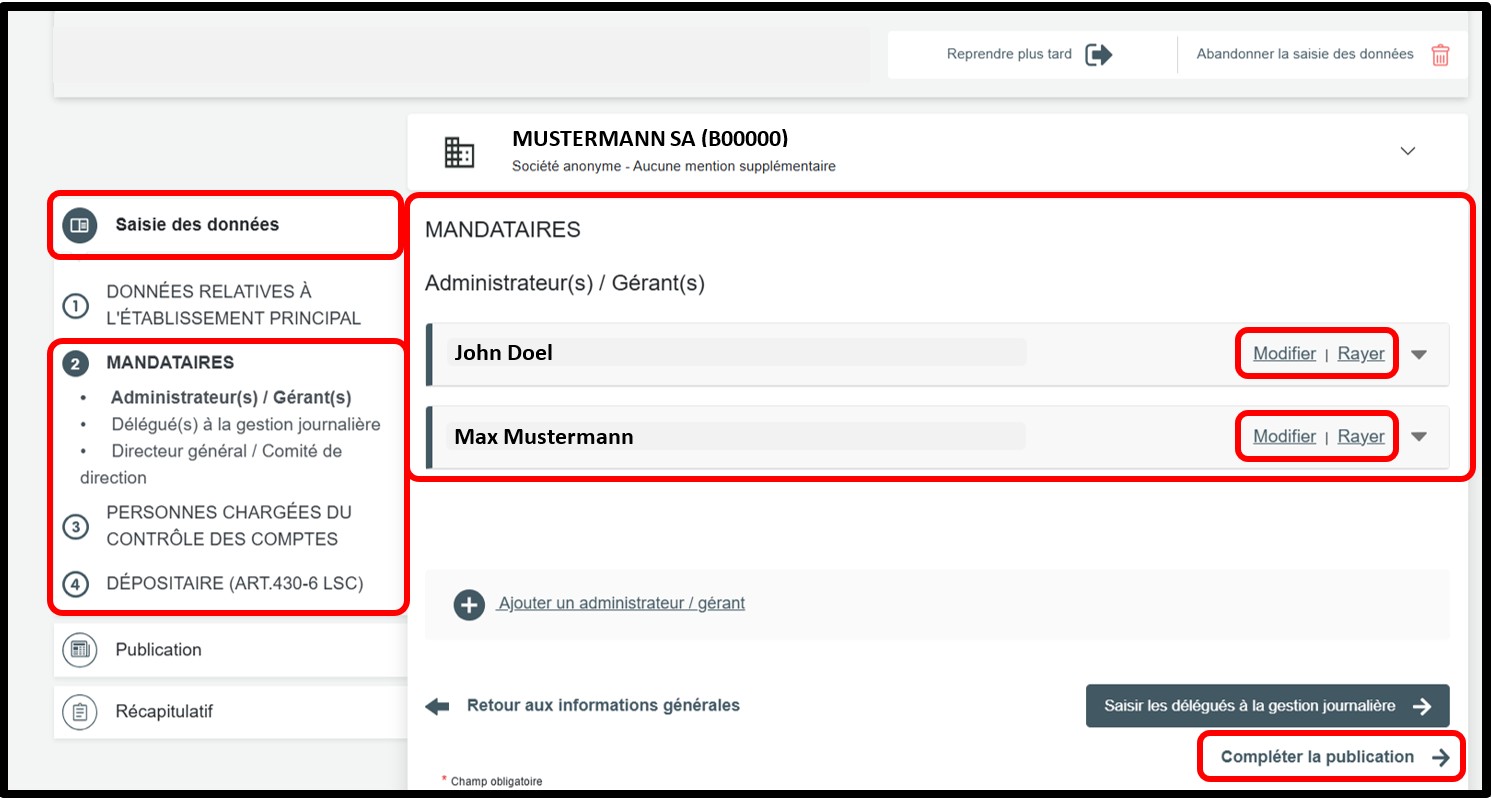
Within the data entry form, the user is offered two options:
- The option Modifier (Modify) allows the user to modify the data of the person registered in the RCS. By clicking on this option, the user unlocks the field concerned, allowing them to make the desired modifications.
The user can cancel the modification by clicking on the Annuler la modification (Cancel modification) option.
- The option Rayer (Delete) allows the user to delete a person registered in the RCS.
The user can cancel the deletion by clicking on the Annuler la radiation (Cancel deletion) option. The original data will be displayed again in the field concerned.
Depending on their needs, the user can also register a new associate and/or an authorised representative. Depending on the situation, the user clicks either on Ajouter un associé or Ajouter un administrateur / gérant, then selects the corresponding type of person and completes the required information.
Once the modifications relating to the associates and/or authorised representatives have been made, the user clicks on Compléter la publication (Complete publication).
Case scenario: Luxembourg national identification number
In the context of the registration or creation of the Luxembourg national identification number for natural persons registered with the RCS, this number must be provided for any natural person registered or to be registered with the RCS in the entity’s file, in whatever capacity (as an associate, authorised representative, statutory auditor, etc.).
However, there are a few exceptions where this number does not need to be provided:
- When the natural person is a legal authorized representative, appointed as part of a procedure registered with the RCS.
- When the natural person is an authorized representative of a company under foreign law that has opened a subsidiary in the Grand Duchy of Luxembourg.
Important: The request to create a Luxembourg national identification number can only be made by the registered entity or by its authorized representative, who will request the creation of a national identifier for natural persons registered or to be registered in its file. Users are reminded that only one Luxembourg national identification number can be assigned per natural person.
Update of the Luxembourg national identification number for natural persons registered with the RCS
If the entity has several associates and/or authorised representatives who already have a Luxembourg national identification number, this number must be entered for each natural person concerned, in the section Saisie des données, under Associés or Mandataires, as applicable, in the field Identité de la personne physique.
Click on the option Modifier to enable the input fields and make the necessary modifications.
In the section Identité de la personne physique, indicate whether the person concerned has a Luxembourg national identification number.
If the person has a Luxembourg national identification number, you must answer Oui to the relevant question and enter the national identification number in the field provided for this purpose.
No supporting document needs to be attached for the national identification number.
Please remember to check both sections (if applicable):
- the section relating to Associés,
- as well as the section relating to Mandataires.
Once the updates have been completed, click on the button Compléter la publication to proceed to the next step.
If the person does not have a Luxembourg national identification number, you must answer Non to the relevant question.
Please remember to check both sections (if applicable):
- the section relating to Associés,
- as well as the section relating to Mandataires.
To proceed to the next step, click on the button Compléter la publication or on Saisir les données relatives à la création du numéro d’identification national luxembourgeois, as appropriate.
Creation of the Luxembourg national identification number
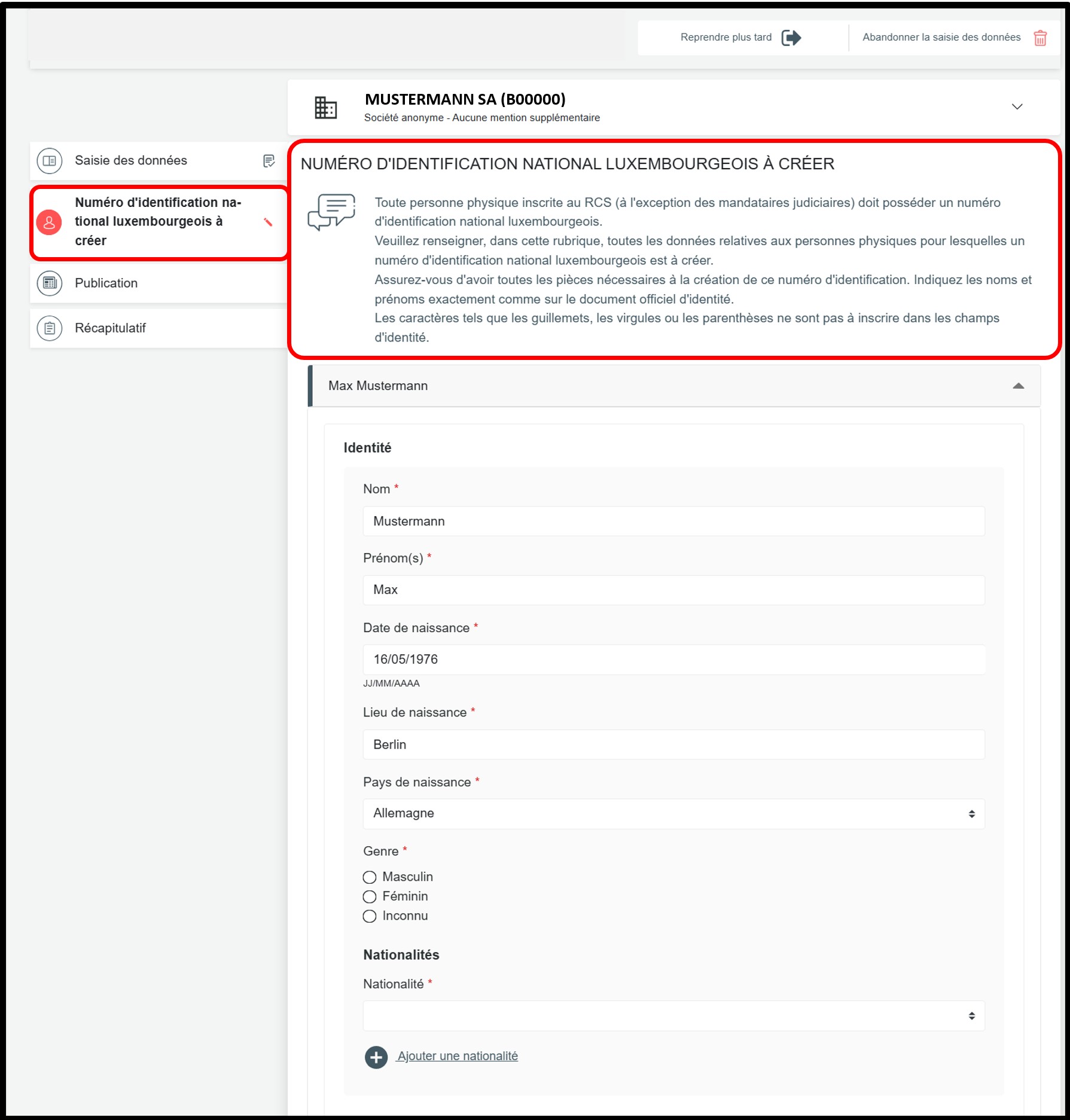
In the Numéro d'identification national luxembourgeois à créer section, the following information must be provided in order to create the Luxembourg national identification number:
- Surname(s)
- Given name(s)
All given names of the natural person must be provided. - Date, place and country of birth
- Gender (male, female, unknown)
- Nationality
All nationalities of the natural person must be indicated using the drop-down list. - Private home address (number, street, postal code, locality, country) – supporting document required. The full address must be provided, not only the locality and the country.
In this case, you must also attach an identity document and, where necessary, proof of address. These documents are used to create the Luxembourg national identification number by the manager of the RCS when processing the application.
It is important that the information provided in the application exactly matches the information shown on the attached documents.
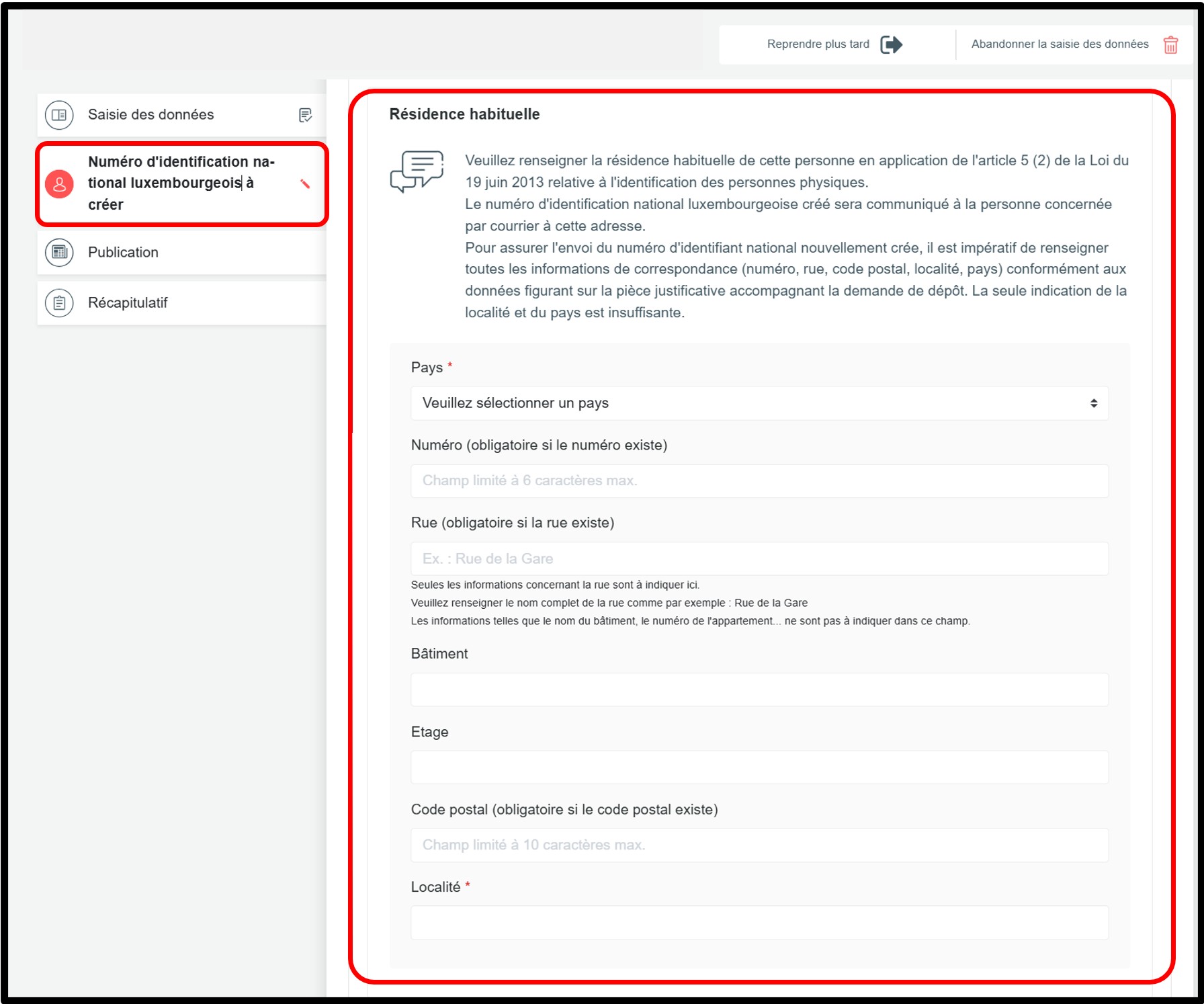
When applying for the creation of a Luxembourg national identification number, you must indicate the person’s private home address in the Résidence habituelle section. The national identification number will be sent to this address.
It is therefore mandatory to provide all address details (number, street, postal code, locality and country), in accordance with the information shown on the supporting document attached to the application. Providing only the locality and the country is not sufficient.
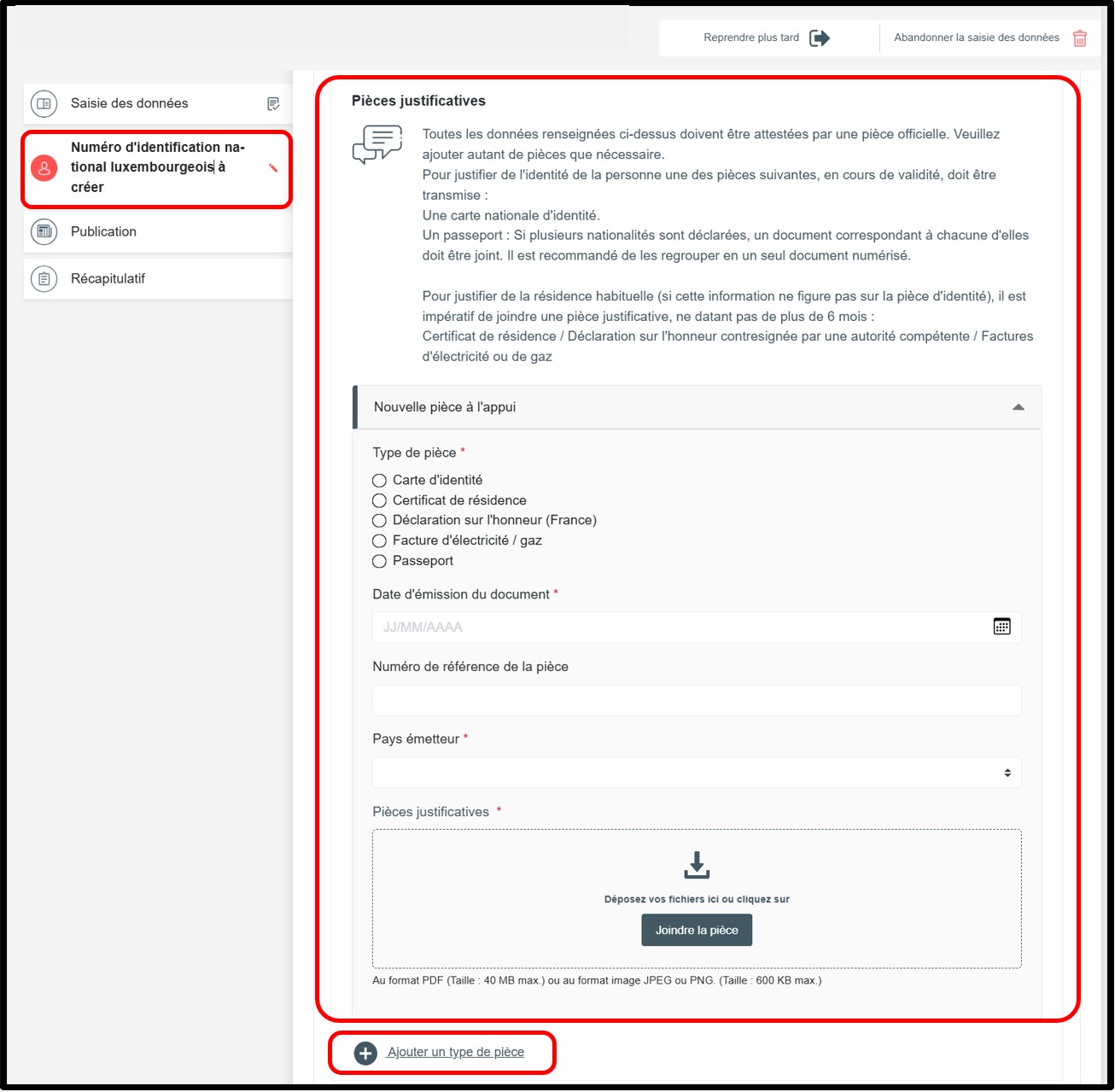
To verify the identity of the person for whom a Luxembourg national identification number is to be created, one of the following valid documents must be provided for control purposes:
- A passport:
Where several nationalities are indicated and not all of them appear on a single supporting document, a supporting document corresponding to each nationality must be attached to the filing application. Where several passports are submitted as supporting documents, it is recommended that they be grouped together in a single scanned document.
- A national identity card.
To justify the private home address (where this information does not appear on the identity document), one of the following documents must be provided for control purposes. The document must not be older than six months:
- a certificate of residence issued by the municipality (or an official document issued by the competent regional authority responsible for confirming home addresses);
- a sworn statement from the person concerned, stamped or countersigned by the competent regional authority responsible for confirming home addresses, an embassy, a notary, or a police station;
- if none of these documents can be provided: a water, electricity, gas, telephone or internet bill.
Please note that these documents are not listed in any order of priority.
You must indicate whether you are authorised to receive the Luxembourg national identification number for the person concerned.
If you select Oui: the national identification number will be shown in the proof of filing, which can be downloaded at the end of the procedure.
If you select Non: the number will not appear in the proof of filing. It will be sent by post directly to the person concerned, at the address indicated in the application.
Once the information has been completed, click on the button Compléter la publication to continue the procedure.
The user can also access their modification request in the My requests to be finalised section available in their customer space, which can be accessed via the My Account menu. The user can thus consult or complete their filing request in process.
Modification - Change of legal form
This administrative procedure concerns the change from one legal form to a new legal form with the continuation of the legal personality.
The filing has to be done in the legal form required by law, concerning the legal form of destination.
A document intended for publication, recording the transformation of the legal form, has to be attached.

After selecting this procedure, the user moves on to the next page where they are invited to choose:
- The language of the data entry form relating to the modification request.
- The new legal form of the entity/person.
The user will also have to select, if applicable, an additional mention to the legal form. If not applicable, select the option No additional mention.
Important: Make sure you have the information required to proceed with the modification and the necessary documentary evidence.
After indicating their choices, the user confirms the creation of their modification request by clicking on the Next button.
The user is then redirected to the data entry form corresponding to the chosen procedure.
The user can also access their modification request in the My requests to be finalised section available in their customer space, which can be accessed via the My Account menu. The user can thus consult or complete their filing request in process.
Modification of a Luxembourg subsidiary (of a person under Luxembourg law)
This procedure concerns the modification of data relating to the Luxembourg subsidiary of a person registered with the RCS of Luxembourg.

After selecting this procedure, the user moves on to the next page where they are invited to choose:
- The subsidiary to be modified from the list of proposed subsidiaries.
- The language of the data entry form relating to the modification request.
Important: Make sure you have the information required to proceed with the modification and the necessary documentary evidence.
After indicating their choices, the user confirms the creation of their modification request by clicking on the Next button.
The user is then redirected to the data entry form corresponding to the chosen procedure.
The user can also access their modification request in the My requests to be finalised section available in their customer space, which can be accessed via the My Account menu. The user can thus consult or complete their filing request in process.
Statutory/non-statutory modification without registration with the RCS
This administrative procedure concerns the modification of the statutes, which has no impact on the data entered in the RCS. No data entry form needs to be filed.
The document attesting to the modification of the statutes must be registered and is subject to publication.

After indicating their choice, the user confirms the creation of their modification request by clicking on the Next button.
Important: Make sure you have the documents intended for publication ready.
The user is then redirected to the data entry form corresponding to the chosen procedure.
In the context of this procedure, the request only includes the Publication section relating to the addition of the document(s) intended for publication.
The user can also access their modification request in the My requests to be finalised section available in their customer space, which can be accessed via the My Account menu. The user can thus consult or complete their filing request in process.
Modification which is to take place in the future without requisition form
This administrative procedure concerns the filing of information that has not yet taken effect and therefore does not need to be registered with the RCS. This concerns facts planned for a date after the filing date or a decision taken under a suspensive condition.
The applicant remains responsible for registering the details by means of a modification procedure on the day of entry into force.

After selecting this procedure, the user moves on to the next page, where they are asked to confirm the creation of their request for modification by clicking on the Next button.
Important: Make sure you have the documents intended for publication ready.
The user is then redirected to the data entry form corresponding to the chosen procedure.
In the context of this procedure, the request only includes the Publication section relating to the addition of the document(s) intended for publication.
The user can also access their modification request in the My requests to be finalised section available in their customer space, which can be accessed via the My Account menu. The user can thus consult or complete their filing request in process.
Modification – Adoption of the regime applicable to societal impact companies
This administrative procedure concerns the adoption by the registered entity of the specific regime applicable to societal impact companies.
A document intended for publication has to be attached, as well as the ministerial approval order.

After selecting this procedure, the user moves on to the next page, where they are invited to choose the language of the data entry form relating to the modification request.
Important: Make sure you have the documents intended for publication ready.
After indicating their choice, the user confirms the creation of their modification request by clicking on the Next button.
The user is then redirected to the data entry form corresponding to the chosen procedure.
In the context of this procedure, the request only includes the Publication section relating to the addition of the document(s) intended for publication.
The user can also access their modification request in the My requests to be finalised section available in their customer space, which can be accessed via the My Account menu. The user can thus consult or complete their filing request in process.