The date of birth of one or more beneficial owners appears to be invalid
Explanation
At least one natural person registered as a beneficial owner or senior managing official in your entity’s RBE file has a date of birth that appears to be incorrect or questionable. This may, for example, result from a data entry error when entering the date of birth, or from a clearly inconsistent date (for instance, a person appearing to be over one hundred years old).
You must therefore update the file by correcting the date of birth of the person or persons concerned. Where applicable, if the person concerned is no longer to be considered a beneficial owner or senior managing official of your entity, you must delete them from the list of beneficial owners or senior managing officials. Updating this information ensures that your entity’s situation is accurately reflected.
How to check the date of birth of your beneficial owners / senior managing officials?
To check the date of birth of your beneficial owners or senior managing officials, consult the relevant list in your entity’s RBE file. This list displays, for each registered person, the declared information, including the date of birth. You can therefore easily verify that this date is correct.
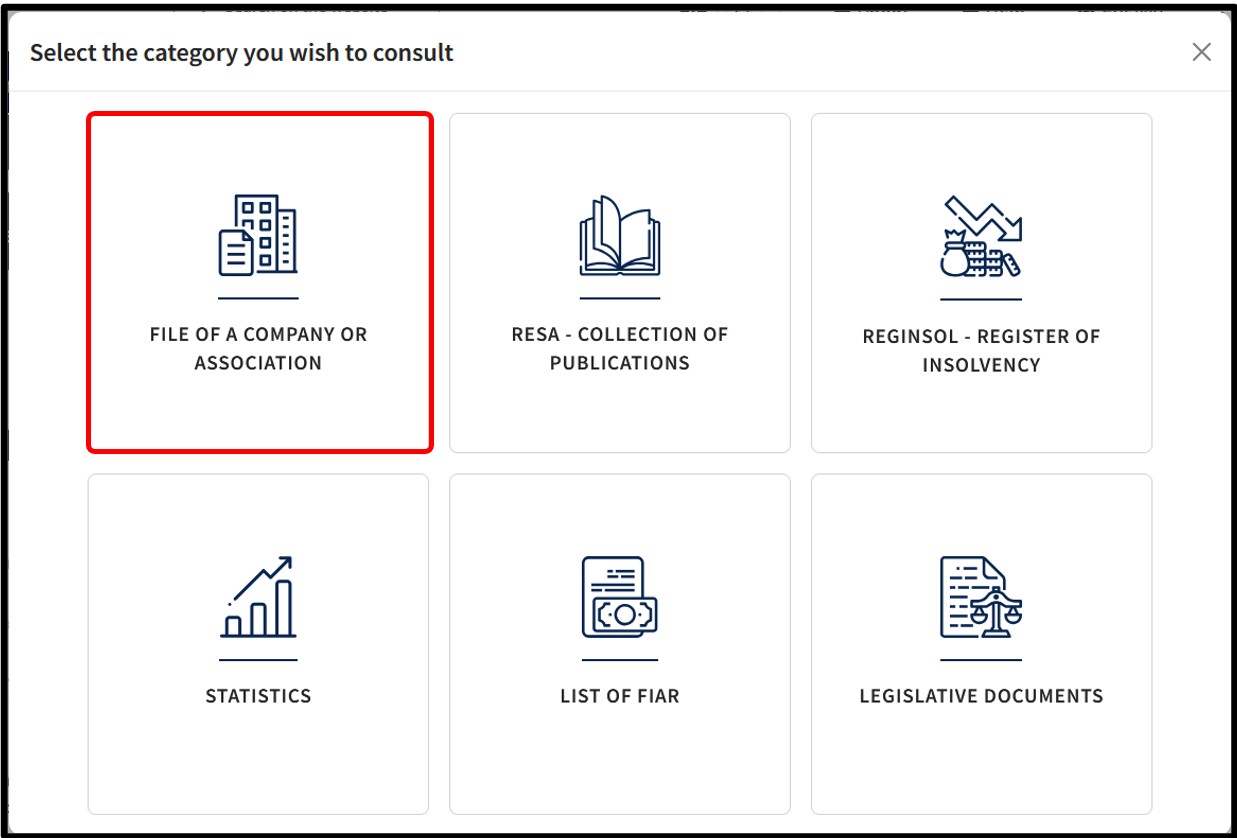
From the Consult menu, select the File of a company or association tile to access the entity’s RCS / RBE file.
After entering the entity’s RCS number in the search engine, you are taken directly to its file.
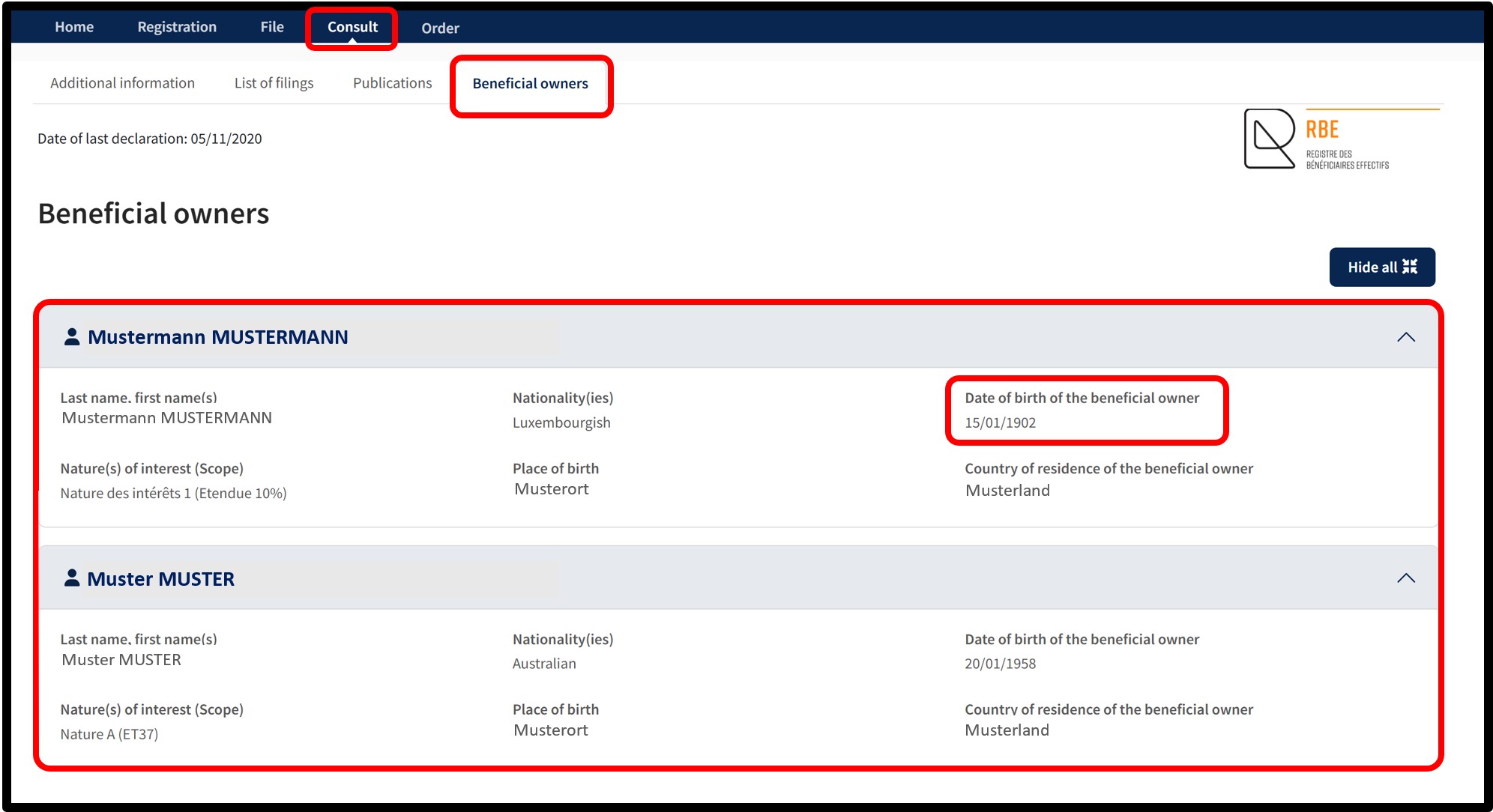
From the main screen of the entity’s RCS / RBE file, select the Beneficial owners tab. This tab allows you to view the list of your beneficial owners / senior managing officials, as well as the information relating to them.
In the example provided in the explanatory section, you can see that, for one of the beneficial owners, the indicated date of birth appears questionable, as it suggests an age of more than one hundred and twenty years.
To correct this information, you must first delete this person from the list of beneficial owners / senior managing officials and then register them again by entering the correct date of birth.
How to correct an incorrect or questionable date of birth?
To correct an incorrect or questionable date of birth relating to one or more natural persons registered as beneficial owners or senior managing officials, you must submit a modification of your beneficial owner information to the RBE. This involves updating the information of the persons concerned by entering the correct date of birth.
The information presented is standard and provided for guidance purposes only. Depending on the legal form of your entity, the documents to be provided or the steps to be followed may differ.
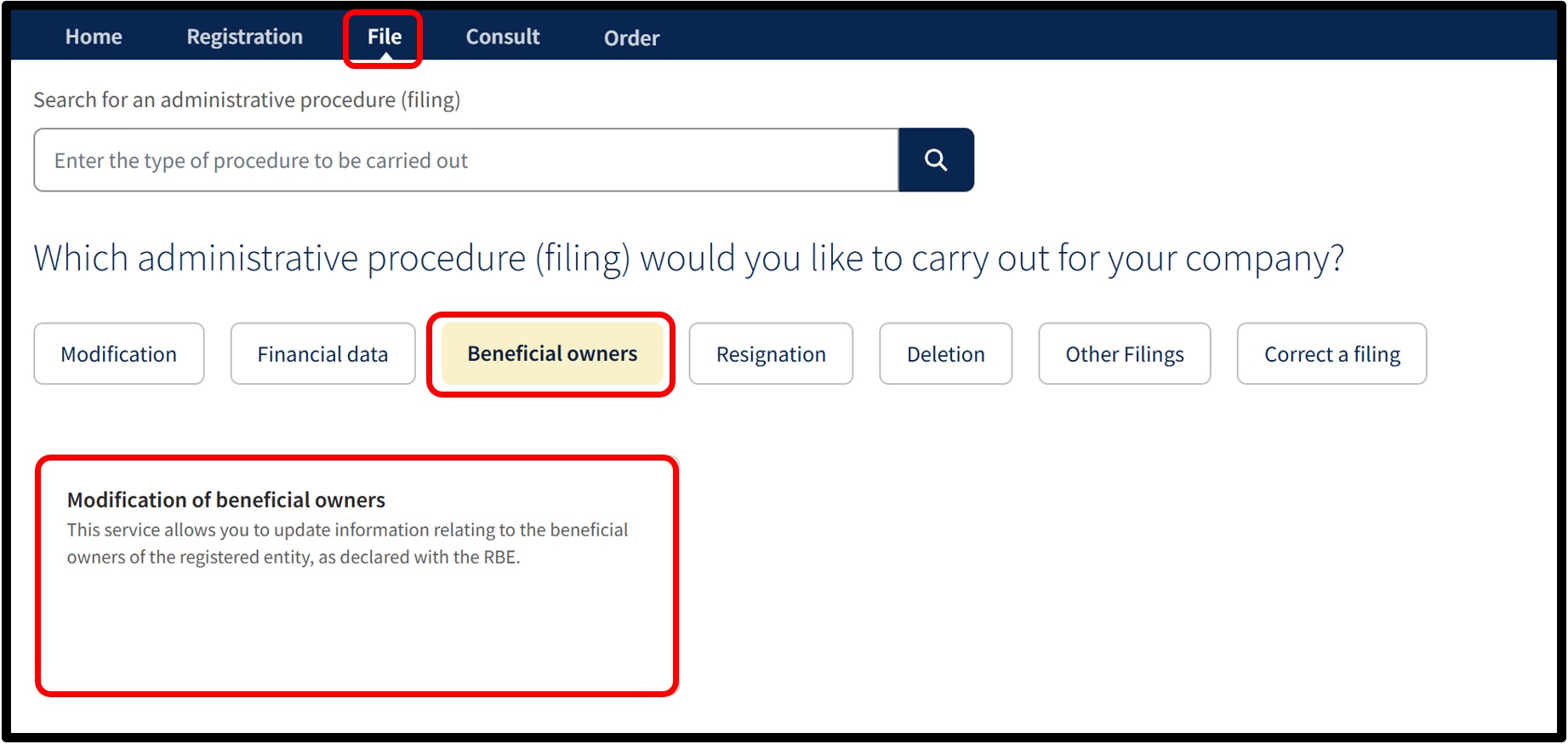
To update the list of beneficial owners / senior managing officials of your entity with the RBE, select the Beneficial owners category, then choose the Modification of beneficial owners service.

Once the service has been selected, you will access a screen on which you must check the box relating to the Declaration of honour in order to certify that you are duly authorised to carry out the modification.
If you do not check this box, you will not be able to continue with the beneficial owner modification procedure.
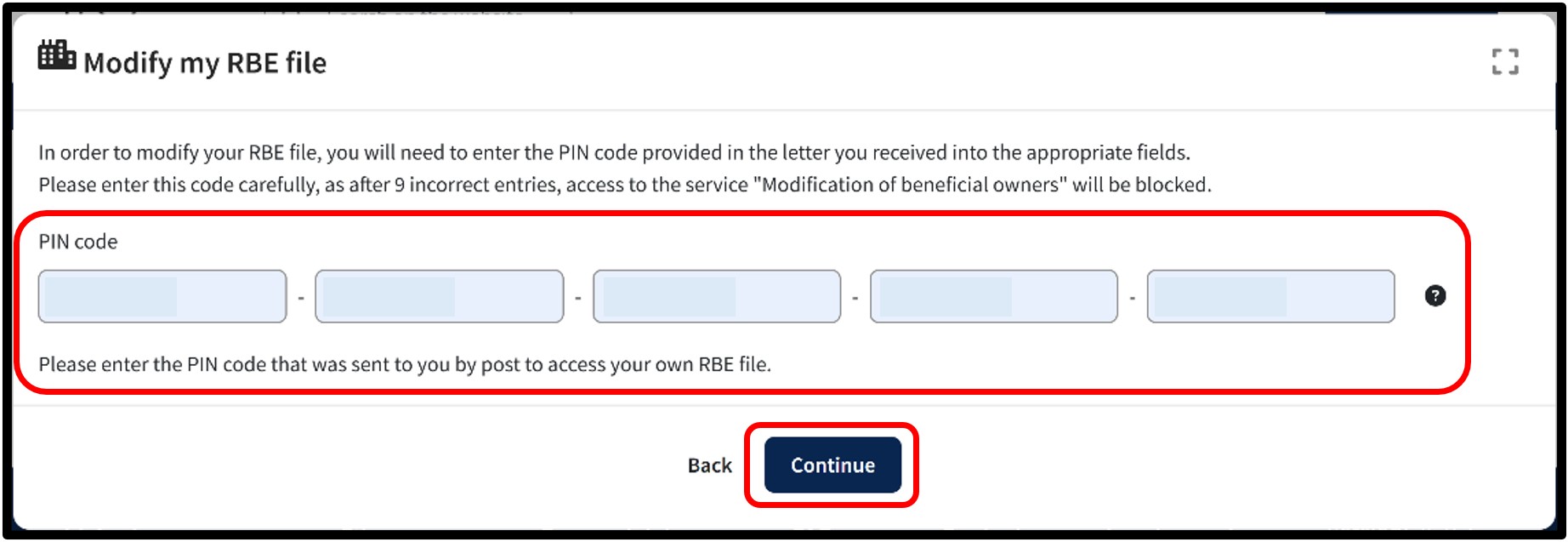
After checking the Declaration of honour box, a pop-up window opens allowing you to enter your PIN code in the designated field. This code was sent to you by post and allows you to access your RBE file.
Once the PIN code has been entered, click Continue.
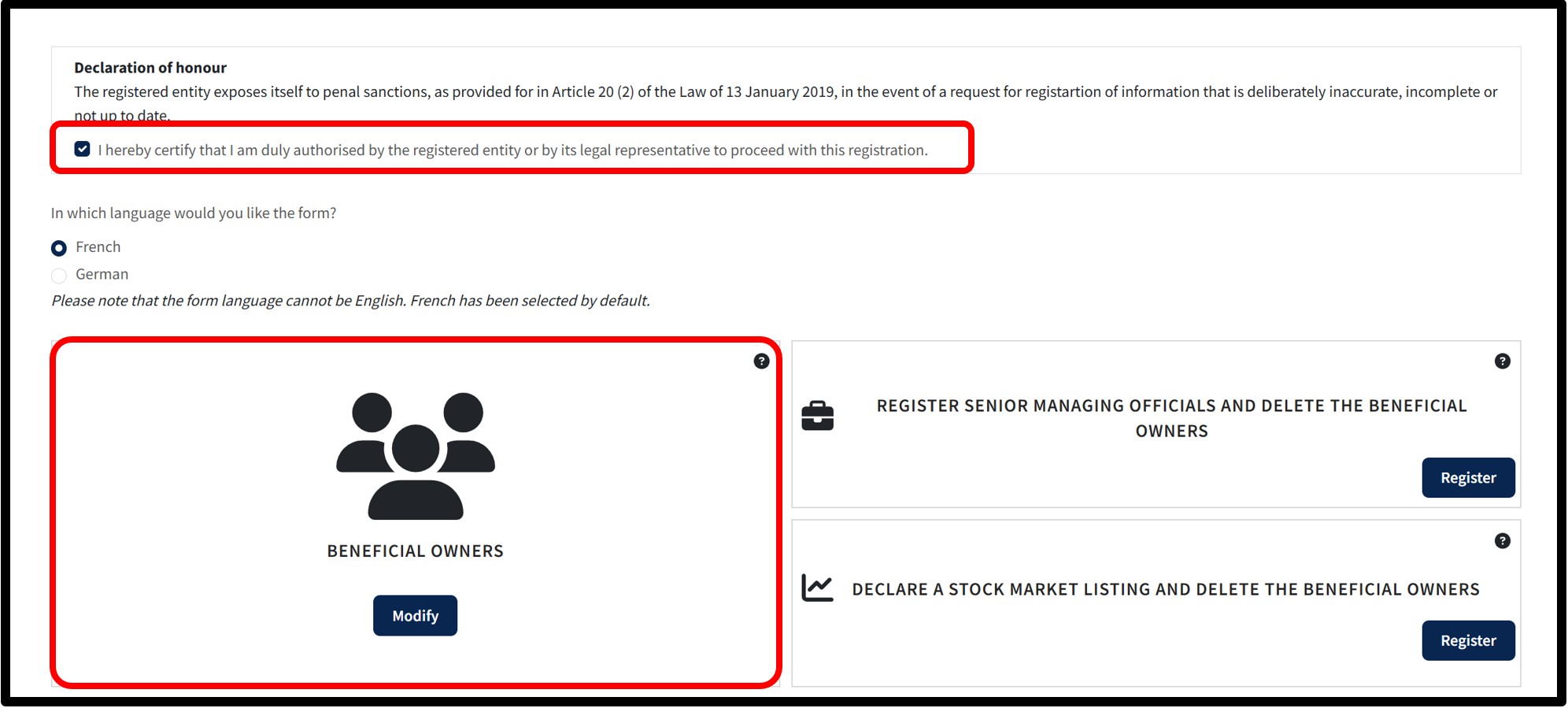
After clicking Continue, you access the screen where you must choose the language of the form.
Depending on the type of beneficial owners initially declared for your entity:
- If your modification concerns beneficial owners, click the Modify button.
- If your modification concerns senior managing officials, click the Modify button.
By clicking the Modify button corresponding to your situation, you are redirected to the form displaying the list of the relevant beneficial owners or senior managing officials.
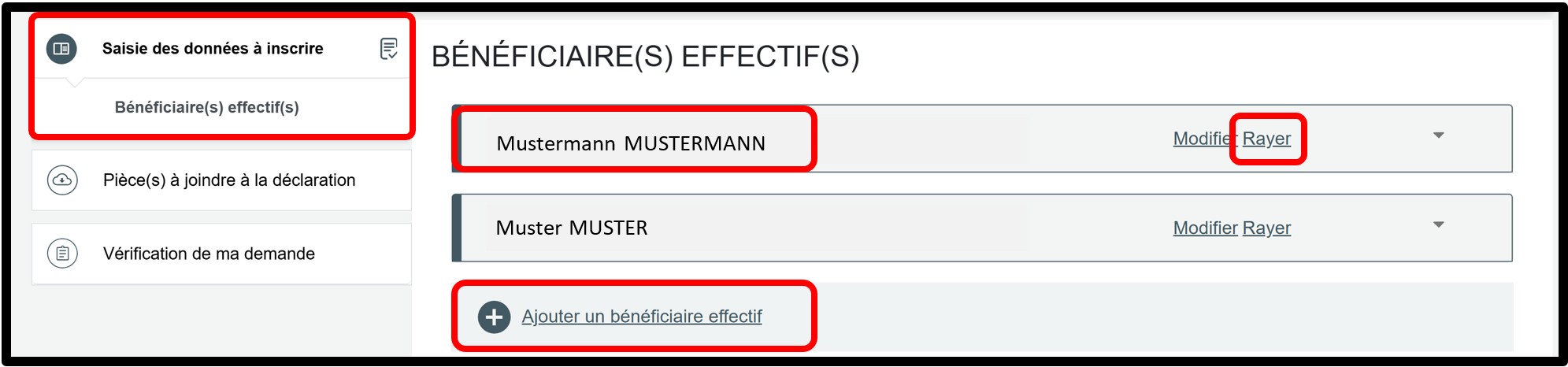
In the Saisie des données à inscrire section, you access the list of your beneficial owners.
After identifying the person whose date of birth is questionable, please remove them from the list by clicking the Radier option.
Then click the Ajouter un bénéficiaire effectif option to re-register this person with the correct information. In this case, you must again attach the required supporting documents.
If the person concerned is no longer to be considered a beneficial owner of your entity, you must permanently delete them from the list and, where applicable, register a new beneficial owner.
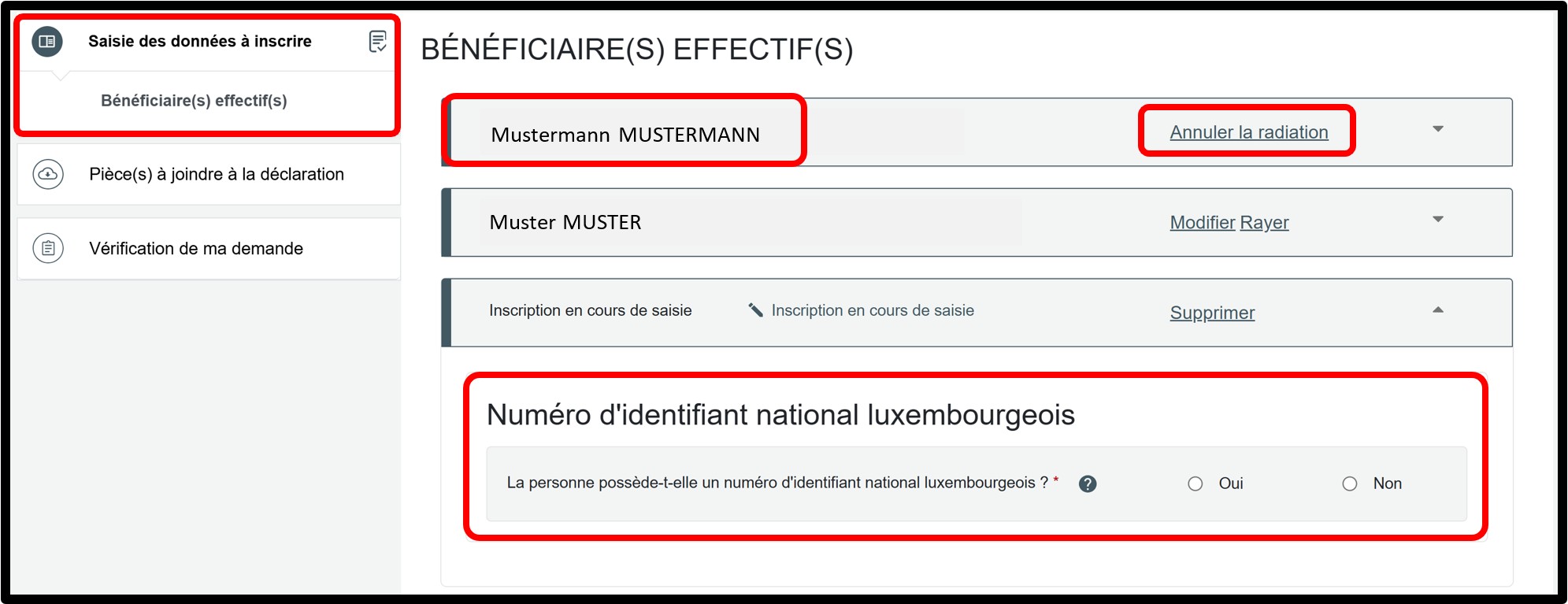
To re-register the beneficial owner, you must first indicate whether the person to be declared has a Luxembourg national identification number.
- Select Oui if the person has a Luxembourg national identification number.
- Select Non if the person does not have one.
Modification of beneficial owners / senior managing officials (following their deletion)
Form: Additional information
Beneficial owners
In the Saisie des données à inscrire section, you must first indicate whether the person to be declared has a Luxembourg national identification number.
- Select Oui if the person has a Luxembourg national identification number.
- Select Non if the person does not have one.
You can add an additional beneficial owner by clicking the Ajouter un beneficiaire effectif option.
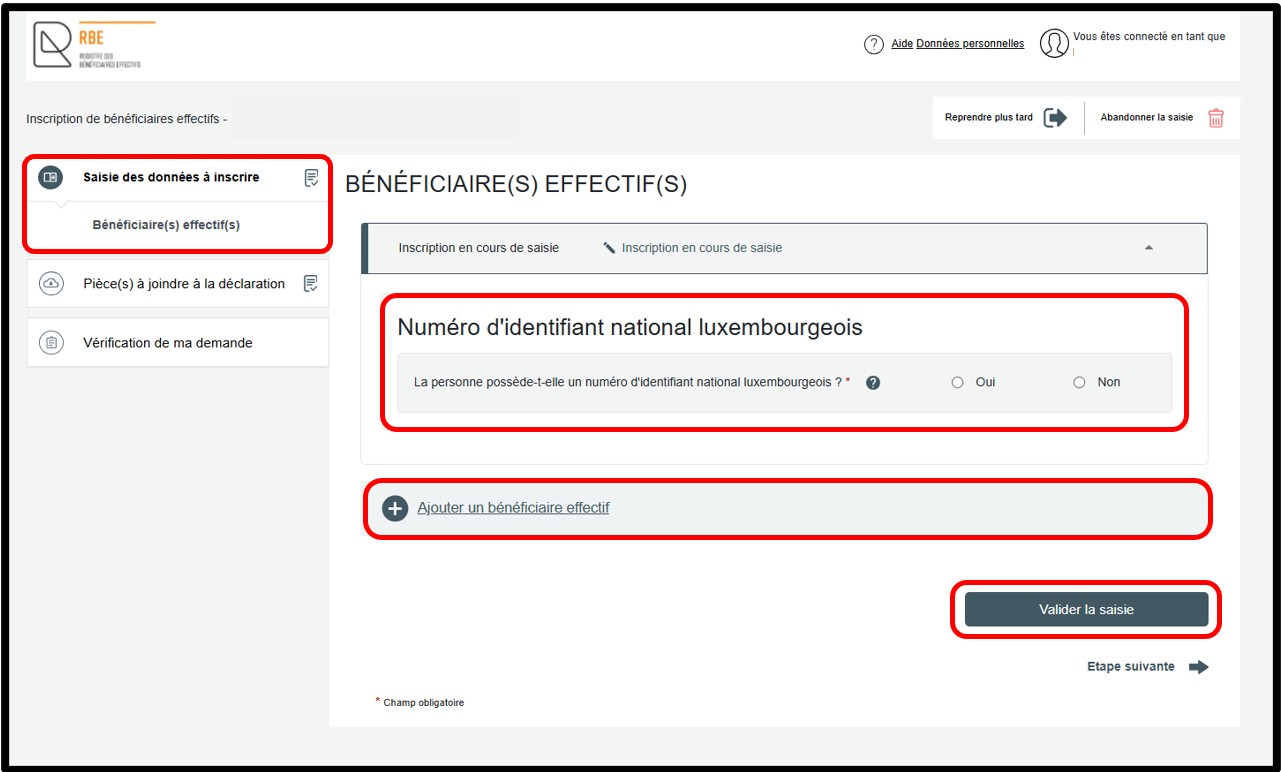
If you select the Oui option, the required input fields are displayed automatically. You must then complete the requested information in order to proceed with the declaration. Once all fields have been completed, click the Vérifier la saisie button. This action allows the entered data to be checked. Any errors or missing information are highlighted in red on the screen. These must be corrected before continuing.
After the data has been validated, you can access the next step by clicking on the Vérification de ma demande section. If the beneficial owner has a Luxembourg national identification number, no supporting documents are required to finalise the declaration.
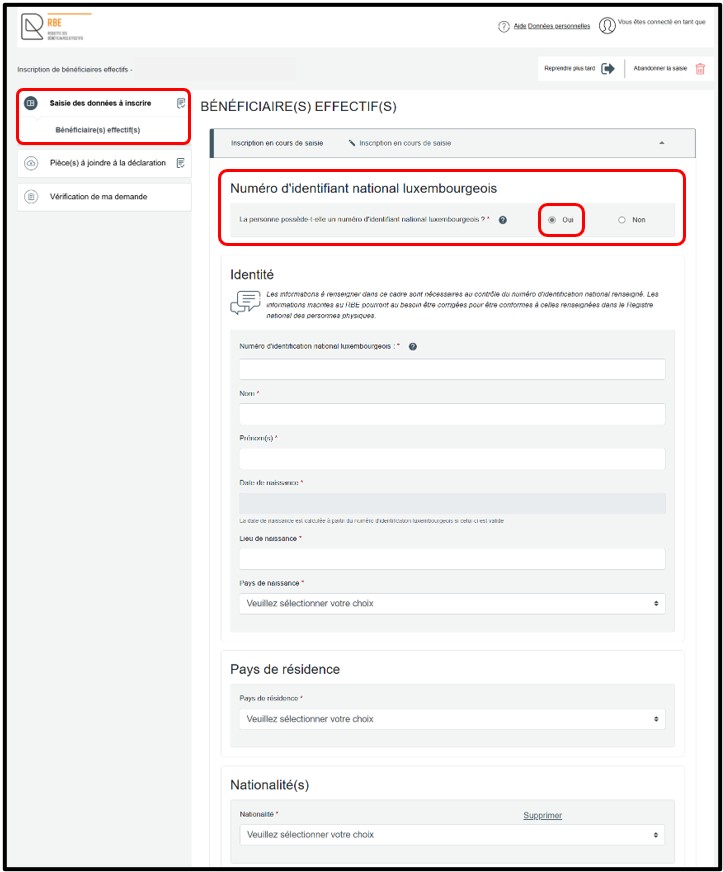
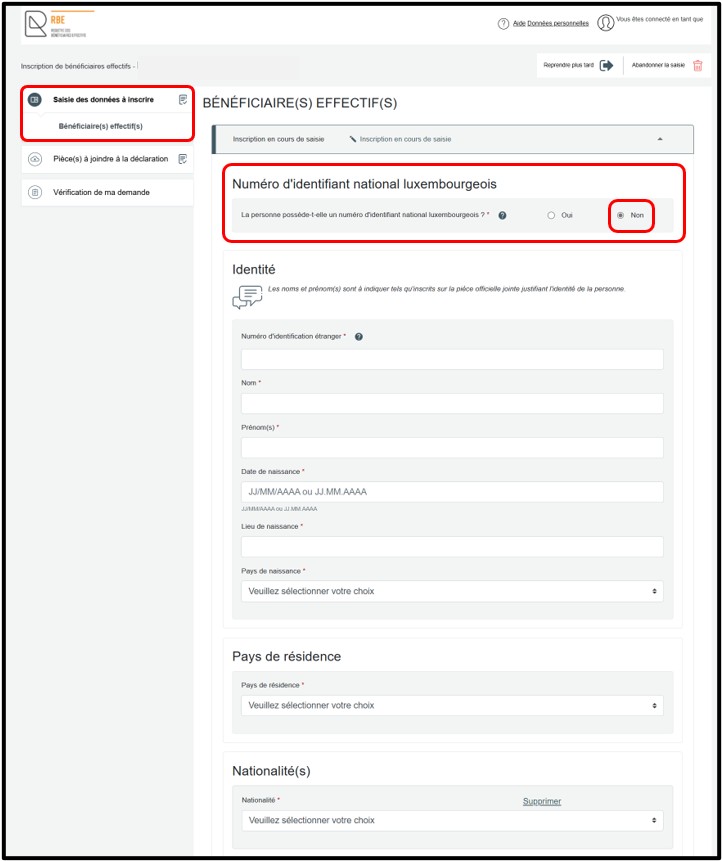
If you select the Non option, the required input fields are displayed automatically. You must then complete the requested information in order to proceed with the declaration. Once all fields have been completed, click the Vérifier la saisie button. This action allows the entered data to be checked. Any errors or missing information are highlighted in red on the screen. These must be corrected before continuing.
After the data has been validated, you move on to the next step by clicking on the Pièce(s) à joindre à la déclaration section.
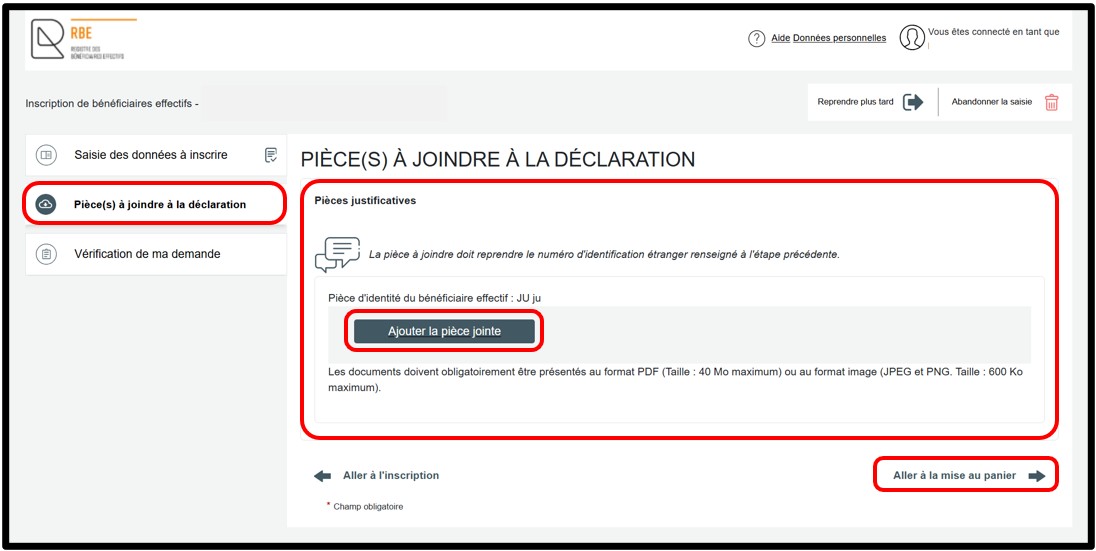
In the Pièce(s) à joindre à la déclaration section, you must attach the required supporting document in the Pièces justificatives field by clicking the Ajouter la pièce jointe button. The list of documents to be attached is proposed based on the information entered in the Saisie des données à inscrire section. To proceed with the declaration, then click the Aller à la mise au panier link.
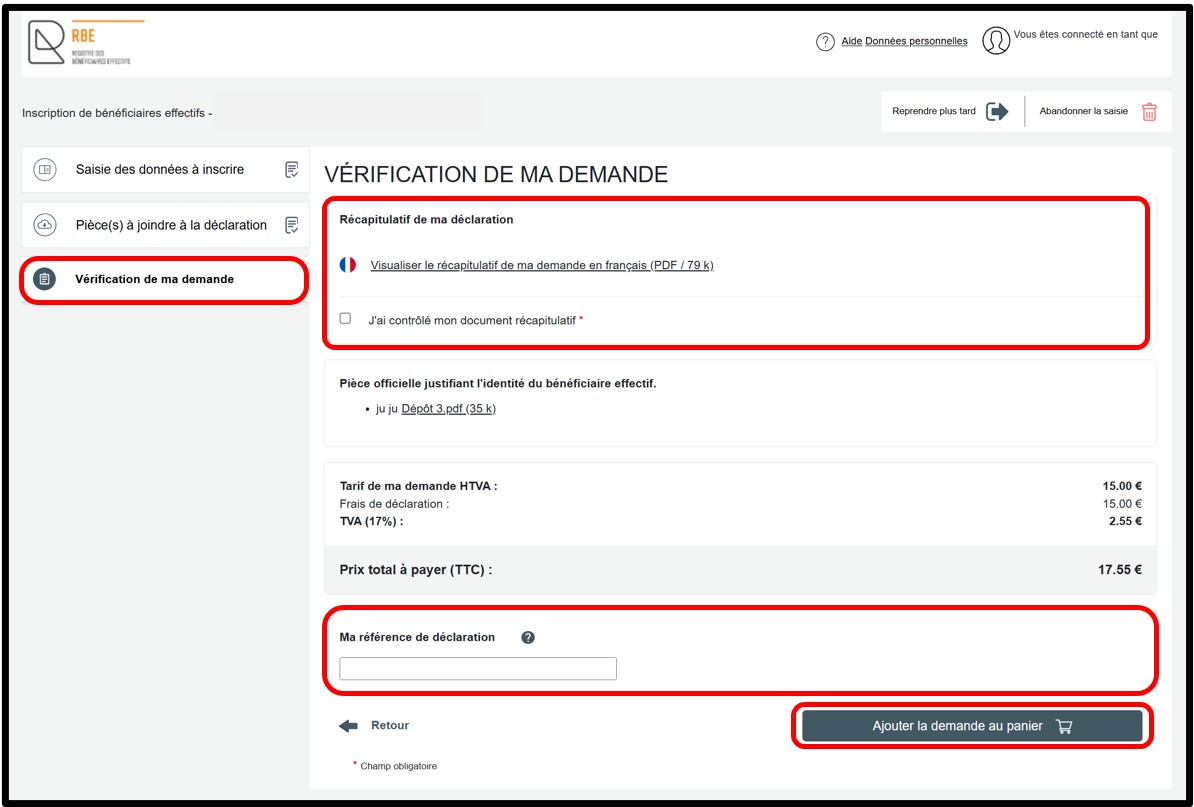
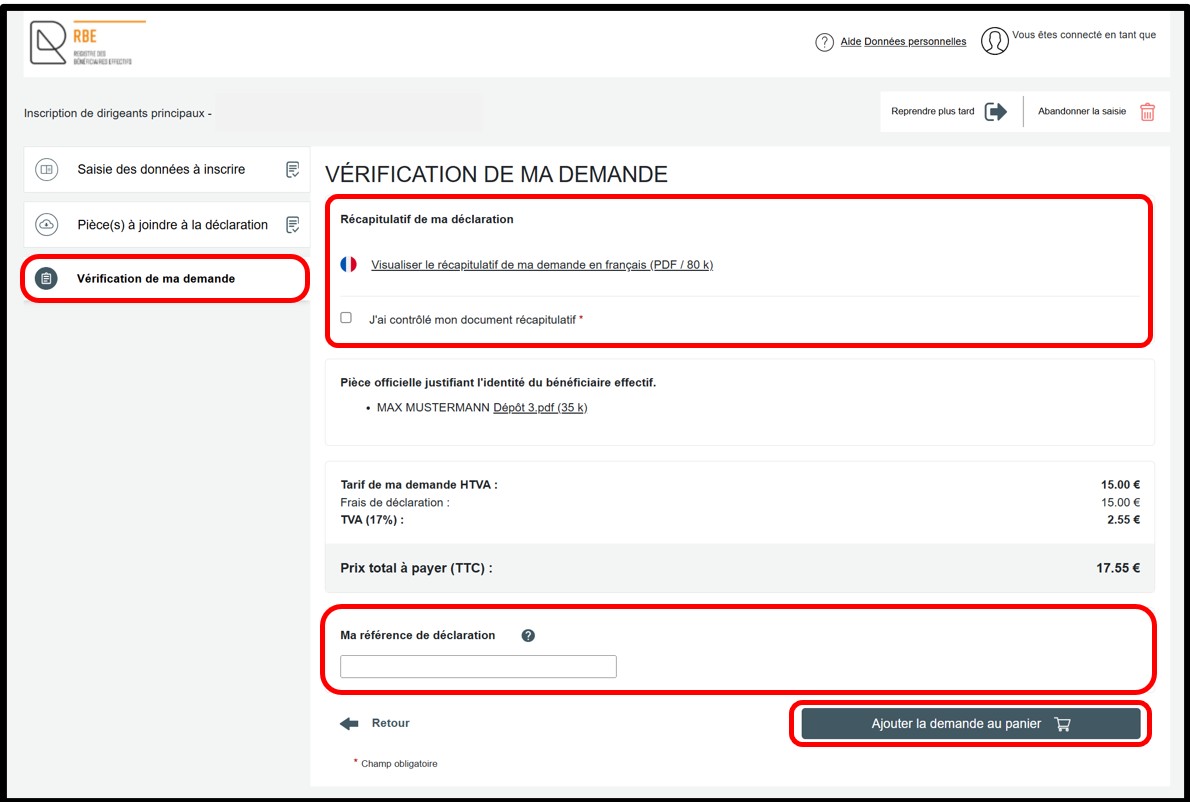
The Vérification de ma demande section displays a summary of the declaration to allow the user to check it before adding it to the basket. You can view the summary of your declaration in PDF format by clicking the Visualiser le récapitulatif de ma demande en français link. If you notice an error, you can return to the previous steps to access the relevant section or sub-section and correct the information.
If the information is correct, you must check the J’ai contrôlé mon document récapitulatif checkbox. You may also enter a free reference in the Ma référence de déclaration field in order to better organise your requests. To finalise your declaration, click the Ajouter la demande au panier button.
Senior managing officials
In the Saisie des données à inscrire section, you must first indicate whether the person to be declared has a Luxembourg national identification number.
- Select Oui if the person has a Luxembourg national identification number.
- Select Non if the person does not have one.
You can add an additional senior managing official by clicking the Ajouter un dirigeant principal option.
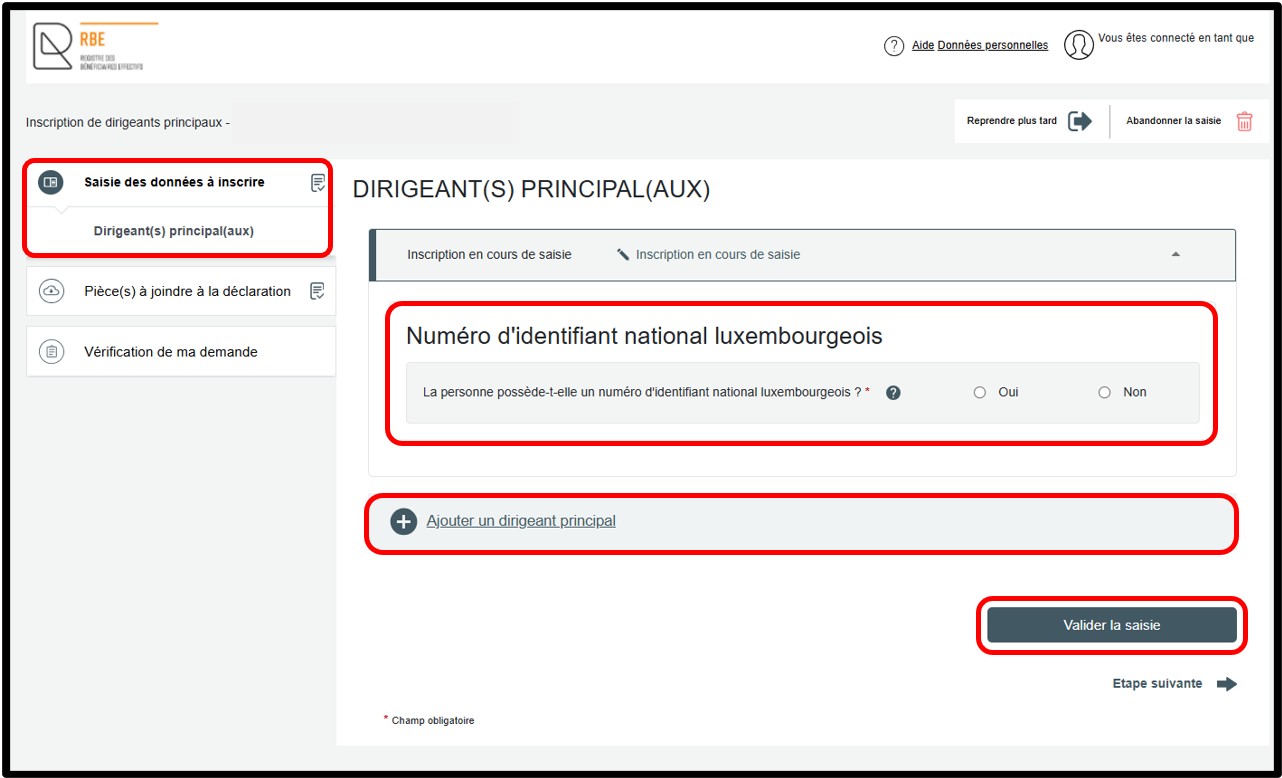
If you select the Oui option, the required input fields are displayed automatically. You must then complete the requested information in order to proceed with the declaration. Once all fields have been completed, click the Vérifier la saisie button. This action allows the entered data to be checked. Any errors or missing information are highlighted in red on the screen. These must be corrected before continuing.
After the data has been validated, you can access the next step by clicking on the Vérification de ma demande section. If the senior managing official has a Luxembourg national identification number, no supporting documents are required to finalise the declaration.
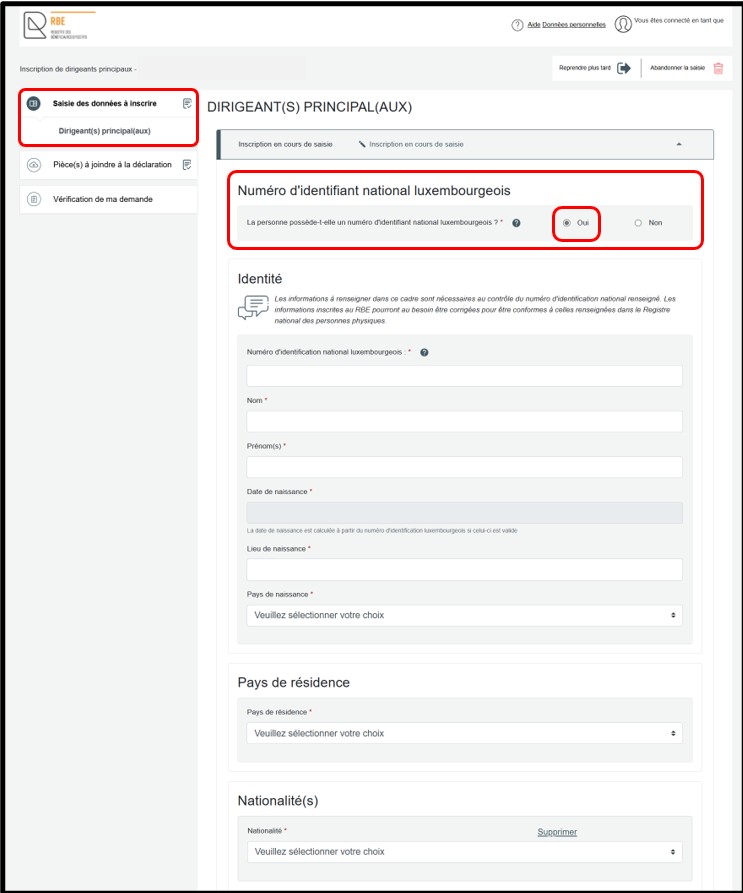
If you select the Non option, the required input fields are displayed automatically. You must then complete the requested information in order to proceed with the declaration. Once all fields have been completed, click the Vérifier la saisie button. This action allows the entered data to be checked. Any errors or missing information are highlighted in red on the screen. These must be corrected before continuing.
After the data has been validated, you move on to the next step by clicking on the Pièce(s) à joindre à la déclaration section.
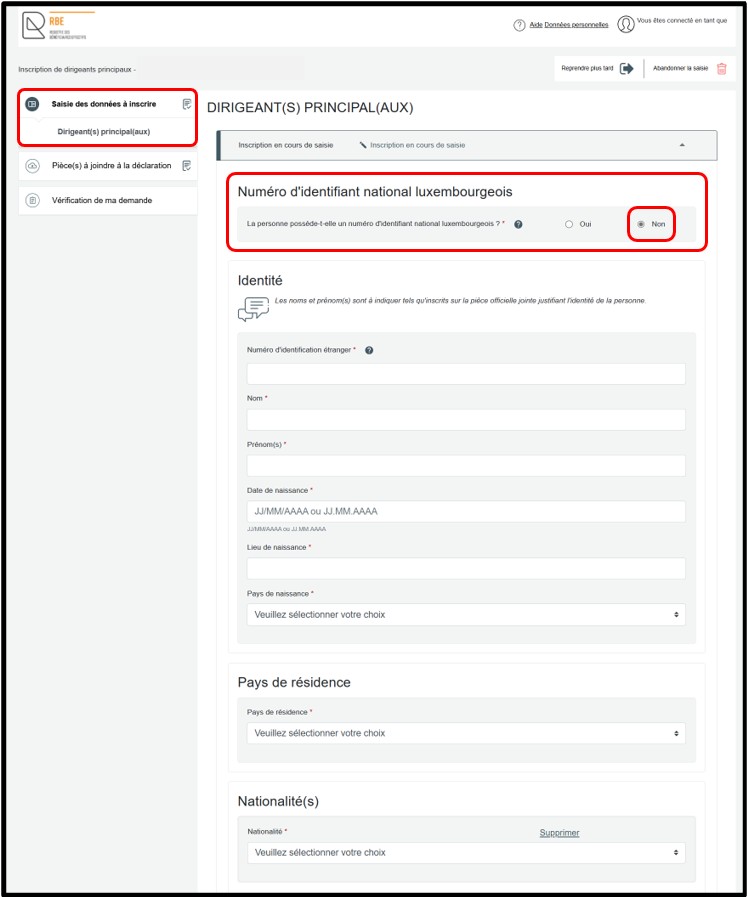
In the Pièce(s) à joindre à la déclaration section, you must attach the required supporting document in the Pièces justificatives field by clicking the Ajouter la pièce jointe button. The list of documents to be attached is proposed based on the information entered in the Saisie des données à inscrire section. To proceed with the declaration, then click the Aller à la mise au panier link.
The Vérification de ma demande section displays a summary of the declaration to allow the user to check it before adding it to the basket. You can view the summary of your declaration in PDF format by clicking the Visualiser le récapitulatif de ma demande en français link. If you notice an error, you can return to the previous steps to access the relevant section or sub-section and correct the information.
If the information is correct, you must check the J’ai contrôlé mon document récapitulatif checkbox. You may also enter a free reference in the Ma référence de déclaration field in order to better organise your requests. To finalise your declaration, click the Ajouter la demande au panier button.
Information to be registered with the RBE - Beneficial owners or senior managing officials
How to complete the field relating to the Luxembourg national identification number?
The Luxembourg national identification number must be registered with the RBE for beneficial owners / senior managing officials who have such a number. In this case, no documentary evidence needs to be provided.
How to complete the field relating to the foreign identification number?
The foreign identification number to be entered must correspond to the one appearing on the documentary evidence to be attached to the declaration.
Specific case 1: the beneficial owner / senior managing official has a foreign national identification number
- If a national identification number exists in the country, this number must be indicated on the declaration. It must also appear on the documentary evidence to be attached to the declaration. It should be noted that in this case, as long as the foreign national identification number has been entered in the declaration, there is no need to indicate the number of the identity document in the RBE declaration.
Specific case 2: the beneficial owner / senior managing official has an identity document number (in the absence of a national identification number)
- If there is no unique national identification number, the number to be given in the declaration to the RBE is the number of the identity document presented (e.g. passport number). Only this number will be accepted; any other number, even if it appears on the document presented, will be refused.
Likewise, when a document has different national identification numbers (e.g. tax identification number and national insurance number), the number of the identity document presented must be indicated. The document numbers accepted are those on the identity documents accepted as proof of the person's identity (Identity card - Passport - Residence/resident permit - Driving licence).
Important: In accordance with the update of Luxembourg national identification numbers assigned to natural persons registered with the RCS, reporting entities are required to ensure that the data declared is consistent. Where necessary, they are responsible for updating the foreign identification number previously provided without delay, in accordance with the regulatory provisions in force.
How to complete the fields relating to surname and first name(s)?
- For beneficial owners or senior managing officials with a Luxembourg national identification number, the information relating to the surname and first name(s) to be included on the form must correspond exactly to the information in the National Register of Natural Persons.
- For beneficial owners or senior managing officials who do not have a Luxembourg national identification number, the information to be provided must be consistent with the documentary evidence to be attached, enabling the identity of the person to be established. If the person has more than one first name, all of them must be indicated on the form. As regards the field relating to the name, the information should be entered as it appears on the official documentary evidence. Please note that characters such as quotation marks, commas or parentheses are not to be entered in these fields.
For further information, consult our FAQ - Luxembourg national identification number.
How to enter the nature and extent of the effective interests held?
The fields relating to the nature and extent of beneficial interests held are only provided if the beneficial owners who are natural persons have been identified. If senior managing officials are to be registered, these fields are not provided on the declaration form.
- Nature des intérêts effectifs (Nature of beneficial interests): The information to be entered in this field concerns only the nature of the interests held. These may include, for example, shares, equity interests, capital interests or voting rights.
- Étendue (Scope): The information to be disclosed specifically refers to the precise scope of the effective interests held. It is not sufficient to indicate "strictly greater than 25%". This may, for example, be a percentage or a proportion.
If an effective interest type needs to be added, the user is prompted to click on the Ajouter un type d’intérêt effectif (Add an effective interest type) option to open the fields for completion.