No beneficial owner is registered - RBE declaration not submitted
Explanation
No beneficial owner is currently registered for this entity. However, the entity is required to declare its beneficial owners within one month of its registration, which has not been done. You must therefore declare the information relating to your beneficial owners in order to bring the file into compliance and regularise the situation.
How can beneficial owners / senior managing officials be declared?
To declare beneficial owners / senior managing officials, you must submit a declaration of your beneficial owners to the RBE. This involves registering the persons who effectively hold the status of beneficial owner / senior managing officials for your entity and providing the required information in order to complete the file.
Reference documentation for identifiying beneficial owners
- How to identify benefical owners - Explanatory guide (Pdf, 943 Kb) (Pdf)
This guide helps you correctly identify the beneficial owners of your entity. It outlines the criteria to apply and the steps to follow to determine the persons concerned.
The information presented is standard and provided for guidance purposes only. Depending on the legal form of your entity, the documents to be provided or the steps to be followed may differ.
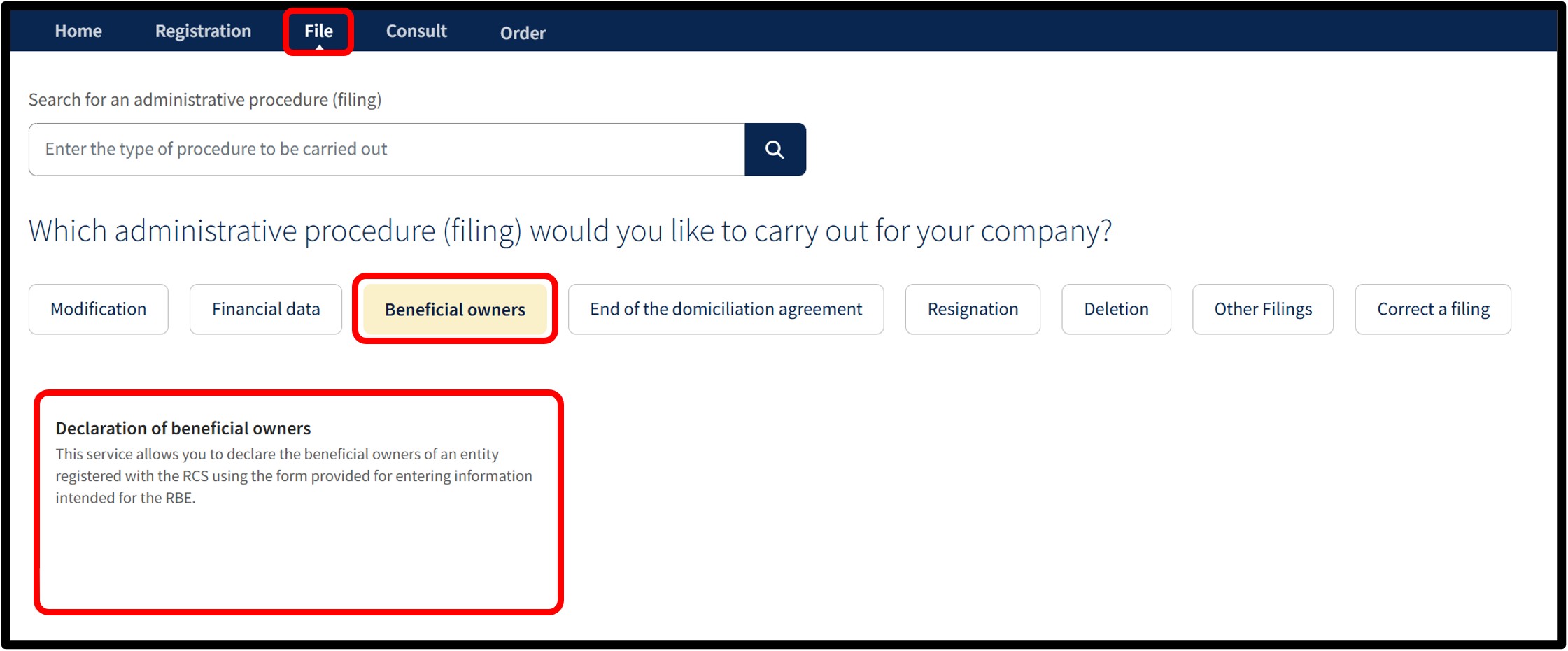
To declare the beneficial owners / senior managing officials of your entity with the RBE, select the Beneficial owners category, then choose the Declaration of beneficial owners service.
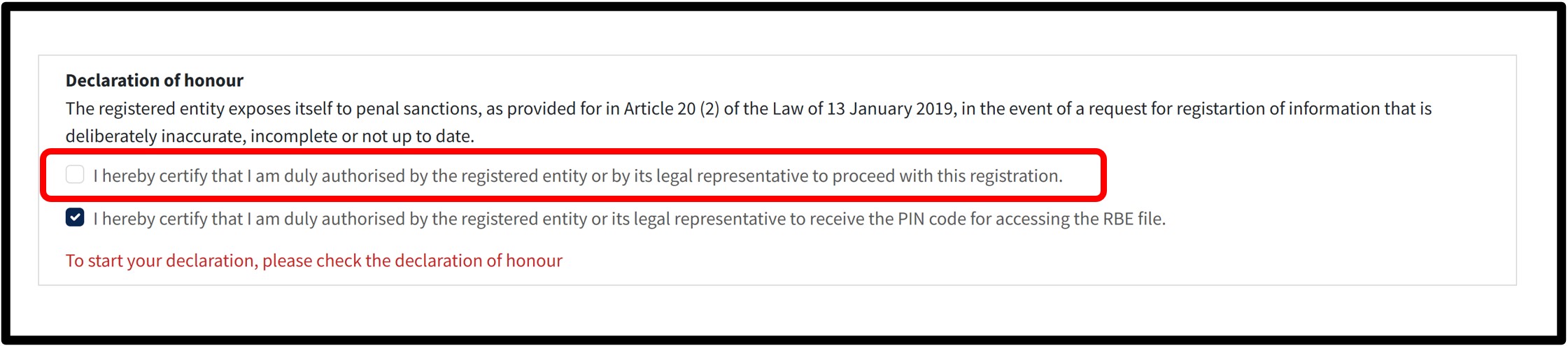
Once the service has been selected, you will access a screen on which you must check the box relating to the Declaration of honour in order to certify that you are duly authorised to submit the declaration.
If you do not check this box, you will not be able to continue with the beneficial owners declaration procedure.
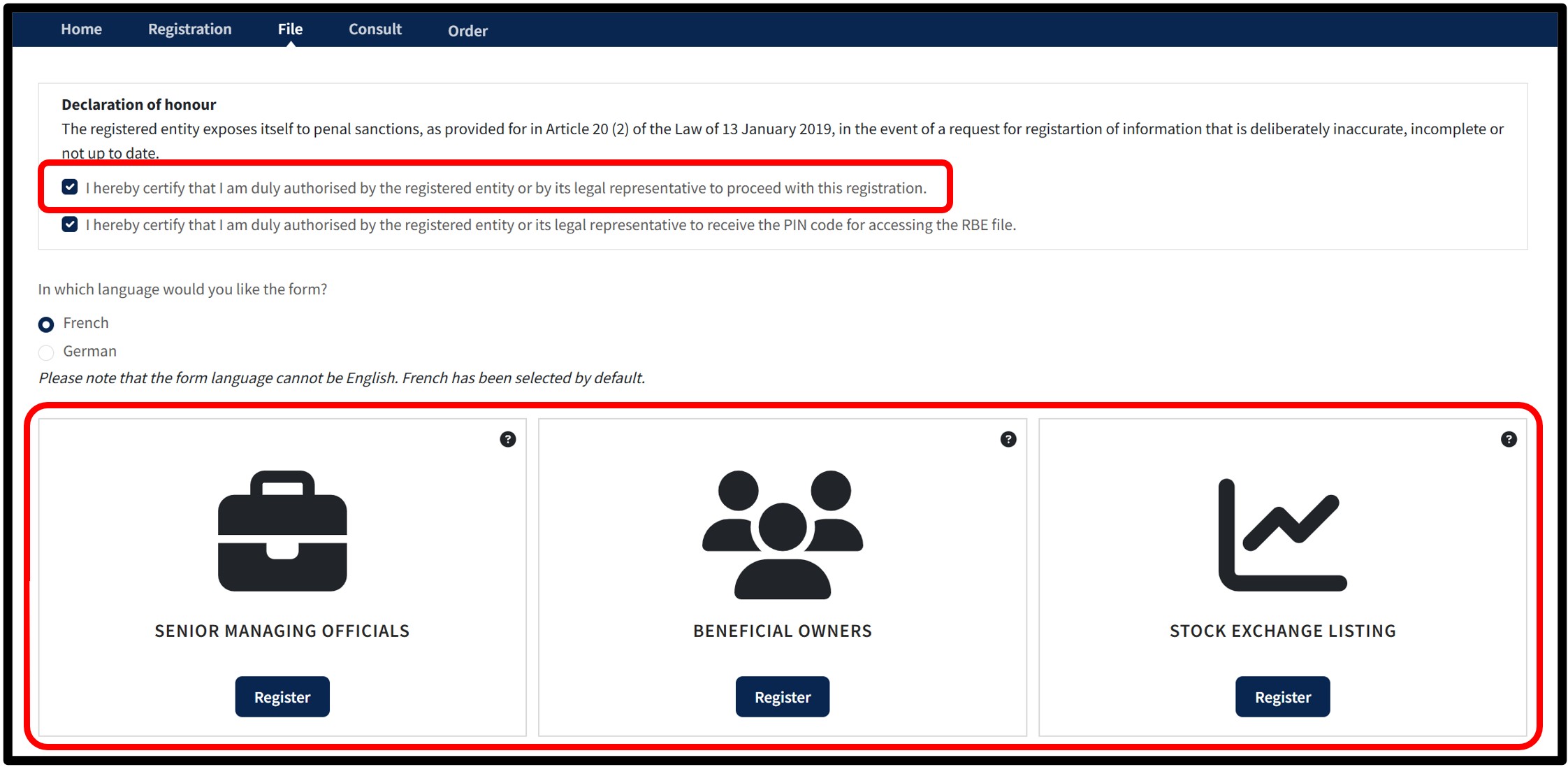
Once the Declaration of honour box has been checked, you must choose the language of the data entry form in order to continue with the declaration.
You then confirm the creation of your declaration by clicking on the Register button corresponding to the type of beneficial owners you wish to declare.
Before starting, it is your responsibility to determine who the beneficial owners (Pdf) of your entity are. These are always natural persons.
Three categories are available:
- Senior managing officials, where the beneficial owners cannot be identified;
- Beneficial owners, where they can be identified;
- Stock exchange listing, if your entity is listed on a stock exchange.
You may select only one type of beneficial owner. Once your choice has been made, you will be redirected to the corresponding form.
Important: please ensure that you have all the required information and, where necessary, the supporting documents before starting.
Declaration of beneficial owners / senior managing officials
Form: Additional information
Senior managing officials
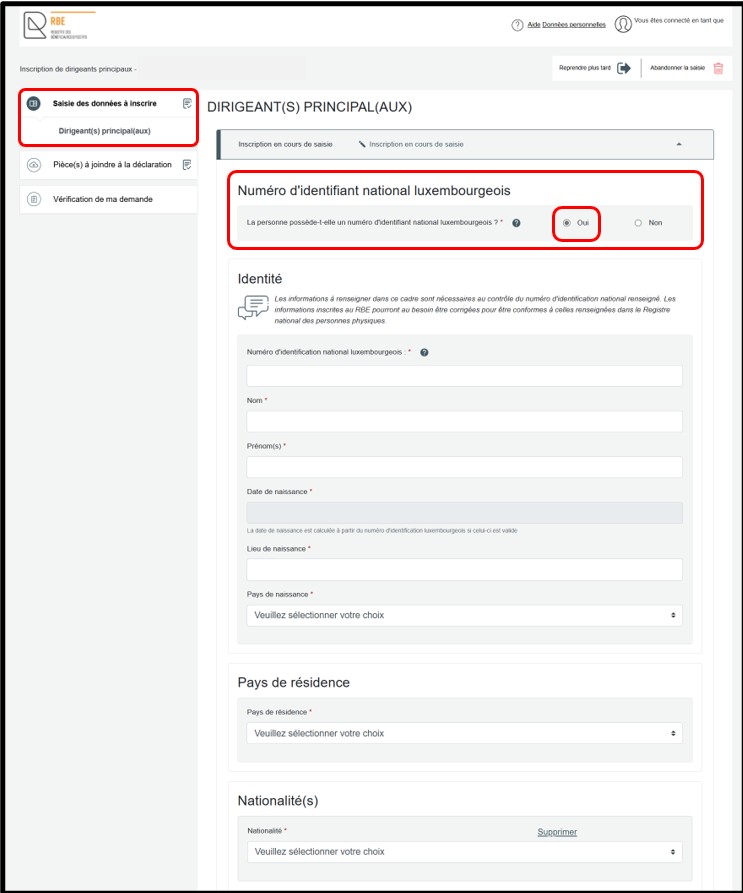
In the Saisie des données à inscrire section, you must first indicate whether the person to be declared has a Luxembourg national identification number.
- Select Oui if the person has a Luxembourg national identification number.
- Select Non if the person does not have one.
You can add an additional senior managing official by clicking the Ajouter un dirigeant principal option.
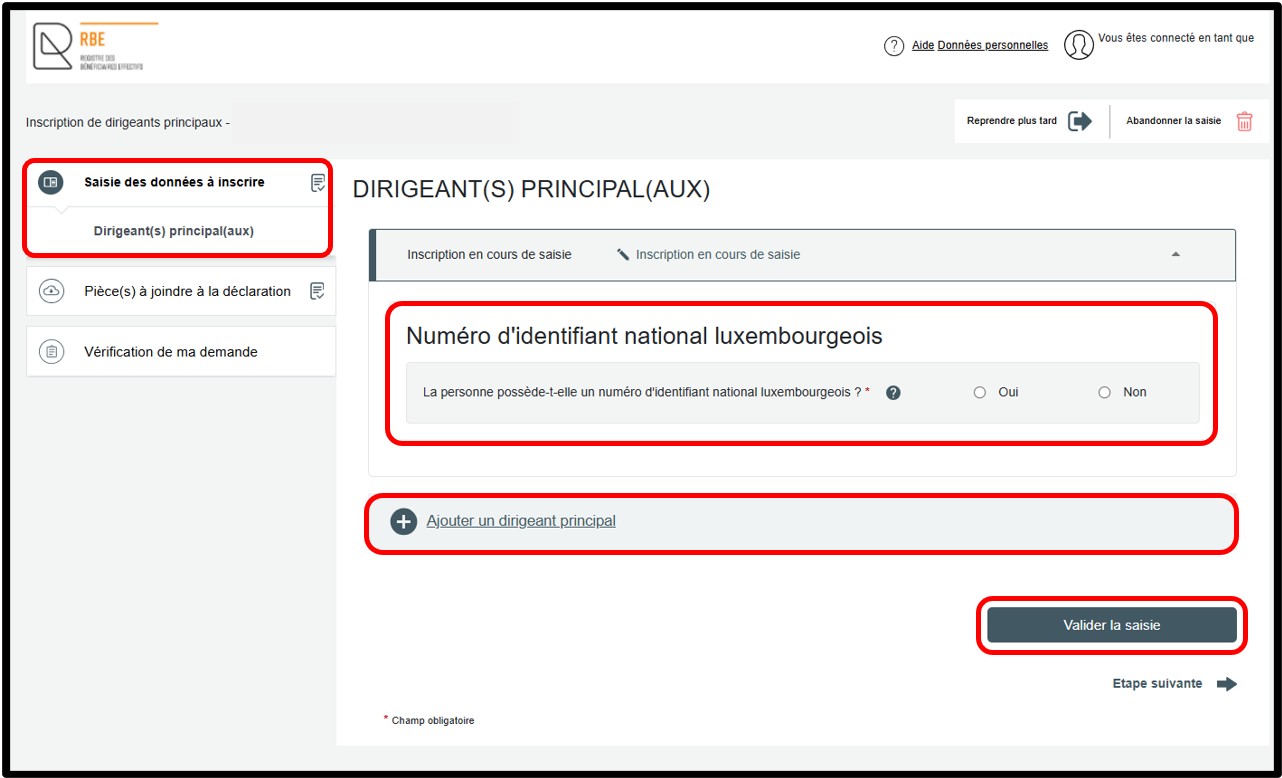
If you select the Oui option, the required input fields are displayed automatically. You must then complete the requested information in order to proceed with the declaration. Once all fields have been completed, click the Vérifier la saisie button. This action allows the entered data to be checked. Any errors or missing information are highlighted in red on the screen. These must be corrected before continuing.
After the data has been validated, you can access the next step by clicking on the Vérification de ma demande section. If the senior managing official has a Luxembourg national identification number, no supporting documents are required to finalise the declaration.
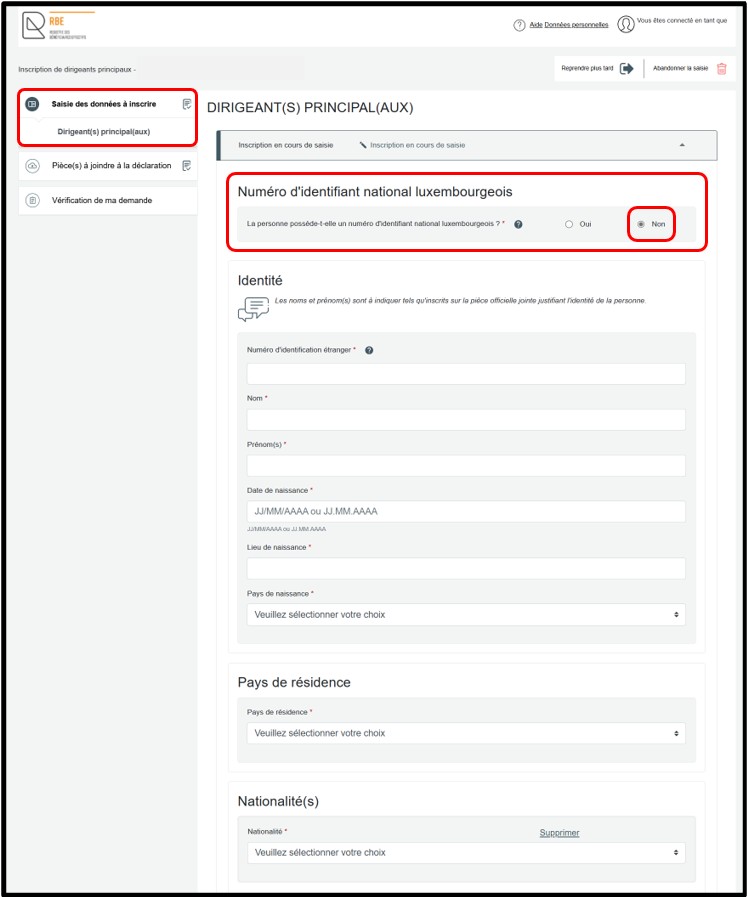
If you select the Non option, the required input fields are displayed automatically. You must then complete the requested information in order to proceed with the declaration. Once all fields have been completed, click the Vérifier la saisie button. This action allows the entered data to be checked. Any errors or missing information are highlighted in red on the screen. These must be corrected before continuing.
After the data has been validated, you move on to the next step by clicking on the Pièce(s) à joindre à la déclaration section.
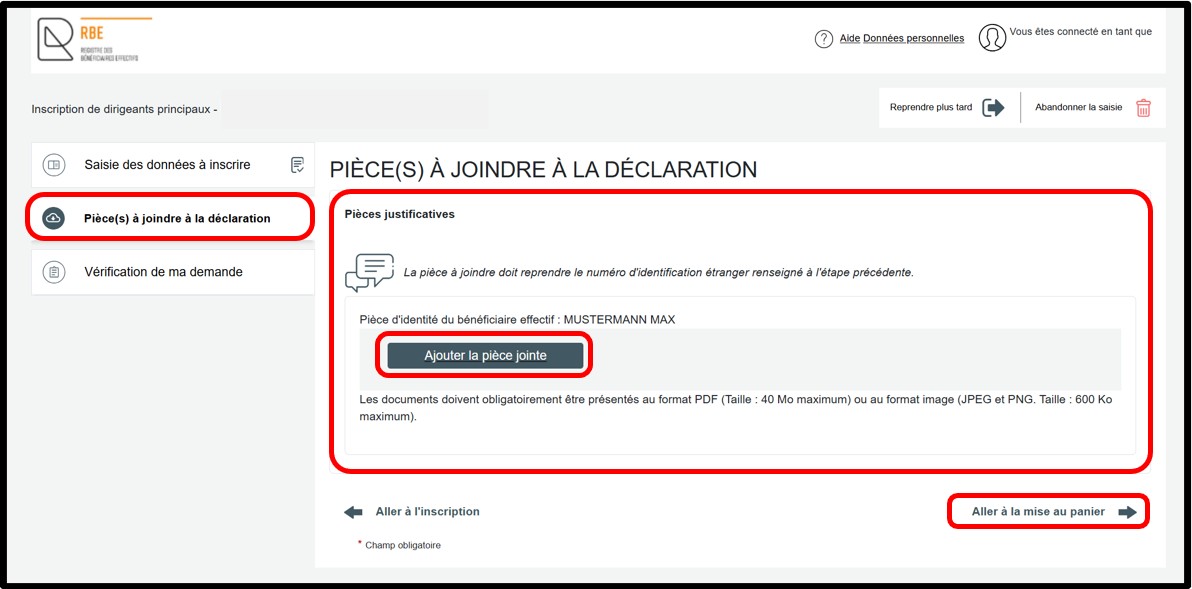
In the Pièce(s) à joindre à la déclaration section, you must attach the required supporting document in the Pièces justificatives field by clicking the Ajouter la pièce jointe button. The list of documents to be attached is proposed based on the information entered in the Saisie des données à inscrire section. To proceed with the declaration, then click the Aller à la mise au panier link.
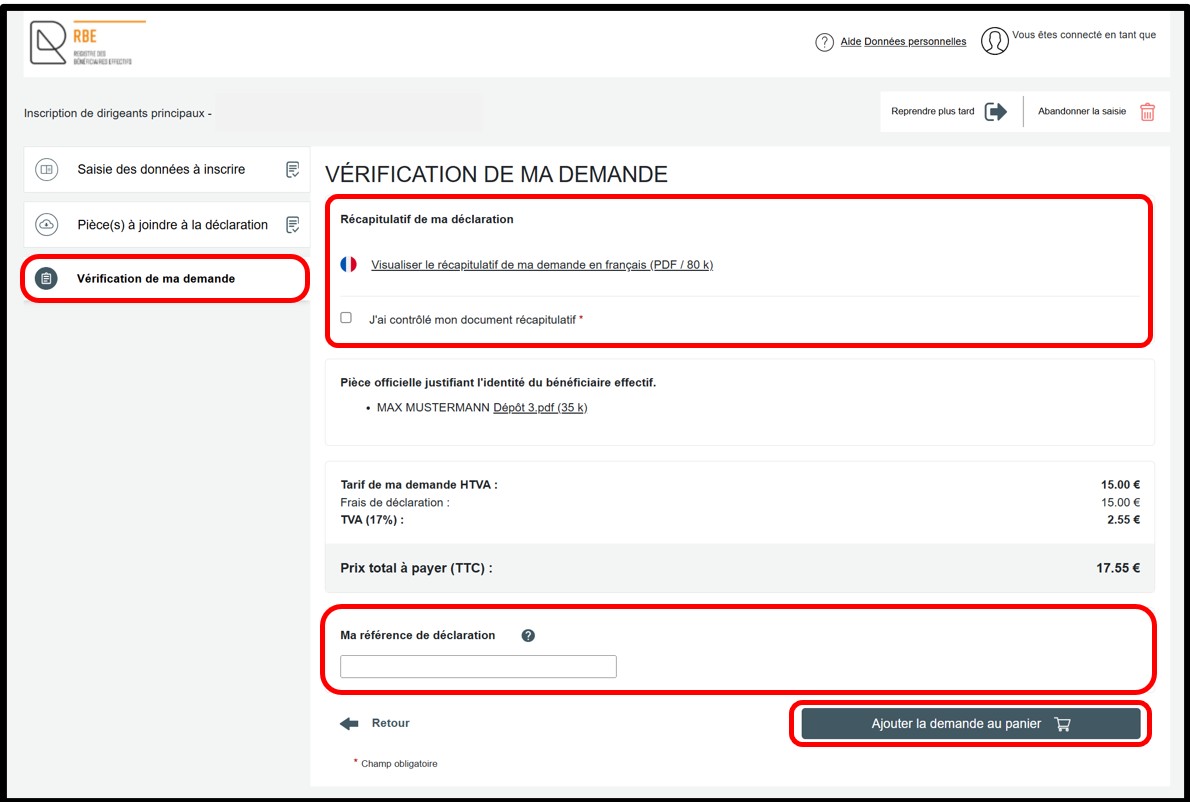
The Vérification de ma demande section displays a summary of the declaration to allow the user to check it before adding it to the basket. You can view the summary of your declaration in PDF format by clicking the Visualiser le récapitulatif de ma demande en français link. If you notice an error, you can return to the previous steps to access the relevant section or sub-section and correct the information.
If the information is correct, you must check the J’ai contrôlé mon document récapitulatif checkbox. You may also enter a free reference in the Ma référence de déclaration field in order to better organise your requests. To finalise your declaration, click the Ajouter la demande au panier button.
Beneficial owners
In the Saisie des données à inscrire section, you must first indicate whether the person to be declared has a Luxembourg national identification number.
- Select Oui if the person has a Luxembourg national identification number.
- Select Non if the person does not have one.
You can add an additional beneficial owner by clicking the Ajouter un beneficiaire effectif option.
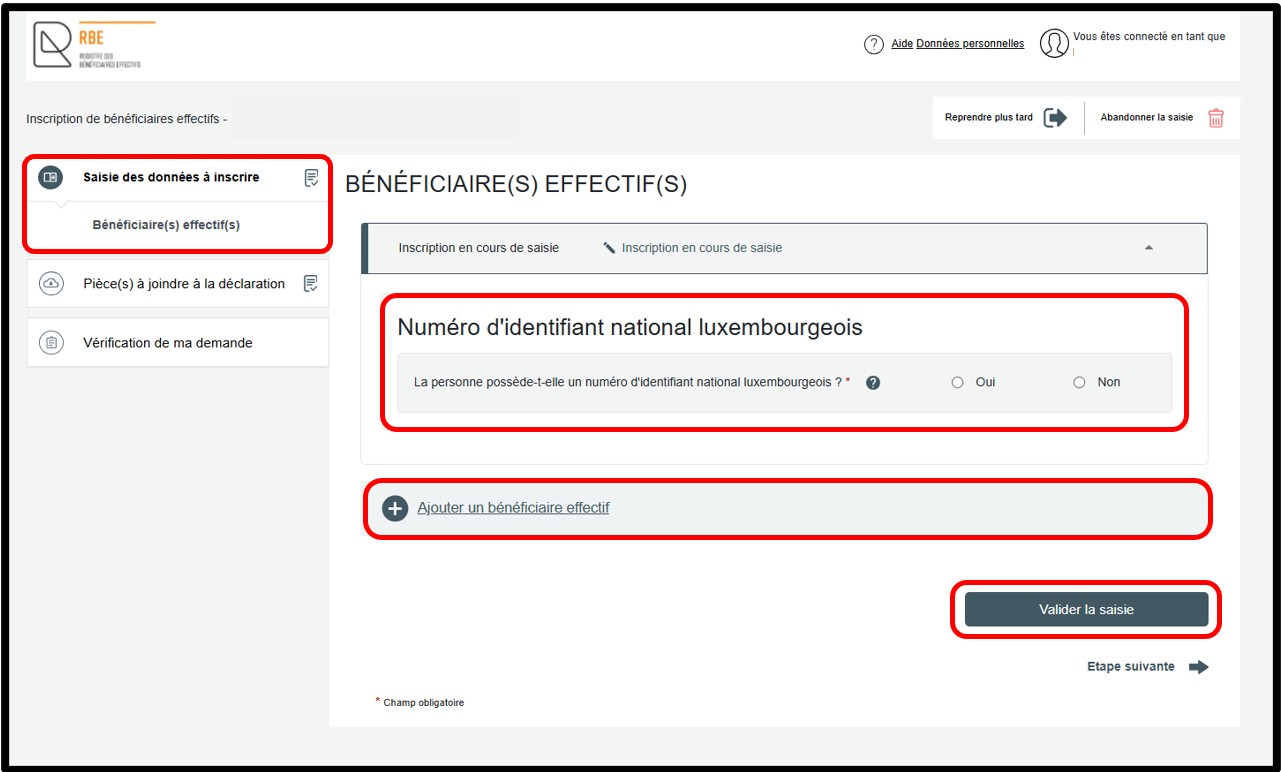
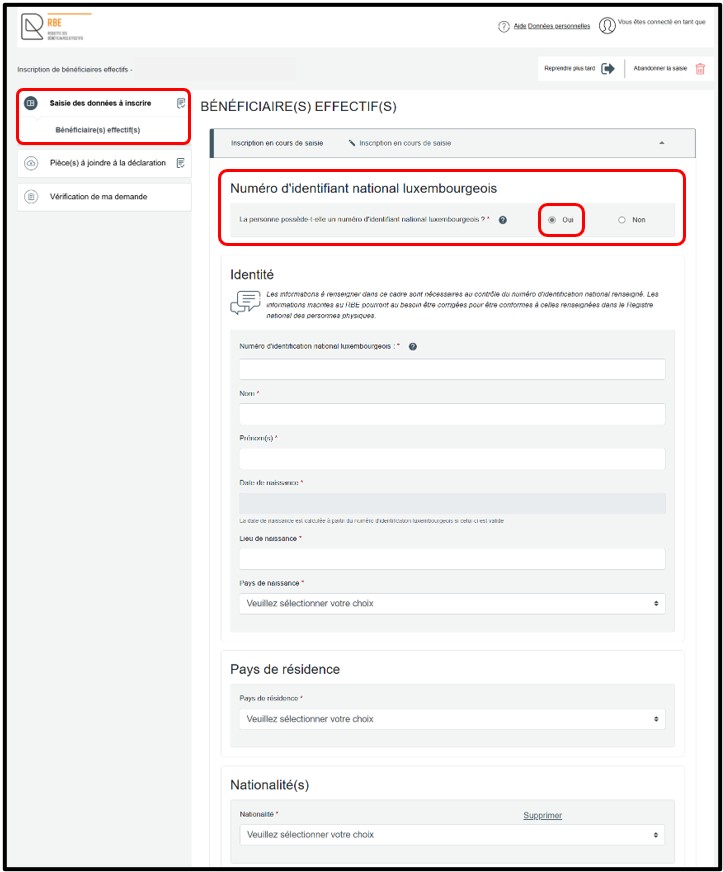
If you select the Oui option, the required input fields are displayed automatically. You must then complete the requested information in order to proceed with the declaration. Once all fields have been completed, click the Vérifier la saisie button. This action allows the entered data to be checked. Any errors or missing information are highlighted in red on the screen. These must be corrected before continuing.
After the data has been validated, you can access the next step by clicking on the Vérification de ma demande section. If the beneficial owner has a Luxembourg national identification number, no supporting documents are required to finalise the declaration.
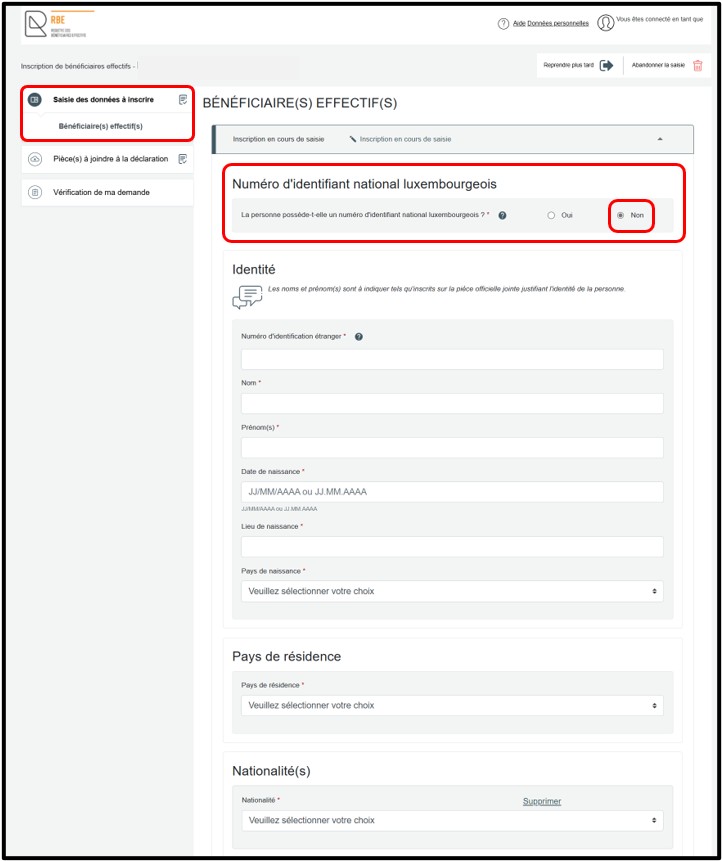
If you select the Non option, the required input fields are displayed automatically. You must then complete the requested information in order to proceed with the declaration. Once all fields have been completed, click the Vérifier la saisie button. This action allows the entered data to be checked. Any errors or missing information are highlighted in red on the screen. These must be corrected before continuing.
After the data has been validated, you move on to the next step by clicking on the Pièce(s) à joindre à la déclaration section.
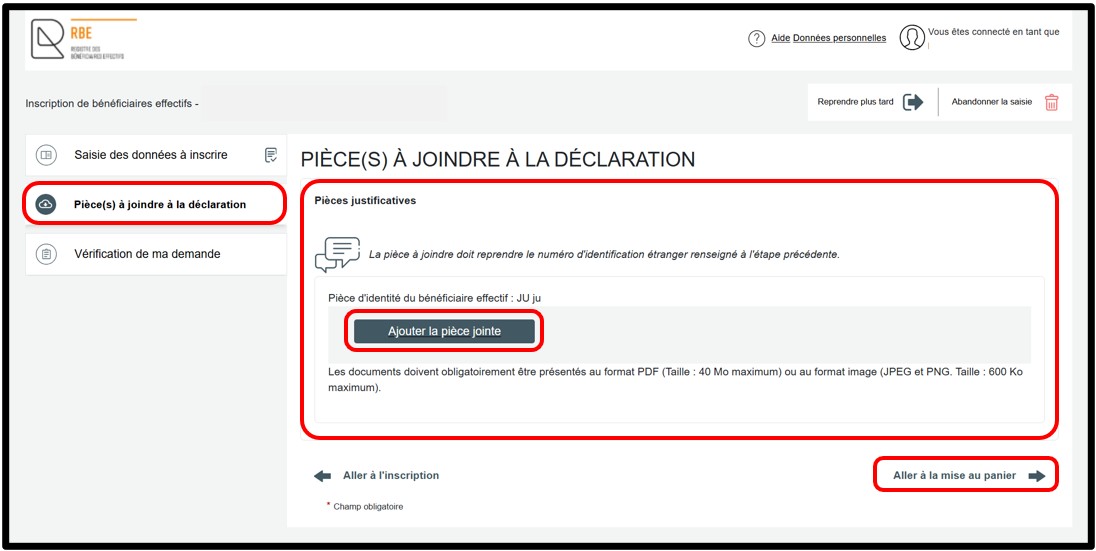
In the Pièce(s) à joindre à la déclaration section, you must attach the required supporting document in the Pièces justificatives field by clicking the Ajouter la pièce jointe button. The list of documents to be attached is proposed based on the information entered in the Saisie des données à inscrire section. To proceed with the declaration, then click the Aller à la mise au panier link.
The Vérification de ma demande section displays a summary of the declaration to allow the user to check it before adding it to the basket. You can view the summary of your declaration in PDF format by clicking the Visualiser le récapitulatif de ma demande en français link. If you notice an error, you can return to the previous steps to access the relevant section or sub-section and correct the information.
If the information is correct, you must check the J’ai contrôlé mon document récapitulatif checkbox. You may also enter a free reference in the Ma référence de déclaration field in order to better organise your requests. To finalise your declaration, click the Ajouter la demande au panier button.
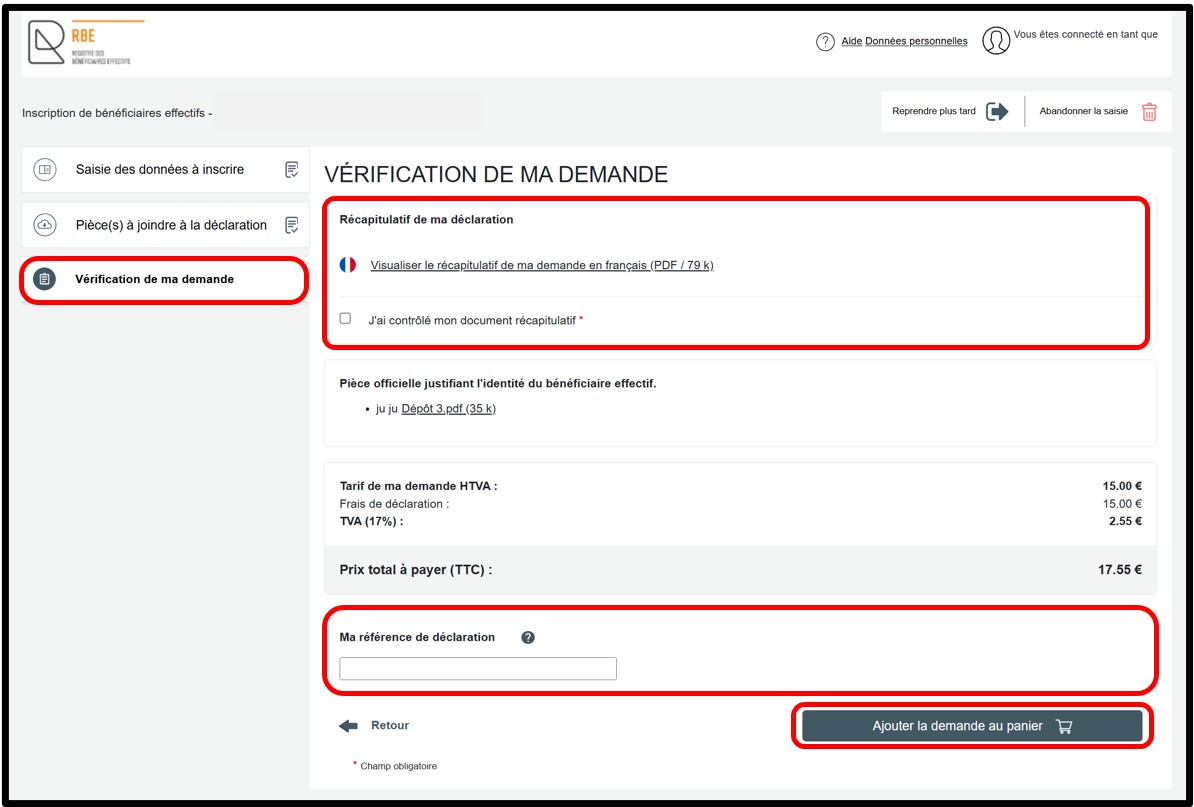
Stock exchange listing
In the Saisie des données à inscrire section, you must complete the following fields:
- Système de cotation, and
- Pays de cotation.
Once all fields have been completed, click the Vérifier la saisie button. This action allows the entered data to be checked. Any errors or missing information are highlighted in red on the screen and must be corrected before continuing. After the data has been validated, you move on to the next step by clicking on the Pièce(s) à joindre à la déclaration section.
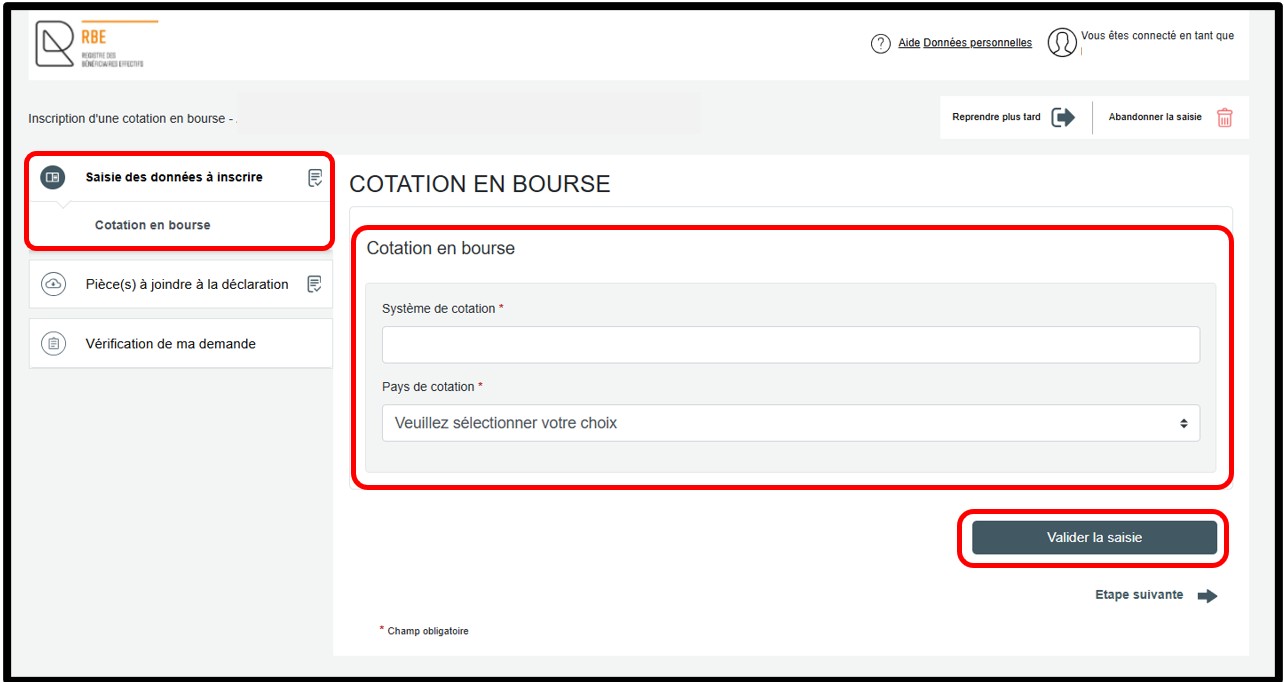
In the Pièce(s) à joindre à la déclaration section, you must attach the required certificate in the Documents attestant que la société est cotée en bourse field by clicking the Ajouter la pièce jointe button. To proceed with the declaration, then click the Aller à la mise au panier link.
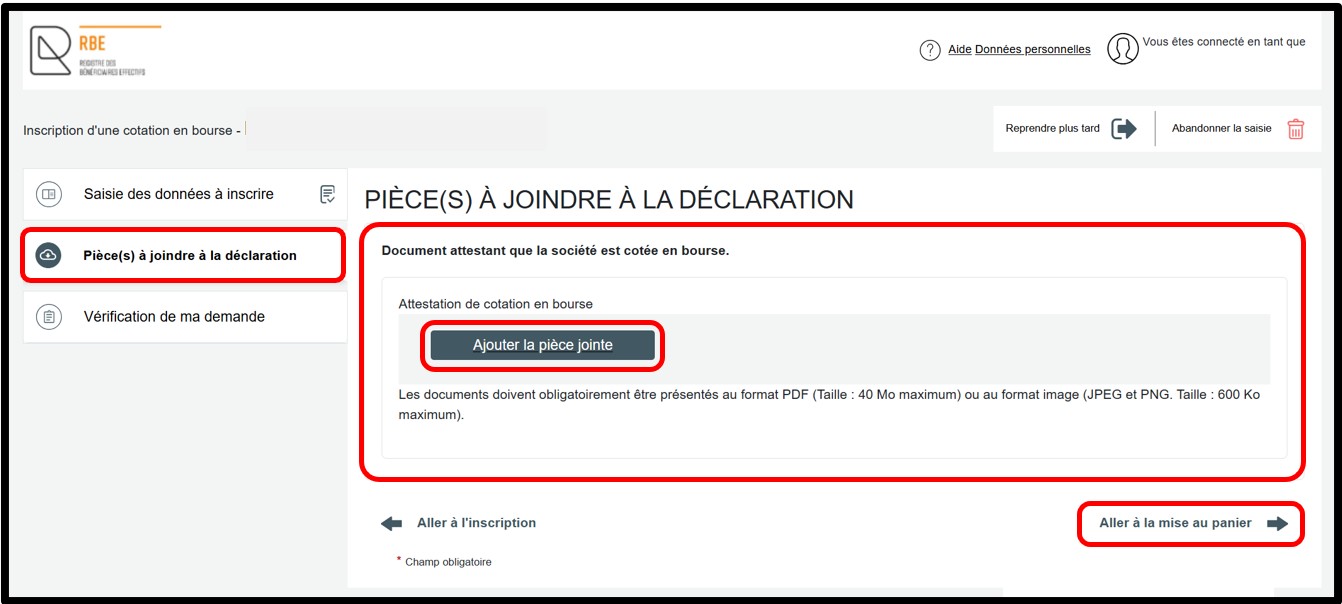
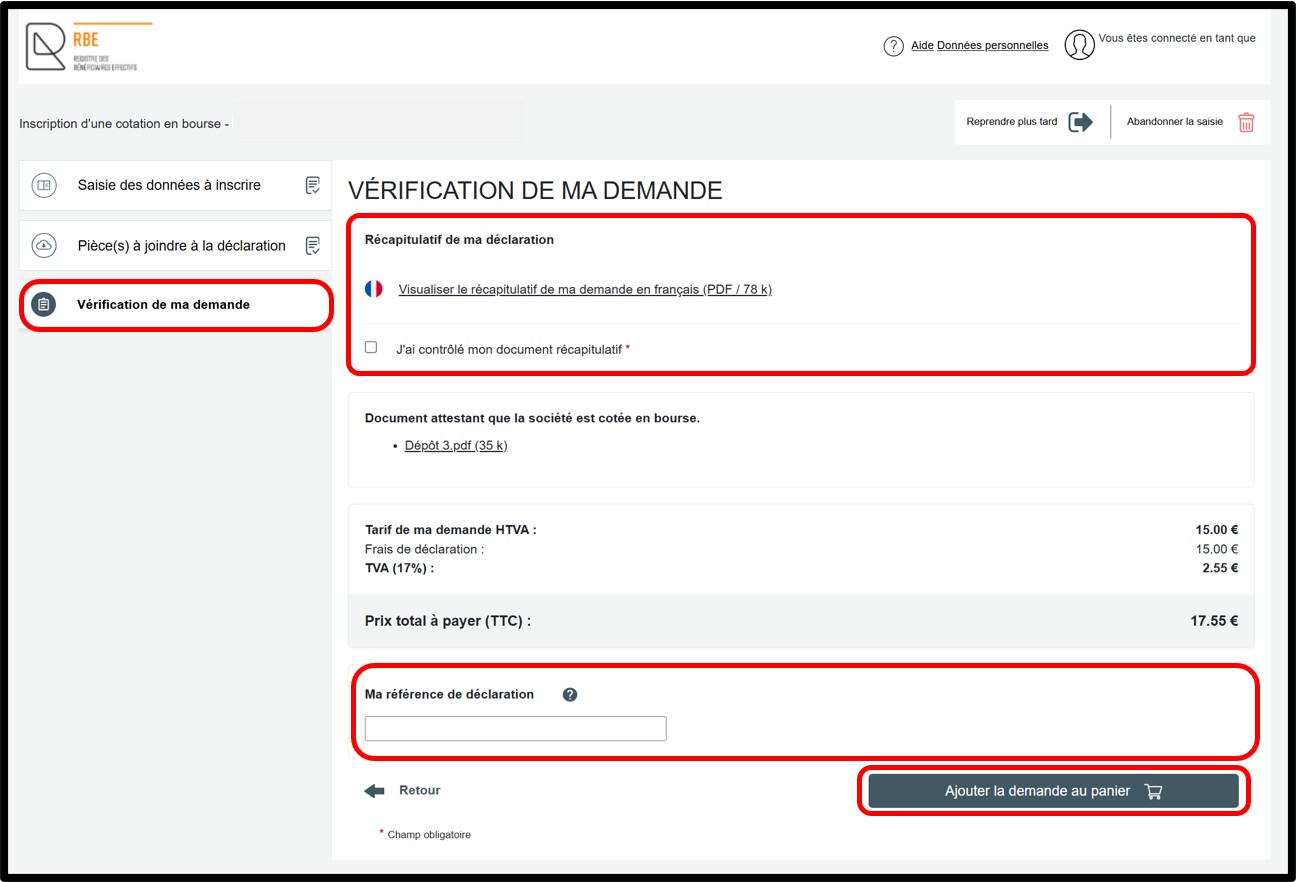
The Vérification de ma demande section displays a summary of the declaration to allow the user to check it before adding it to the basket. You can view the summary of your declaration in PDF format by clicking the Visualiser le récapitulatif de ma demande en français link. If you notice an error, you can return to the previous steps to access the relevant section or sub-section and correct the information.
If the information is correct, you must check the J’ai contrôlé mon document récapitulatif checkbox. You may also enter a free reference in the Ma référence de déclaration field in order to better organise your requests. To finalise your declaration, click the Ajouter la demande au panier button.
Information to be registered with the RBE - Beneficial owners or senior managing officials
How to complete the field relating to the Luxembourg national identification number?
The Luxembourg national identification number must be registered with the RBE for beneficial owners / senior managing officials who have such a number. In this case, no documentary evidence needs to be provided.
How to complete the field relating to the foreign identification number?
The foreign identification number to be entered must correspond to the one appearing on the documentary evidence to be attached to the declaration.
Specific case 1: the beneficial owner / senior managing official has a foreign national identification number
- If a national identification number exists in the country, this number must be indicated on the declaration. It must also appear on the documentary evidence to be attached to the declaration. It should be noted that in this case, as long as the foreign national identification number has been entered in the declaration, there is no need to indicate the number of the identity document in the RBE declaration.
Specific case 2: the beneficial owner / senior managing official has an identity document number (in the absence of a national identification number)
- If there is no unique national identification number, the number to be given in the declaration to the RBE is the number of the identity document presented (e.g. passport number). Only this number will be accepted; any other number, even if it appears on the document presented, will be refused.
Likewise, when a document has different national identification numbers (e.g. tax identification number and national insurance number), the number of the identity document presented must be indicated. The document numbers accepted are those on the identity documents accepted as proof of the person's identity (Identity card - Passport - Residence/resident permit - Driving licence).
Important: In accordance with the update of Luxembourg national identification numbers assigned to natural persons registered with the RCS, reporting entities are required to ensure that the data declared is consistent. Where necessary, they are responsible for updating the foreign identification number previously provided without delay, in accordance with the regulatory provisions in force.
How to complete the fields relating to surname and first name(s)?
- For beneficial owners or senior managing officials with a Luxembourg national identification number, the information relating to the surname and first name(s) to be included on the form must correspond exactly to the information in the National Register of Natural Persons.
- For beneficial owners or senior managing officials who do not have a Luxembourg national identification number, the information to be provided must be consistent with the documentary evidence to be attached, enabling the identity of the person to be established. If the person has more than one first name, all of them must be indicated on the form. As regards the field relating to the name, the information should be entered as it appears on the official documentary evidence. Please note that characters such as quotation marks, commas or parentheses are not to be entered in these fields.
For further information, consult our FAQ - Luxembourg national identification number.
How to complete the field relating to nationality?
The nationality of the beneficial owner / senior managing official to be registered must be selected from a drop-down list on the form. If the person has multiple nationalities, all of them must be registered with the RBE. To do this, the user is asked to click on the Ajouter une nouvelle nationalité (Add a new nationality) option and select it from the drop-down list.
If the person has a Luxembourg national identification number, the information to be communicated to the RBE must be in accordance with the entries in the National Register of Natural Persons.
How to complete the fields relating to date and place of birth?
The date of birth (day, month and year) and place of birth (town and country) must be registered with the RBE and must be consistent with:
- The information contained in the National Registry of Natural Persons, if the person has a Luxembourg national identification number.
- The information contained in the attached documentary evidence, for persons who do not have a Luxembourg national identification number.
Please note that if the person to be registered has a Luxembourg national identification number, the date of birth will be automatically generated in the field provided for this purpose.
How to complete the field relating to country of residence?
The country of residence of the beneficial owner / senior managing official to be registered must be selected from a drop-down list provided on the form.
How to enter the exact address, private or professional?
The professional address or private address of the beneficial owner / senior managing official is to be entered. The full address must be provided. The street name must be written in full, i.e. including terms such as street, avenue, boulevard, etc.
Please note that for Luxembourg addresses, the information provided to the RBE concerning the locality, street and building number must be consistent with the data in the national register of localities and streets. An automatic address check is carried out directly on the declaration form to be completed by the applicant. The National Register of Localities and Streets can be consulted here. No documentary evidence of the address needs to be attached.
How to enter the nature and extent of the effective interests held?
The fields relating to the nature and extent of beneficial interests held are only provided if the beneficial owners who are natural persons have been identified. If senior managing officials are to be registered, these fields are not provided on the declaration form.
- Nature des intérêts effectifs (Nature of beneficial interests): The information to be entered in this field concerns only the nature of the interests held. These may include, for example, shares, equity interests, capital interests or voting rights.
- Étendue (Scope): The information to be disclosed specifically refers to the precise scope of the effective interests held. It is not sufficient to indicate "strictly greater than 25%". This may, for example, be a percentage or a proportion.
If an effective interest type needs to be added, the user is prompted to click on the Ajouter un type d’intérêt effectif (Add an effective interest type) option to open the fields for completion.
Concerning the fields relating to the restriction of access to consultation (only for beneficial owners)
These fields are only accessible if beneficial owners have been identified. If the option to restrict access to consultation is selected, the sections Motif(s) (Reason(s)) and Durée du risque (en mois) (Duration of risk (in months)) – limited to 36 months – appear on the page. The request to restrict access has to be sent to the LBR administrator at the same time as the declaration of beneficial owners.
The user must check the risk(s) incurred by the beneficial owner concerned, attach documentary evidence justifying the request, and indicate the preferred duration of the restriction (in months).
Concerning the field relating to the function (only for certain senior managing officials)
In principle, this field should not be completed. It is provided to enable certain senior managing officials to specify the particular nature of their function. This is the case for legal representatives (e.g. provisional board members) or liquidators. When this field is completed in the form, a systematic consistency check is carried out against the data entered in the RCS. The function entered in the RBE must correspond to that entered in the RCS.
Regarding stock exchange listing
When the registered entity itself is a listed company, it is only required to enter in the RBE the name of the regulated market on which its securities are admitted to trading, as well as the country. A supporting document must be provided at the time of registration with the RBE. This exemption applies only in this specific situation and does not apply where the listed company is an associate of the registered entity and not the registered entity itself.