No board member is registered
Explanation
No board member are currently registered for this entity. However, at least two board members must be appointed in order to represent and bind the entity. You must therefore complete the information relating to the persons authorised to bind the entity by registering at least two board members.
How to register board members?
To register a board member, you must submit a modification filing with the RCS. This consists of completing the list of persons authorised to bind the entity by adding at least two board members who effectively have this authority.
The information presented is standard and provided for guidance purposes only. Depending on the legal form of your entity, the documents to be provided or the steps to be followed may differ.
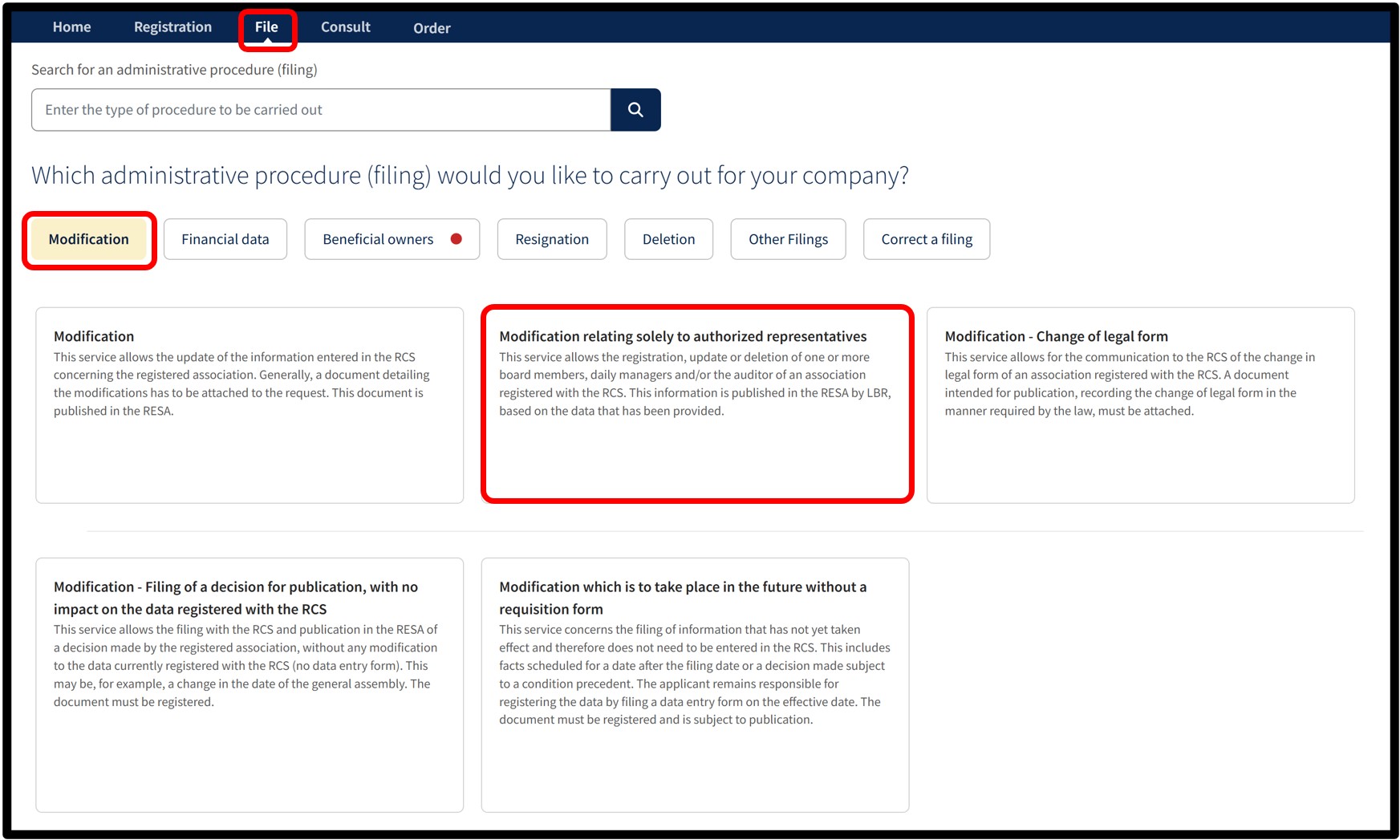
After selecting the service Modification relating solely to authorized representatives, you will access a screen where you must choose the language of the form.
For this type of filing, publication in the RESA is generated automatically by the manager of the RCS based on the information provided in your application.
Once the language has been selected, click on Next. You will then be redirected to the data entry form to complete the amendment.
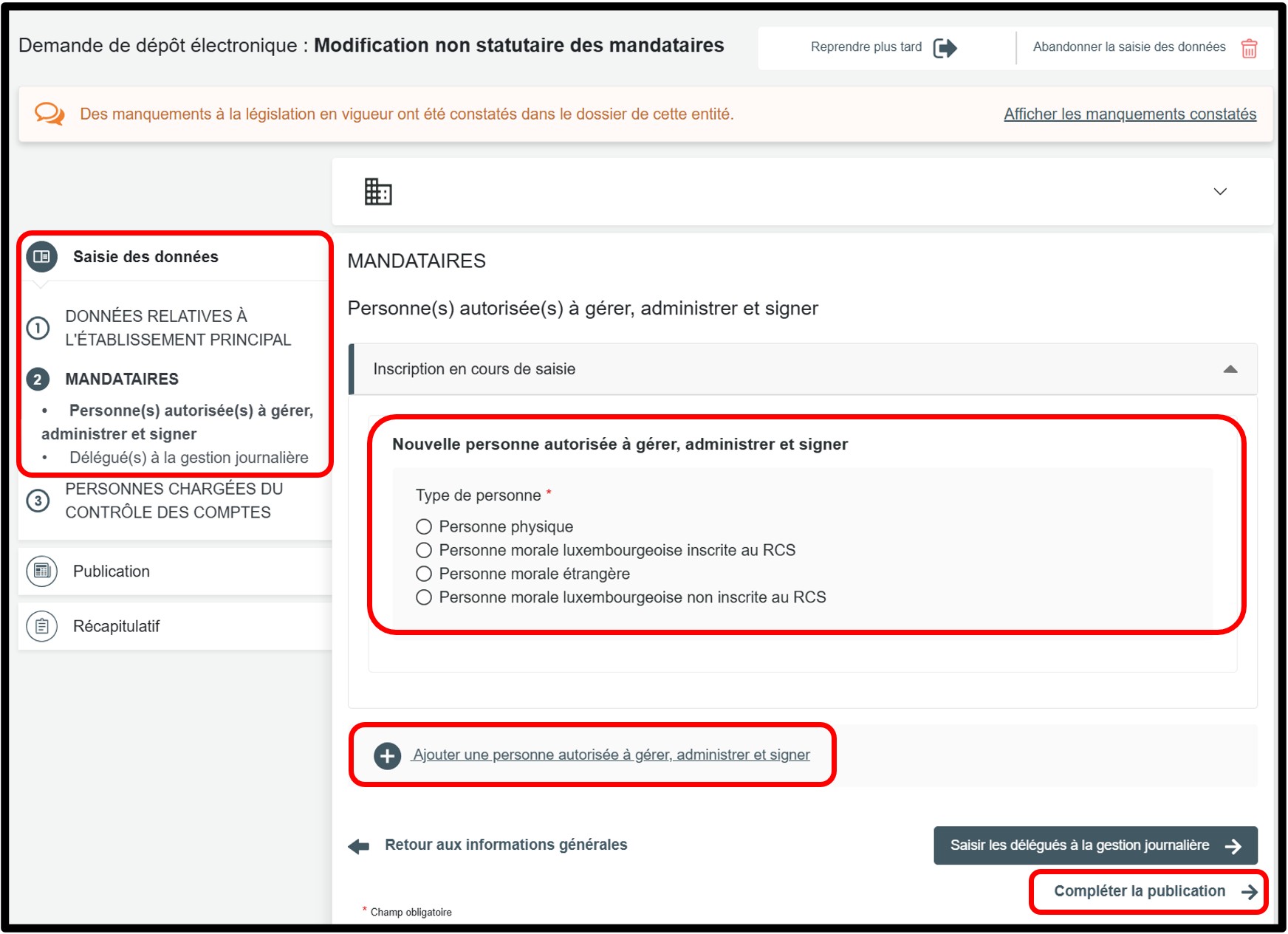
In the part Saisie des données, select the section Mandataires to access the information to be updated.
To add an additional board member, click the Ajouter une personne autorisée à gérer, administrer et signer option.
Depending on the type of person authorised to manage, administer and sign, the entity must select one of the following options and provide the corresponding information:
Scenario: Personne physique (Natural person)
- Luxembourg national identification number
- Surname(s) and first name(s)
- Date, place and country of birth
- Private or professional address
- Type of mandate, including an indication of the nature and scope of the powers
- Term of office, including the date of appointment
Scenario: Personne morale luxembourgeoise immatriculée au RCS (Luxembourg legal entity registered with theRCS)
- Registration number with RCS
- Type of mandate, including an indication of the nature and scope of the powers
- Term of office, including the date of appointment
Scenario: Personne morale étrangère (Foreign legal entity)
- Country of registration of the legal entity
- Trade name or company name
- Legal form (if applicable)
- Registration number in the relevant register, if the legislation of the State to which the legal entity is subject provides for such a number, as well as the name of the register, where applicable
- Private or professional address
- Type of mandate, including an indication of the nature and scope of the powers
- Term of office, including the date of appointment
Scenario: Personne morale luxembourgeoise non inscrite au RCS (Luxembourg legal entity not registered with the RCS)
- Trade name or company name
- Legal form (if applicable)
- Private or professional address
- Type of mandate, including an indication of the nature and scope of the powers
- Term of office, including the date of appointment
- Permanent representative (if applicable)
Once all information has been completed, click on Compléter la publication to proceed to the next step.
Form: Additional information
Publication
When using this procedure, there is no need to create and attach a document for publication. As an administrative simplification, publication in the RESA for this type of filing is generated automatically by the manager of the RCS based on the information provided in your application. Once this step has been completed, click on the Récapitulatif section to proceed to the next step.
Récapitulatif
Section of the request where you can check the summary of your request before sending it to the cart. To do this, click on Visualiser le récapitulatif de ma demande en français to open the PDF document. If you spot an error, you can go back using the previous step button to the section where the information has to be corrected.
If all the information is correct, check the box J’ai contrôlé mon document récapitulatif. You can also add a personal reference in the field Ma référence de dépôt to better organise your requests. Once you have finished verifying, click on Ajouter la demande au panier to confirm your procedure.