The term of office of the permanent representative(s) of the subsidiary(ies) of a Luxembourg company has expired
Explanation
The term of office of one or more permanent representatives of the subsidiary or subsidiaries has expired. If a permanent representative is no longer in office, you must delete them from your list of authorized representatives and, where applicable, register a new authorized representative. If the person is still in office, you simply need to renew their mandate. Updating this information ensures that your entity’s situation is correctly reflected.
How can the term of office of the permanent representatives of the subsidiary be corrected?
To update this information, you must submit a modification filing with the RCS. Two situations may arise:
- The term of office has expired and has not been renewed: in this case, you must delete the authorized representative from the list, as they are no longer in office.
- The term of office has expired but the authorized representative remains in office: in this case, it is sufficient to update the information by amending the duration of their term of office.
These adjustments help ensure that the list of authorized representatives remains accurate and up to date.
The information presented is standard and provided for guidance purposes only. Depending on the legal form of your entity, the documents to be provided or the steps to be followed may differ.
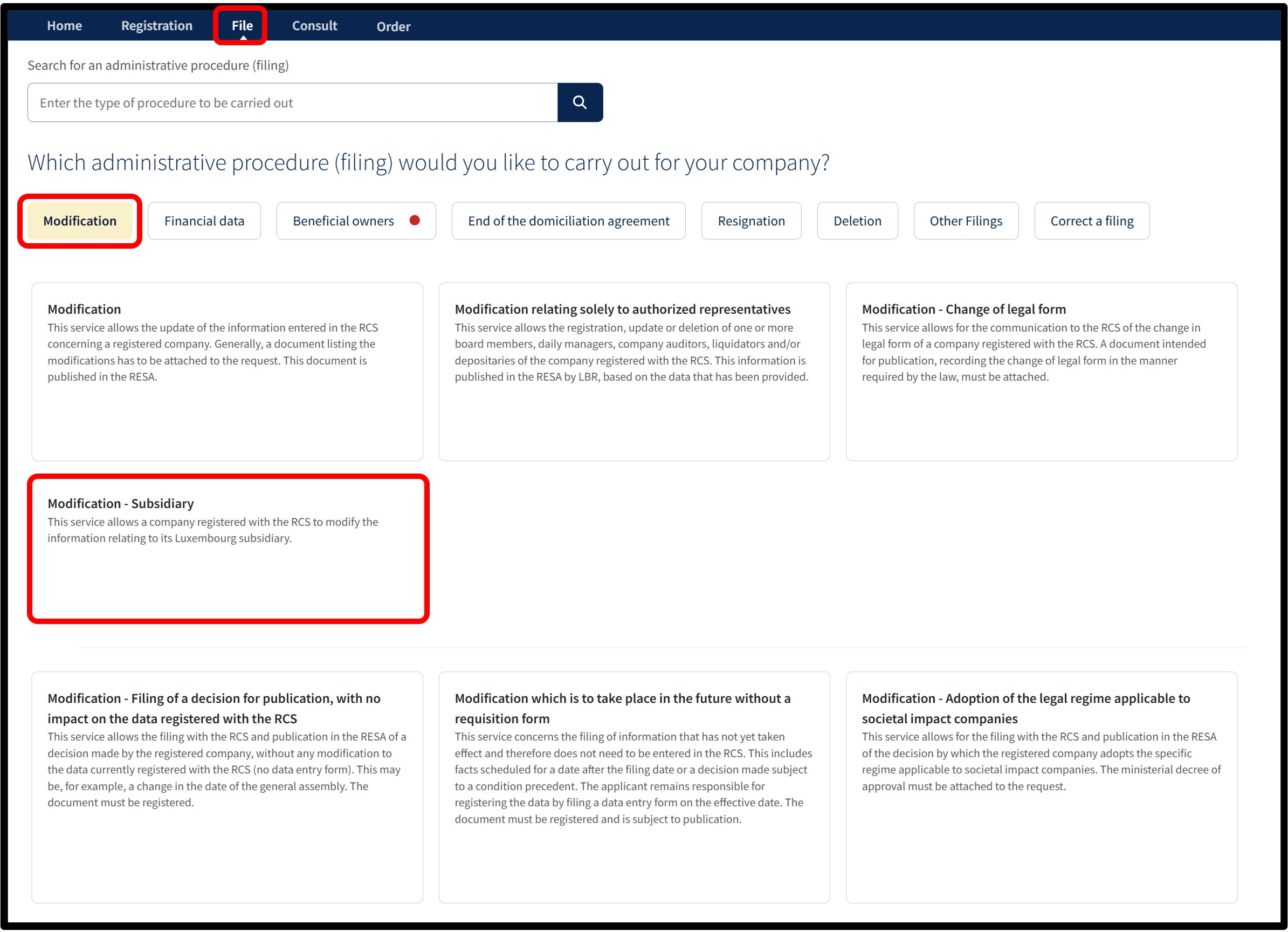
After selecting the Modification - Subsidiary service, you will be taken to the page where you have to select the subsidiary to be modified from the list provided, then choose the language of the form.
Before continuing, ensure you have all the necessary information and documents required to make the modification.
Once you have selected your language, click Next. You will then be automatically redirected to the data entry form to complete the modification.
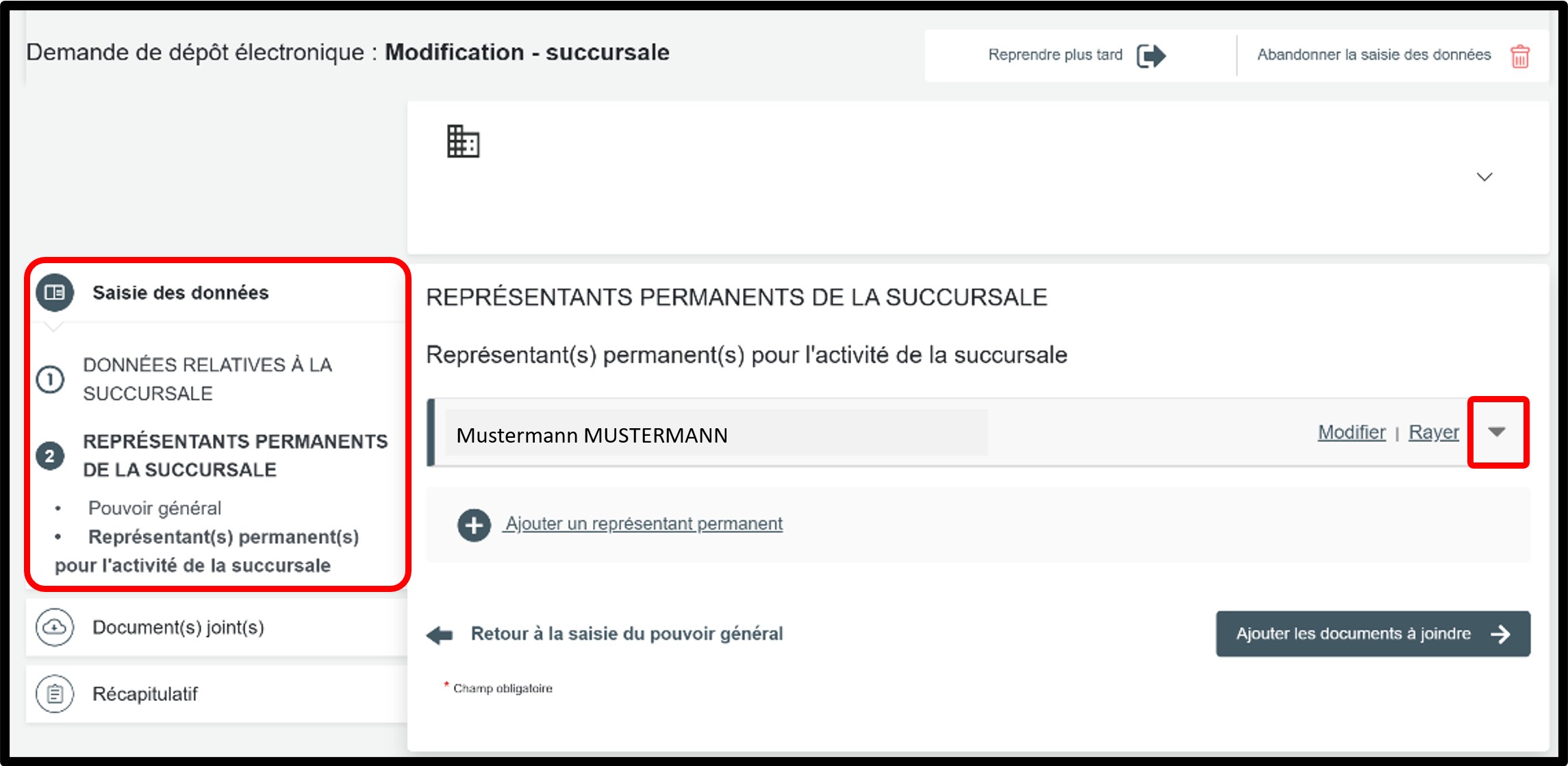
In the part Saisie des données, select the Représentants permanents de la succursale section to access the information to be updated.
Scenario 1 – The mandate has expired and has not been renewed
In this case, you must remove the authorized representative from the list, as they are no longer in office. To do so, simply click on the Rayer option.
To add a permanent representative, click on Ajouter un représentant permanent, select the Type de personne, then complete the required information.
Scenario 2 – The mandate has expired but the authorized representative remains in office
In this case, you only need to update the information by amending the duration of the mandate. First, click on the small arrow to display the details of the authorized representative to be updated.
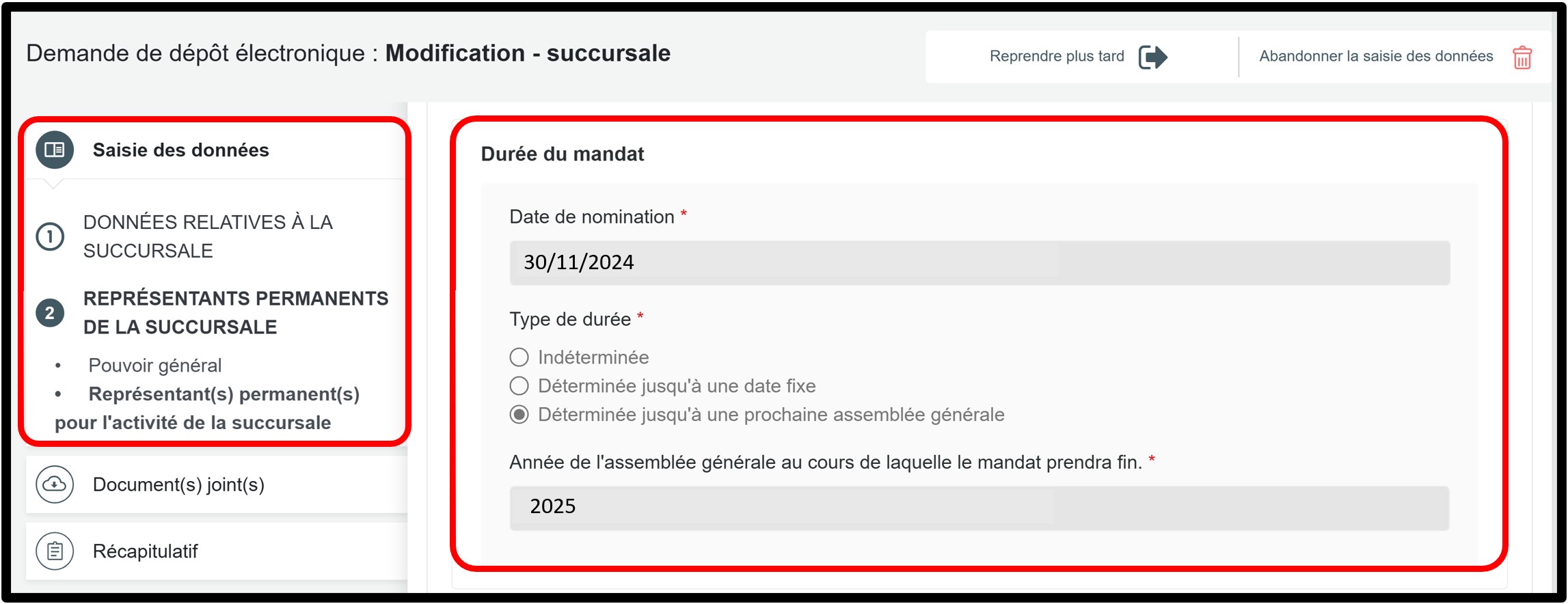
In the example provided as part of the explanations, you can see in the Durée du mandat section that the mandate expired in 2025.
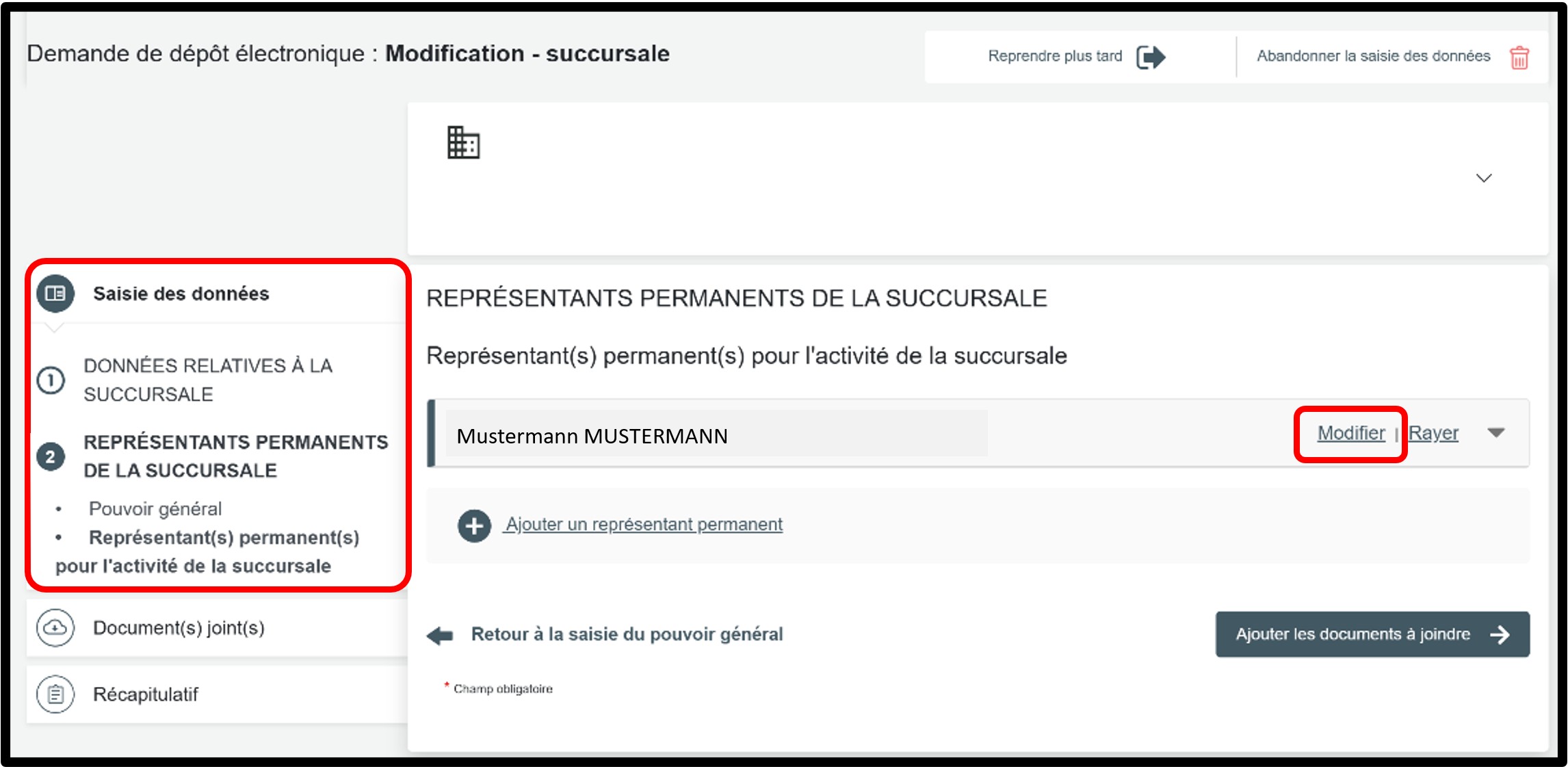
To renew the mandate, click on the Modifier option to unlock the input fields and make the necessary changes.
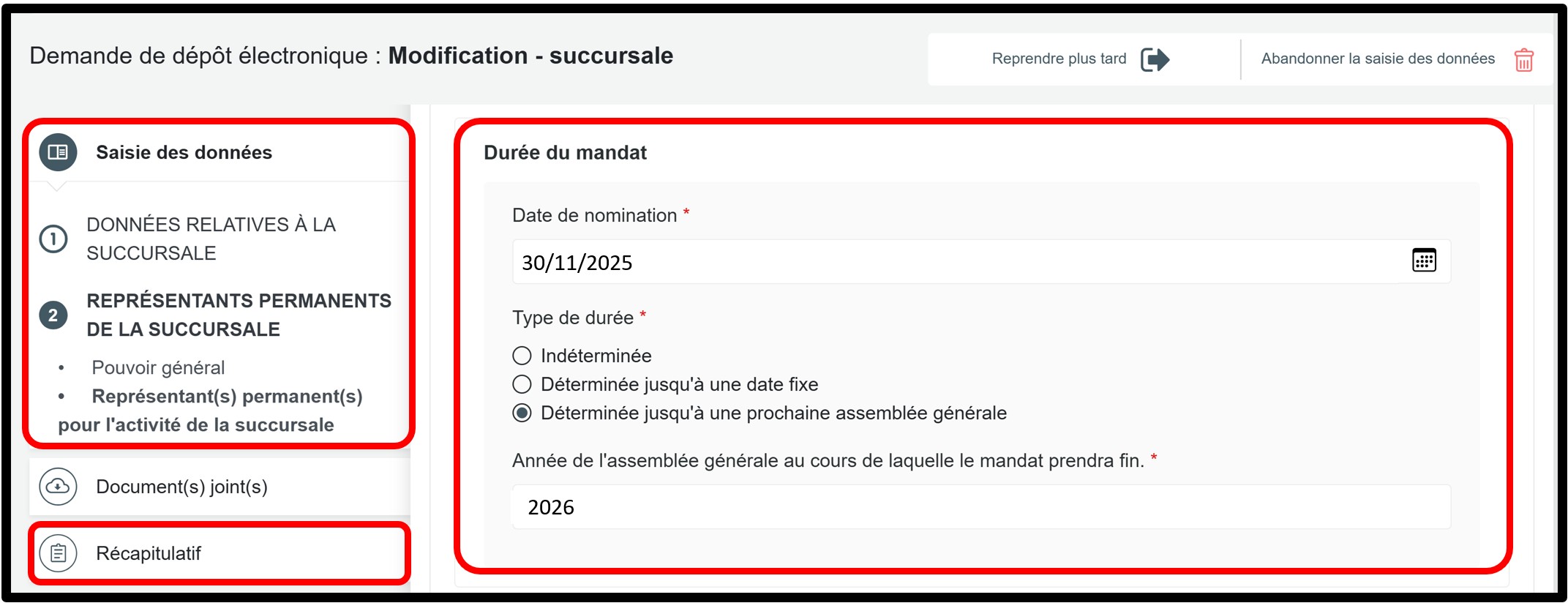
Then go to the Durée du mandat section to correct the information, depending on the scenario applicable to your entity.
The duration of the mandate may be determined or indeterminate:
- If no duration is provided in the appointment deed, select Indéterminée.
- If the appointment deed provides for a specific duration, select Déterminée jusqu’à une date fixe or Déterminée jusqu’à une prochaine assemblée générale, and indicate the end date of the mandate.
In all cases, the new start date of the mandate must be entered. This corresponds to the date on which the mandate is renewed. This date must be entered in the Date de nomination field.
Once the changes have been made, click either on the Récapitulatif section to proceed to the next step.
Form: Additional information
Récapitulatif
Section of the request where you can check the summary of your request before sending it to the cart. To do this, click on Visualiser le récapitulatif de ma demande en français to open the PDF document. If you spot an error, you can go back using the previous step button to the section where the information has to be corrected.
If all the information is correct, check the box J’ai contrôlé mon document récapitulatif. You can also add a personal reference in the field Ma référence de dépôt to better organise your requests. Once you have finished verifying, click on Ajouter la demande au panier to confirm your procedure.
Documents to be submitted: Things to know (PDF/A format required)
General rules
The requirements differ slightly depending on whether or not the document is intended for official publication in the RESA.
1. Documents not intended for publication have to be submitted in PDF/A format. These documents also have to:
- Be submitted in A4 format.
- Have a white horizontal area of at least 35 millimetres at the top of the first page to allow LBR to affix a virtual label representing the electronic filing receipt.
- Be saved in PDF/A-1a or PDF/A-1b format: when saving the file, select the PDF/A-1a or PDF/A-1b option provided by your software (Word, LibreOffice, Adobe, etc.).
2. Documents intended for publication in the RESA have to be submitted in PDF/A Text format. These documents also have to:
- Be submitted in A4 format.
- Have a white horizontal area of at least 35 millimetres at the top of the first page to allow LBR to affix a virtual label representing the electronic filing receipt.
- Be saved in PDF/A-1a or PDF/A-1b format: when saving the file, select the PDF/A-1a or PDF/A-1b option provided by your software (Word, LibreOffice, Adobe, etc.).
- Not contain images.
- Not have been digitised.
- Be written in fonts commonly used in office automation: Arial, Calibri, New Courier, Times New Roman, Helvetica, Source Sans Pro.
In order to guarantee the acceptance of predefined bullet points, and only for this purpose, Wingdings and Symbol fonts are also accepted. - Be written in black font on a white background.
Regarding the header of the documents you are required to submit, place the information below the horizontal white area of 35 mm at the top of the page. The following information must be indicated:
- Trade name (e.g.: Name of your company or your ASBL)
- Legal form (e.g. Société à responsabilité limité; Association sans but lucratif)
- Address of the ASBL (e.g. 1, rue de Luxembourg, L-0000 Luxembourg)
- RCS Number of the company or ASBL (e.g.: B123456; F1234)
Document templates
- Header templates
This document sets out the rules to be followed when formatting the header of documents intended for the RCS. It helps you check that your header complies with the requirements before submitting your filing.