The annual accounts/reports have not been filed for at least three years
Explanation
The entity has not filed its annual accounts for three years. The filing of annual accounts with the RCS is mandatory for each financial year and ensures that the entity’s information is kept up to date. As the annual accounts have not been filed for three years, the entity’s situation is non-compliant. You must therefore file the missing annual accounts as soon as possible in order to regularise the situation.
How can the annual accounts be filed?
To file the annual accounts, you must submit a filing of financial data with the RCS. This involves submitting the annual accounts relating to the relevant financial years, in accordance with the applicable formats and requirements.
-
Certain companies are required to prepare their accounts in accordance with the standard chart of accounts (PCN). In this case, the information must first be completed on the eCDF platform and then filed with the RCS.
-
Companies that prepare their accounts in accordance with International Financial Reporting Standards (IFRS) are not subject to the standard chart of accounts. For these companies, preparation via eCDF is not required.
The filing of annual accounts with the RCS is therefore carried out in two different ways, depending on whether or not the company is subject to the standard chart of accounts.
The information presented is standard and provided for guidance purposes only. Depending on the legal form of your entity, the documents to be provided or the steps to be followed may differ.
Comptes annuels (eCDF) : comment faire votre dépôt ?
Cette prestation permet à votre entité de déposer au RCS les documents comptables manquants pour chaque exercice concerné, après leur préparation et validation sur la plateforme eCDF. Lors de la création de la demande de dépôt, les données déjà validées sur eCDF peuvent être reprises directement.
Le cas échéant, l’entité doit également joindre les autres documents exigés par la loi, au format PDF/A (par exemple l’annexe ou les rapports requis). Une fois le dépôt effectué, la publication de la mention du dépôt au RESA est réalisée automatiquement par LBR.
Annual accounts (eCDF): how to submit your filing?
This service allows your entity to file the missing accounting documents for each relevant financial year with the RCS, after they have been prepared and validated on the eCDF platform. When creating the filing application, the data already validated on eCDF can be retrieved directly.
Where applicable, the entity must also attach the other documents required by law in PDF/A format (for example, the notes to the accounts or the required reports). Once the filing has been completed, publication of the mention of filing in the RESA is carried out automatically by LBR.
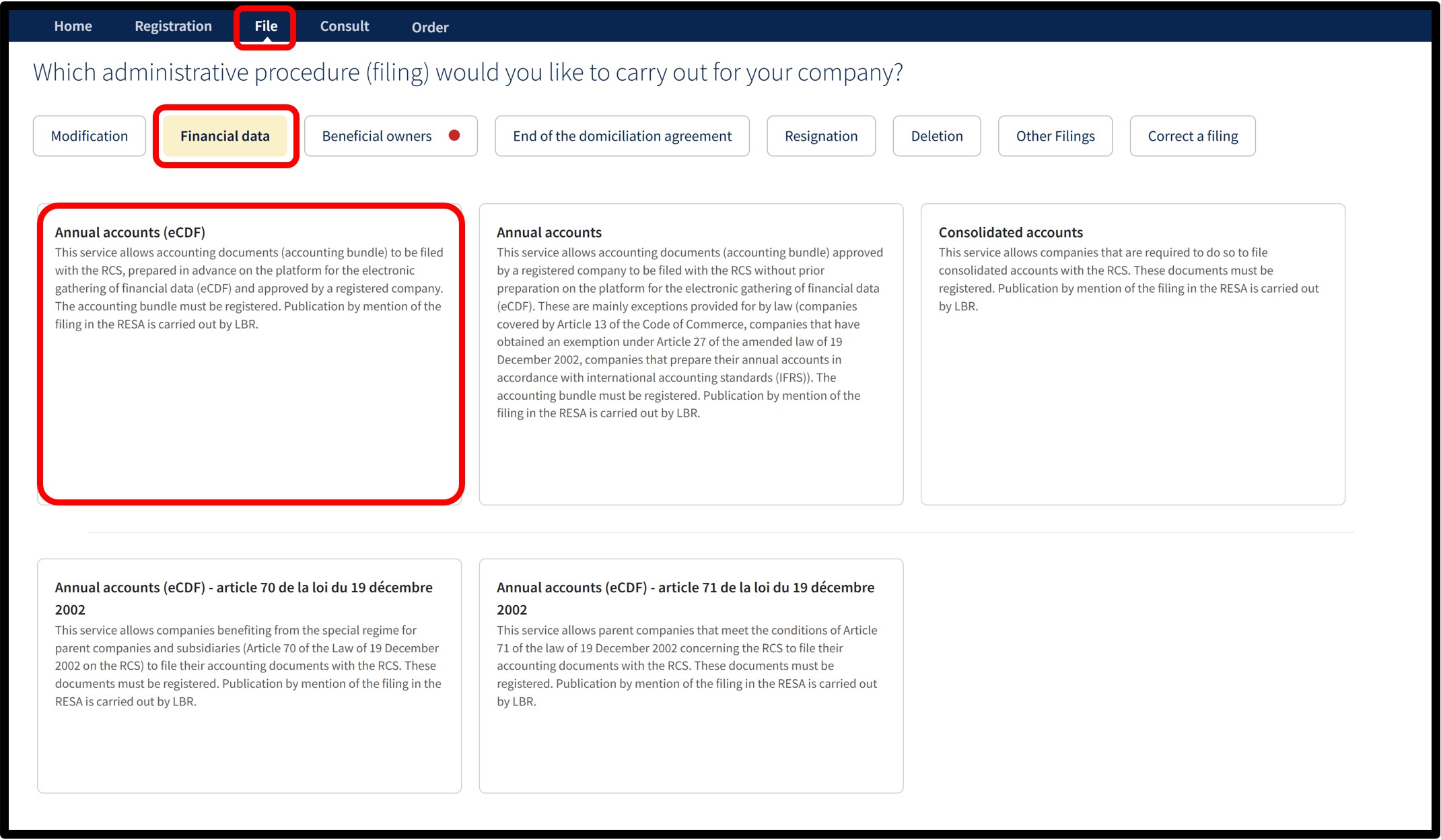
After selecting the Annual accounts (eCDF) service, you will access a screen where you must indicate the start date and the end date of the relevant financial year. These dates must correspond to those shown in the annual accounts attached to the application.
Once the information has been entered, click on Next to access the form and finalise the filing application.
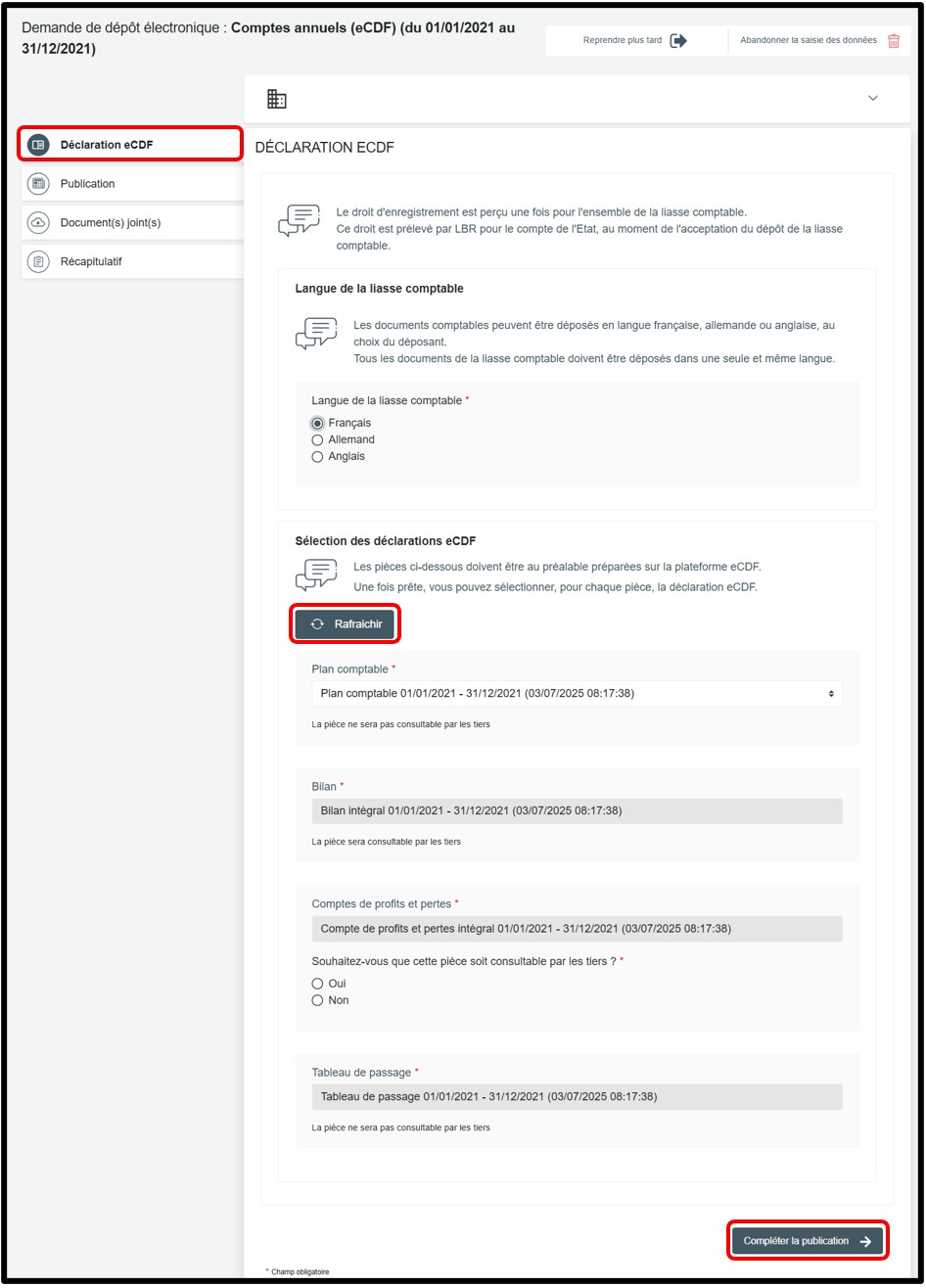
In the Déclaration eCDF section, select the relevant eCDF declaration using the drop-down list (Plan comptable).
The other documents, such as the balance sheet, the profit and loss account and the reconciliation table, are added automatically. They cannot be modified.
By default, the most recently prepared declaration on the eCDF platform is selected. Where necessary, you may update the list by clicking on the Rafraîchir button.
To continue your procedure, then click on the Compléter la publication button.
Form: Additional information
Upload of the required documents
Publication
Section of the request where you have to add the document or documents intended for publication in the RESA. You must attach the documents as a single file, in PDF/A text format. To add it, click on Ajouter la pièce jointe in the Documents à publier par mention field. It is in this section that you must upload, where applicable:
- The statutory notes to the accounts.
- The management report (where applicable).
- The audit report (where applicable).
- The proposed appropriation of results (where applicable).
- The appropriation of results (where applicable).
Once this step has been completed, click on the Ajouter les documents à joindre button to proceed to the next step.
Documen(s) joint(s)
Section of the request where you have to add the document or documents required to validate your filing application. You must attach the documents as a single file, in PDF/A text format, in the Pièce(s) à déposer field by clicking on Ajouter la pièce jointe. These documents are neither published in the RESA nor accessible to third parties.
It is in this section that you must upload, where applicable, the other documents relating to the annual accounts (for example, the list of legal representatives or the persons responsible for auditing the accounts). Once this step has been completed, click on the Vérification de la demande button to proceed to the next step.
Récapitulatif
Section of the request where you can check the summary of your request before sending it to the cart. You can also add a personal reference in the field Ma référence de dépôt to better organise your requests. Once you have finished verifying, click on Ajouter la demande au panier to confirm your procedure.
Annual accounts: how to submit your filing?
This service allows your entity to file the missing accounting documents for each relevant financial year with the RCS without using the eCDF platform. This applies only to specific cases provided for by law:
- Companies covered by Article 13 of the Commercial Code;
- Companies that have been granted a derogation under Article 27 of the amended Law of 19 December 2002;
- Companies that prepare their annual accounts in accordance with International Financial Reporting Standards (IFRS).
The entity must also attach the documents required by law in PDF/A format:
- Annual accounts: balance sheet, profit and loss account and statutory notes
- Balances of accounts included in the standard chart of accounts, including the reconciliation table (where applicable)
- Management report (where applicable)
- Report of the person responsible for auditing the accounts (where applicable)
- Other documents relating to the annual accounts (proposed appropriation of results, appropriation of results, list of legal representatives, and the person or persons responsible for auditing the accounts, etc.)
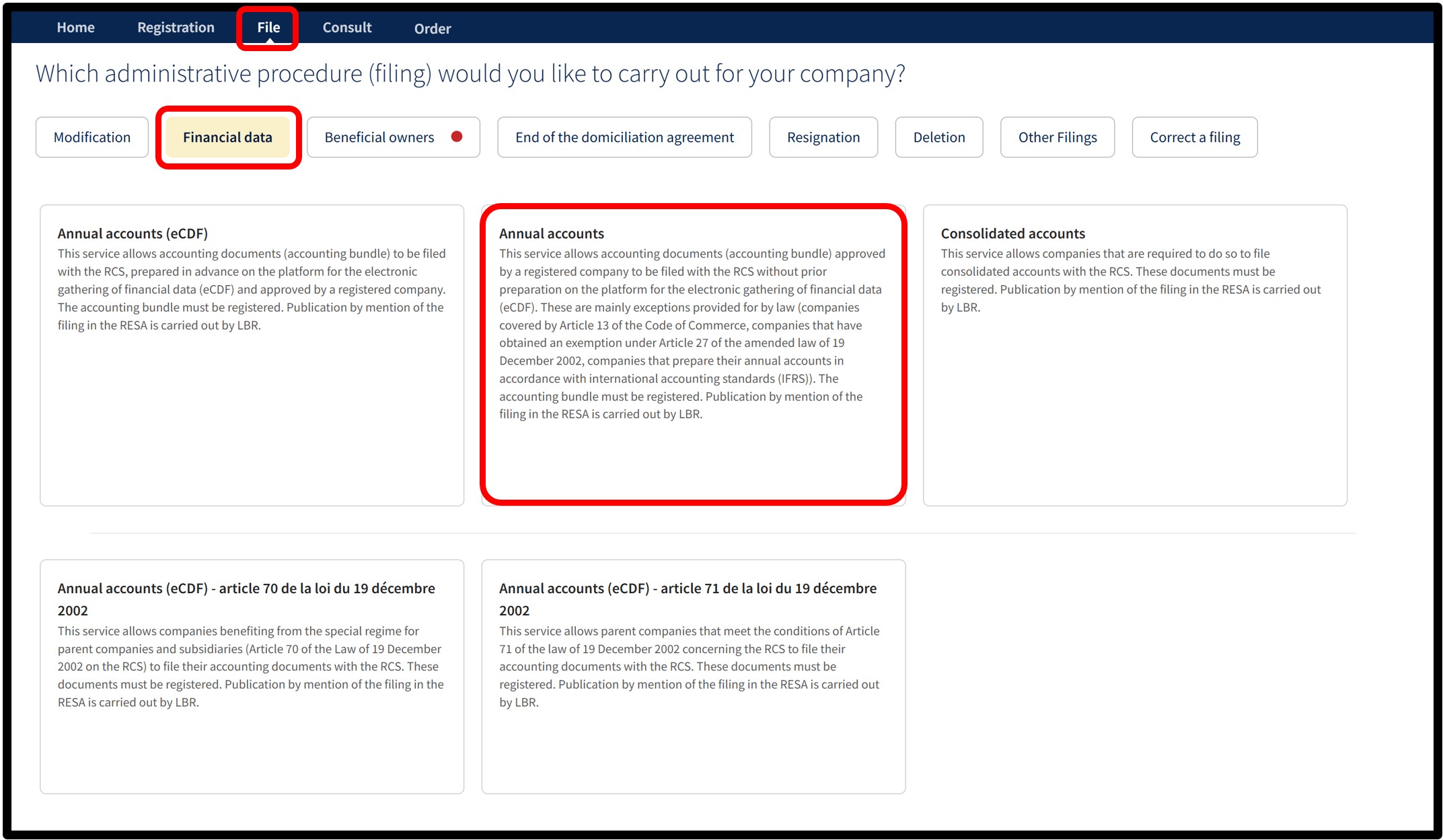
After selecting the Annual accounts service, you will access a screen where you must indicate the start date and the end date of the relevant financial year. These dates must correspond to those shown in the annual accounts attached to the application.
Once the information has been entered, click on Next to access the form and finalise the filing application.
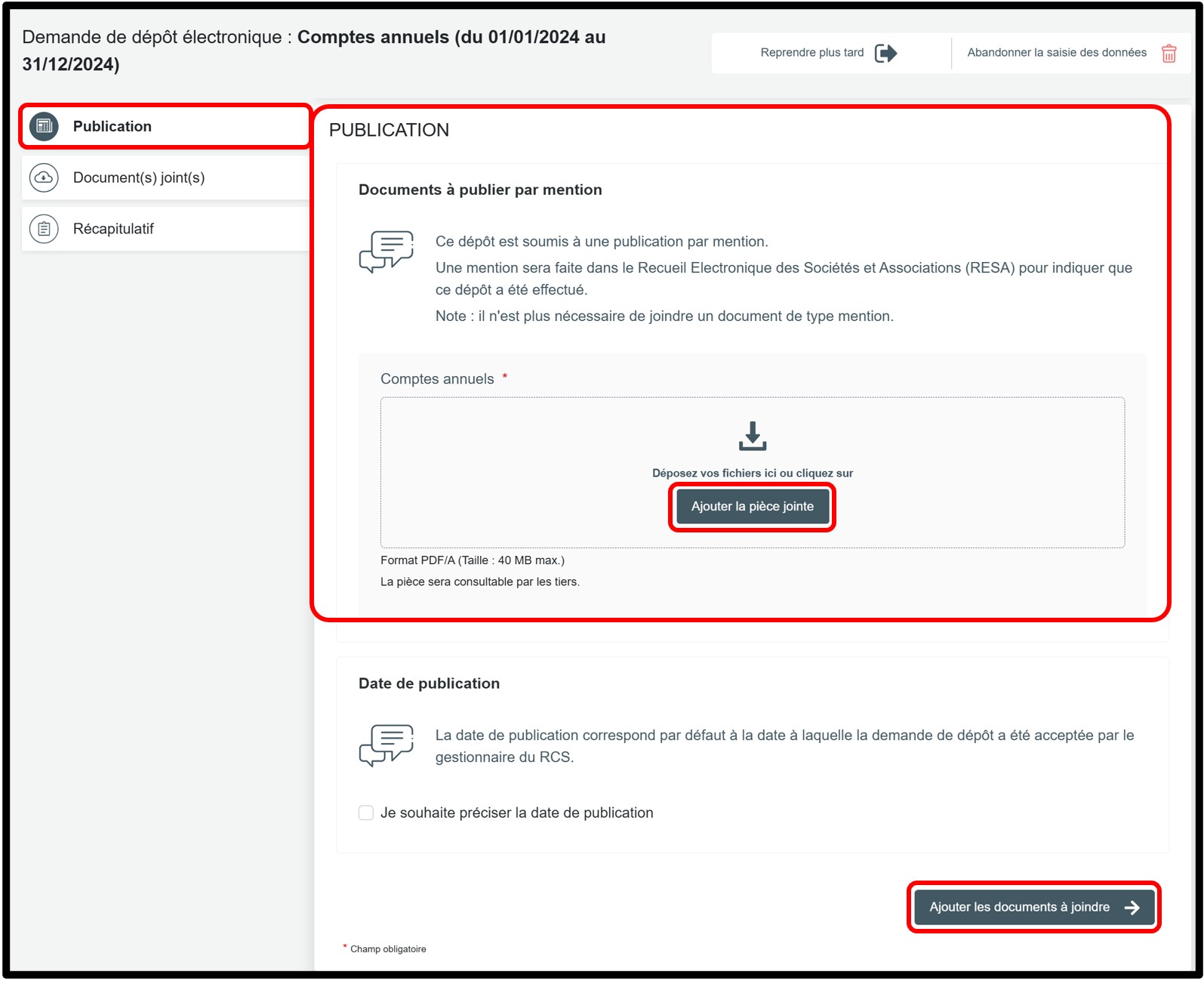
In the Publication section, you must add the document or documents intended for publication in the RESA. The documents must be attached as a single file, in PDF/A text format. To add them, click on Ajouter la pièce jointe in the Documents à publier par mention field. It is in this section that you must upload, where applicable:
- The balance sheet, which summarises your company’s financial position at the end of the financial year.
- The profit and loss account, which presents the income and expenses recorded during the year.
- The statutory notes, which contain additional mandatory information relating to your accounts.
- The management report (where applicable).
- The report of the person responsible for auditing the accounts (where applicable).
- The proposed appropriation of results (where applicable).
- The appropriation of results (where applicable).
To continue your procedure, then click on the Ajouter les documents à joindre button.
Form: Additional information
Documen(s) joint(s)
Section of the request where you have to add the document or documents required to validate your filing application. You must attach the documents as a single file, in PDF/A text format, in the Pièce(s) à déposer field by clicking on Ajouter la pièce jointe. These documents are neither published in the RESA nor accessible to third parties.
It is in this section that you must upload, where applicable, the other documents relating to the annual accounts (for example, the list of legal representatives or the persons responsible for auditing the accounts). Once this step has been completed, click on the Vérification de la demande button to proceed to the next step.
Récapitulatif
Section of the request where you can check the summary of your request before sending it to the cart. You can also add a personal reference in the field Ma référence de dépôt to better organise your requests. Once you have finished verifying, click on Ajouter la demande au panier to confirm your procedure.
Documents to be submitted: Things to know (PDF/A format required)
General rules
The requirements differ slightly depending on whether or not the document is intended for official publication in the RESA.
1. Documents not intended for publication have to be submitted in PDF/A format. These documents also have to:
- Be submitted in A4 format.
- Have a white horizontal area of at least 35 millimetres at the top of the first page to allow LBR to affix a virtual label representing the electronic filing receipt.
- Be saved in PDF/A-1a or PDF/A-1b format: when saving the file, select the PDF/A-1a or PDF/A-1b option provided by your software (Word, LibreOffice, Adobe, etc.).
2. Documents intended for publication in the RESA have to be submitted in PDF/A Text format. These documents also have to:
- Be submitted in A4 format.
- Have a white horizontal area of at least 35 millimetres at the top of the first page to allow LBR to affix a virtual label representing the electronic filing receipt.
- Be saved in PDF/A-1a or PDF/A-1b format: when saving the file, select the PDF/A-1a or PDF/A-1b option provided by your software (Word, LibreOffice, Adobe, etc.).
- Not contain images.
- Not have been digitised.
- Be written in fonts commonly used in office automation: Arial, Calibri, New Courier, Times New Roman, Helvetica, Source Sans Pro.
In order to guarantee the acceptance of predefined bullet points, and only for this purpose, Wingdings and Symbol fonts are also accepted. - Be written in black font on a white background.
Regarding the header of the documents you are required to submit, place the information below the horizontal white area of 35 mm at the top of the page. The following information must be indicated:
- Trade name (e.g.: Name of your company or your ASBL)
- Legal form (e.g. Société à responsabilité limité; Association sans but lucratif)
- Address of the ASBL (e.g. 1, rue de Luxembourg, L-0000 Luxembourg)
- RCS Number of the company or ASBL (e.g.: B123456; F1234)
Document templates
- Header templates
This document sets out the rules to be followed when formatting the header of documents intended for the RCS. It helps you check that your header complies with the requirements before submitting your filing.